User’s Guide Special keys
F.5
Manual method (on the 48-Key Feature Phone)
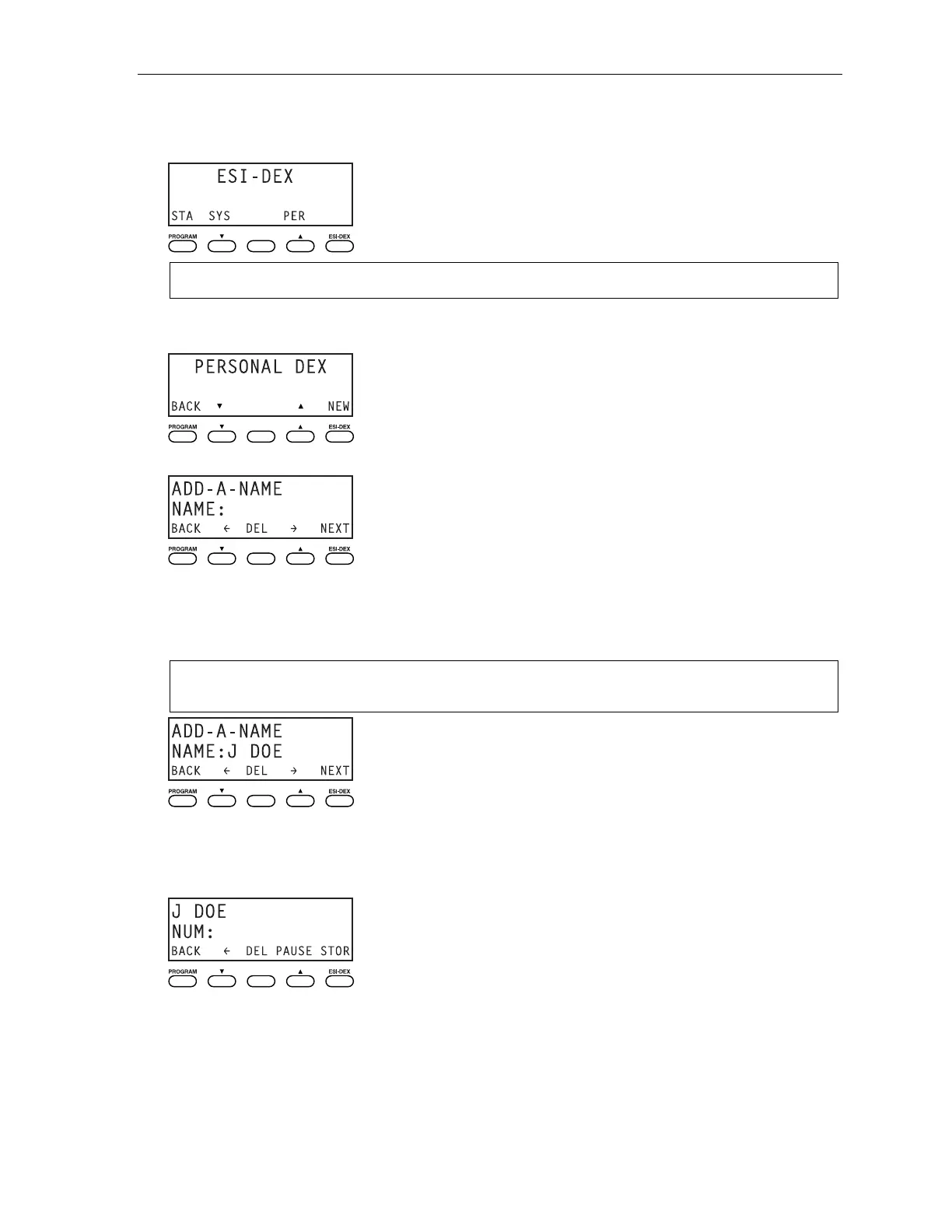
1. While your station is idle (or just after receiving dial tone), press ESI-DEX. This causes the Esi-Dex
menu to appear, as shown:
Note: Your display may differ, depending upon the availability of certain Dexes on your system.
2. Press PER to choose the Personal Dex.
The display now reads:
3. Press NEW.
4. To enter each character for the name, press the dialpad key that includes the desired character.
The key’s possible character entries will change each time you press the key.
5. When the desired character appears, press # to confirm its entry. The cursor will move to the next
character position. Use
and (the scroll keys) to back up or to insert a space.
Example: To enter a B, press 2 twice (the possible options to scroll through are A, B, C and 2). When B
appears, press # to confirm and move to the next entry.
6. Repeat steps 4–5 until the name is complete. The name may contain up to 15 characters (a space
is a character, too).
7. Press NEXT when finished entering the name. You will see the display for entering the number that
goes with the name you entered.
(Continued)



 To Next Page