10
RECORD SETUP
CONTINUOUS RECORD
As factory set, the unit is programmed to record all channels continuously.
MOTION DETECTION RECORD
Right-click on the screen to bring-up the Shortcut Menu select Main Menu and log-in
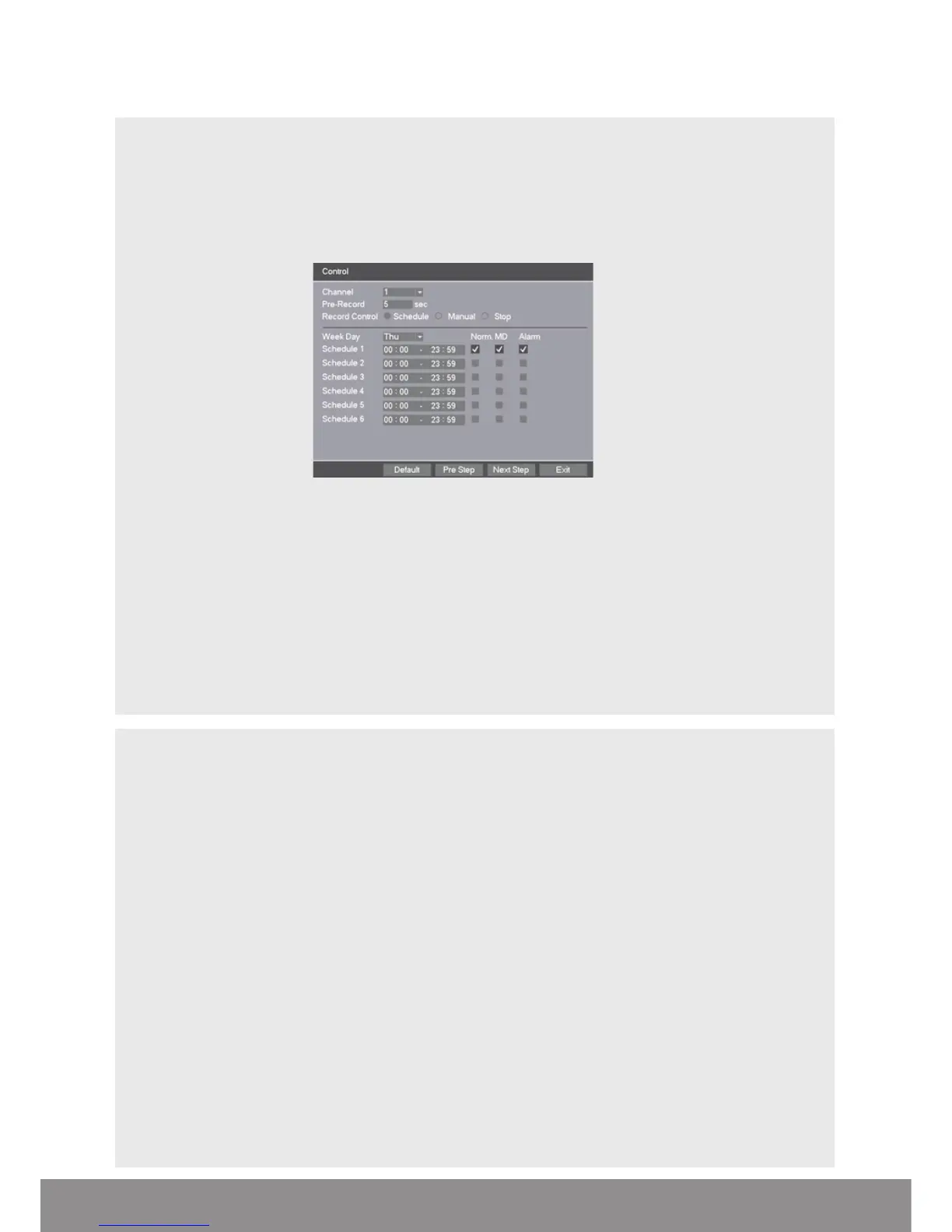
• Select Record > Control
• Select Channel as ALL
• Select Record Control as Schedule
• Select Week Day as ALL
• Select Schedule 1 as MD only
• Click Save
• From the Main Menu select Alarm > Motion Detect
• Select Channel as ALL
• Select Enable
• Select Record Channel 1-4/8/16
• Click Save to finish set-up
ADDITIONAL RECORD OPTIONS
Select Main Menu > Record > Record Config.
Channel
Select 1–4/8/16/ All
Pre-Record
The system can automatically archive up to 30 seconds of recording prior to a motion or alarm
trigger event
Record Control
Selects the recording preference either by schedule, manual or stop option.
Week Day
Enables recording requirements set for each day
Schedule 1-6
Each day can be segmented into 6 specific recording periods throughout the day
NB. When entering the ‘Record > Control’ menu the default screen will always start with a
display for Channel 1 and the current day’s schedule.



 To Next Page