8
APP INSTALLATION
Please download and install the “ESP GuardcamDECO” APP to the smart-phone/ tablet
1. Apply power to the GuardcamDECO, after 1 minute the unit will produce its own Wi-Fi hotspot.
2. Via the settings on the smart-phone/ tablet connect to the Wi-Fi hotspot, the SSID will begin
HD-XXXXXX.
If a password is required please use the default 12345678
3. Once the smart-phone/ tablet is connected to the GuardcamDECO’s Wi-Fi, launch the APP.
4. Select the ‘+’ button to add the device to the APP
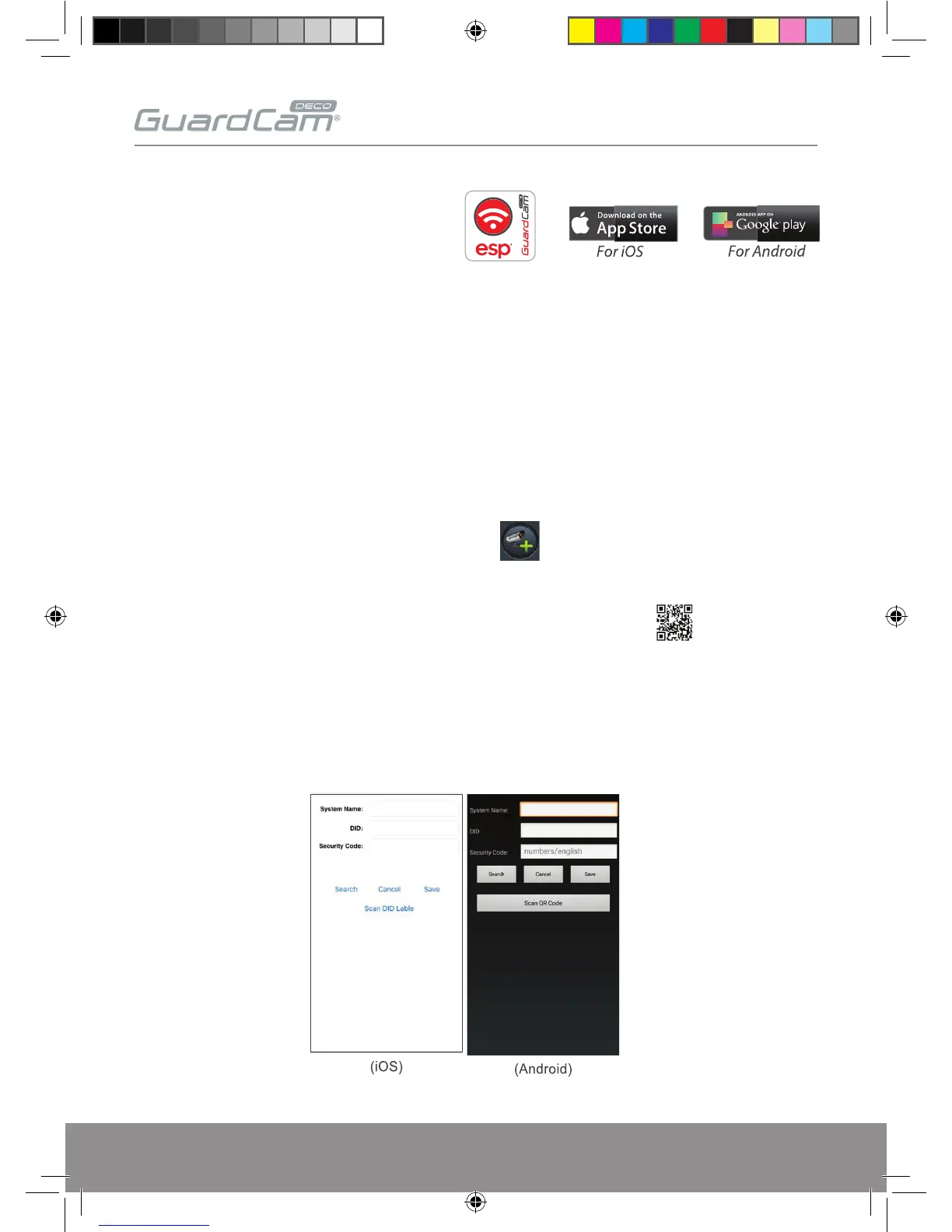
5. Enter a custom ‘System Name’ (example; ‘Front Door’)
6. Select ‘Scan QR Code’, and locate the QR code on the GuardcamDECO unit.
7. Enter the default security code; 123456
8. Select ‘Save’
GUARDCAMDECO Manual.indd 8 12/03/2018 14:23:52


 To Next Page