MAG816 - Installation and Operation Manual 21
6. OPERATION INSTRUCTIONS
6.1 Initial Start-Up of MAG816
The panel is enabled by supplying main and stand-by power supply. An initial start-up
procedure will begin to execute, which runs as follows:
1. For about 2 seconds all LEDs will light up; it is possible for a sound signal to be
activated.
2. All LEDs light up for 1 second - on the main panel (except uPFault) and for the zone
or sounder expanders (the dichromatic LEDs of the zone/ sounder expanders light up in
orange). The sound signalisation is activated.
3. For about 5 seconds the following LEDs light up:
• On the main module - all except uPFault;
• On the 4-zone expanders - the LEDs of zones programmed in Instant
Action mode (i.e. with a set jumper) light up in orange, and all the rest - in
red;
• On the 4-sounder expanders - the Fault LED (SND1 - SND4).
4. The following LEDs light up for 1 second:
• On the main panel - all except uPFault and Fire;
• On the 4-zone expanders - all LEDs are lit off;
• On the 4-sounder expanders - the Fault LED (SND1 - SND4).
At the end of the initial start-up procedure only the POWER SUPPLY 230V LED lights
on. All other LEDs have to be lit off.
The Fire Alarm panel is in Normal Operating mode.
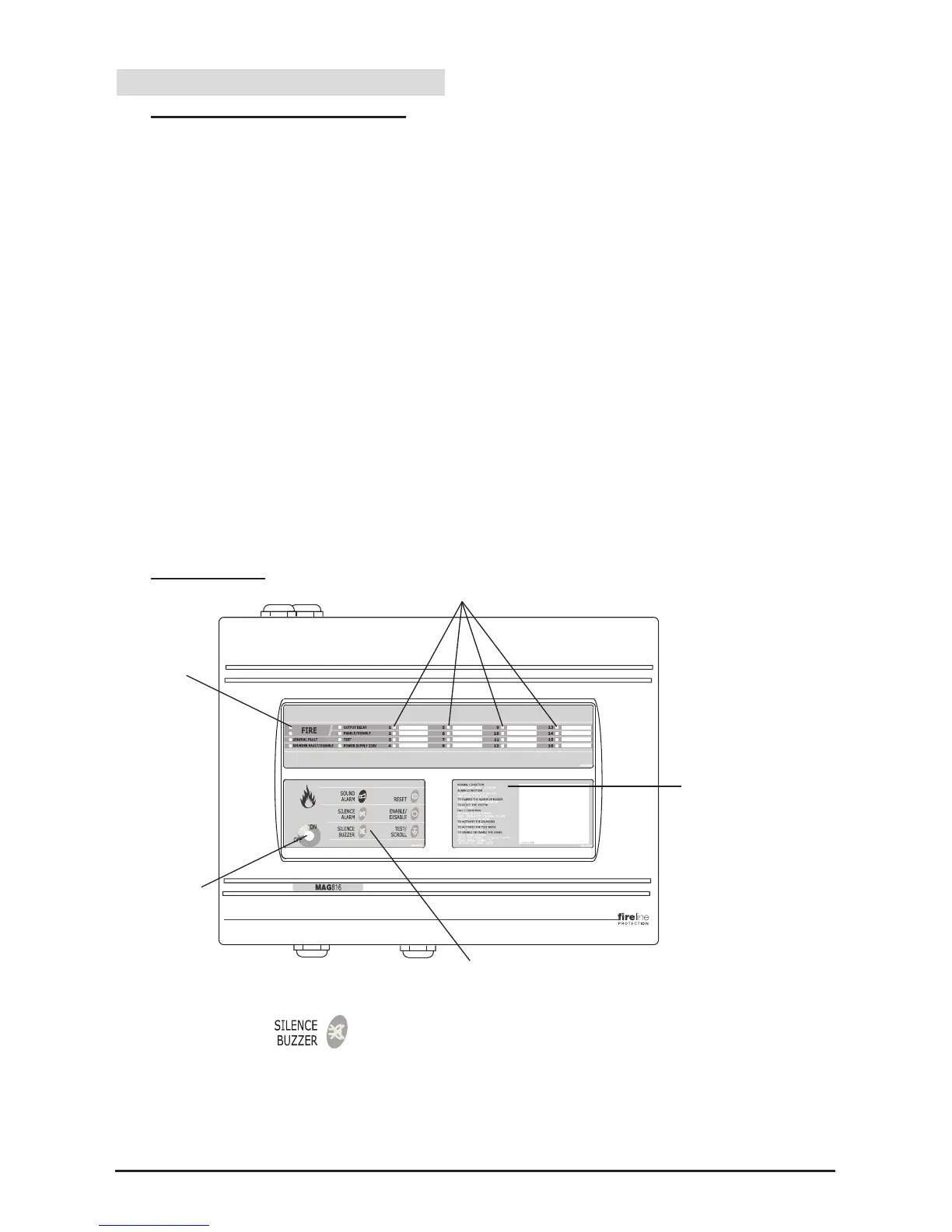
6.2 Front Panel
- Switch for changing over between Access Levels 1 and 2. In OFF position (Access
Level 1) only the button is active and in ON position (Access Level 2) all
buttons are active.
- Operation modes LED indication.
- LED indication on zone status.
- Control buttons.
- Instructions for working with the fire panel.


 To Next Page