12 Electronic Theatre Controls, Inc.
Mounting the Power Supply
The Power Supply comes with four sturdy rubber feet installed,
allowing you to set it on any stable flat surface. If you wish,
bracket kits are available from ETC that allow you to hang the
Power Supply from a pipe, or install it into a rack. The following
instructions explain how to use both kits.
Note: When you mount the Power Supply, keep in mind that you
will need access to both the front and rear panels.
Installing rack mount brackets on the Power Supply
To install rack mount brackets on your ColorSource Power Supply,
follow these steps.
1. Unplug the power cord from the Power Supply.
2. Place the Power Supply on a flat surface.
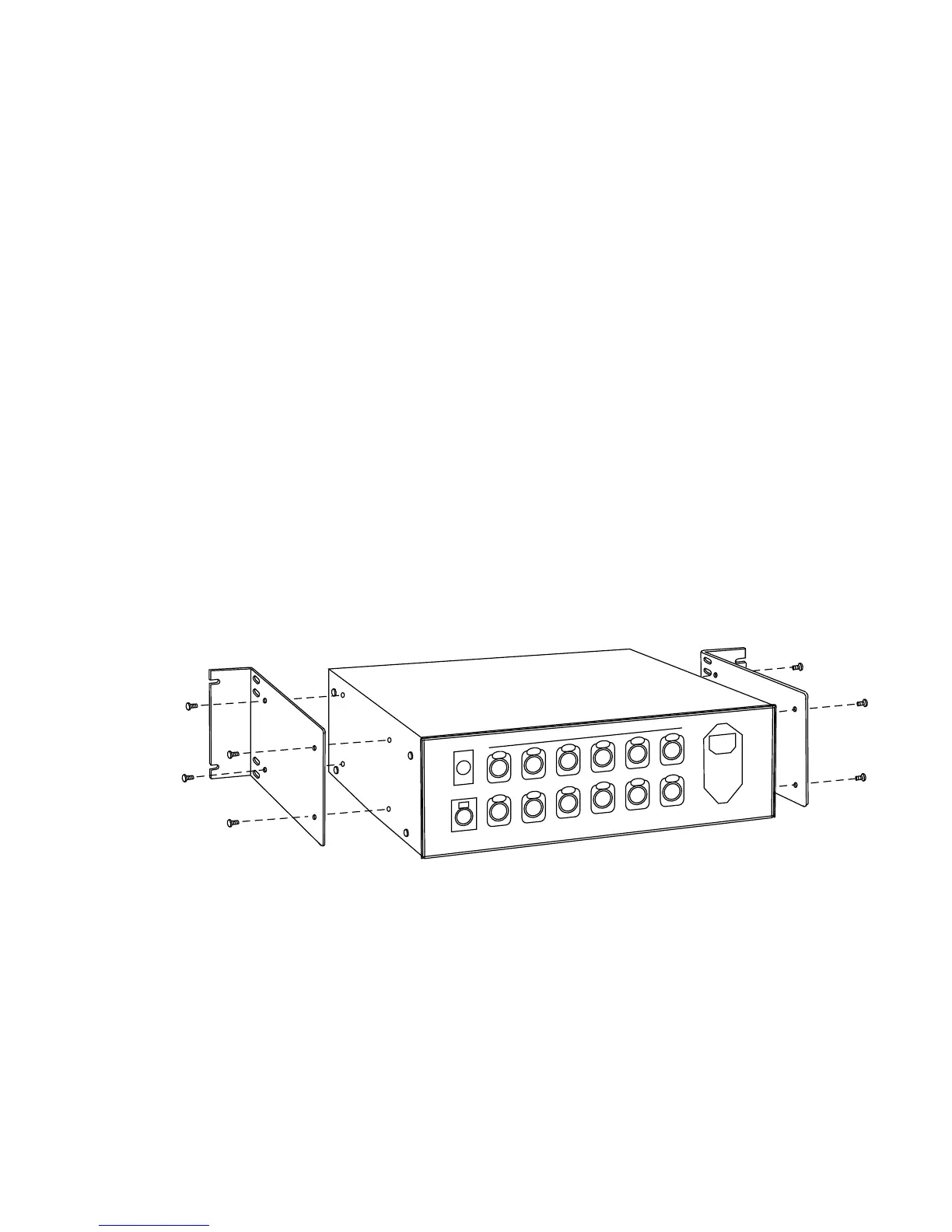
3. Position the brackets as shown below.
4. Attach the brackets using the supplied screws.
5. Slide the Power Supply into a 19-inch rack and fasten. Remove
rubber feet from Power Supply if necessary and save them.
COLORSOURCE OUTPUT
DMX IN
DMX OUT
12 3 45 6
78
9
10 11
12
AUTO LOAD
AC POWER










 To Next Page