16 Electronic Theatre Controls, Inc.
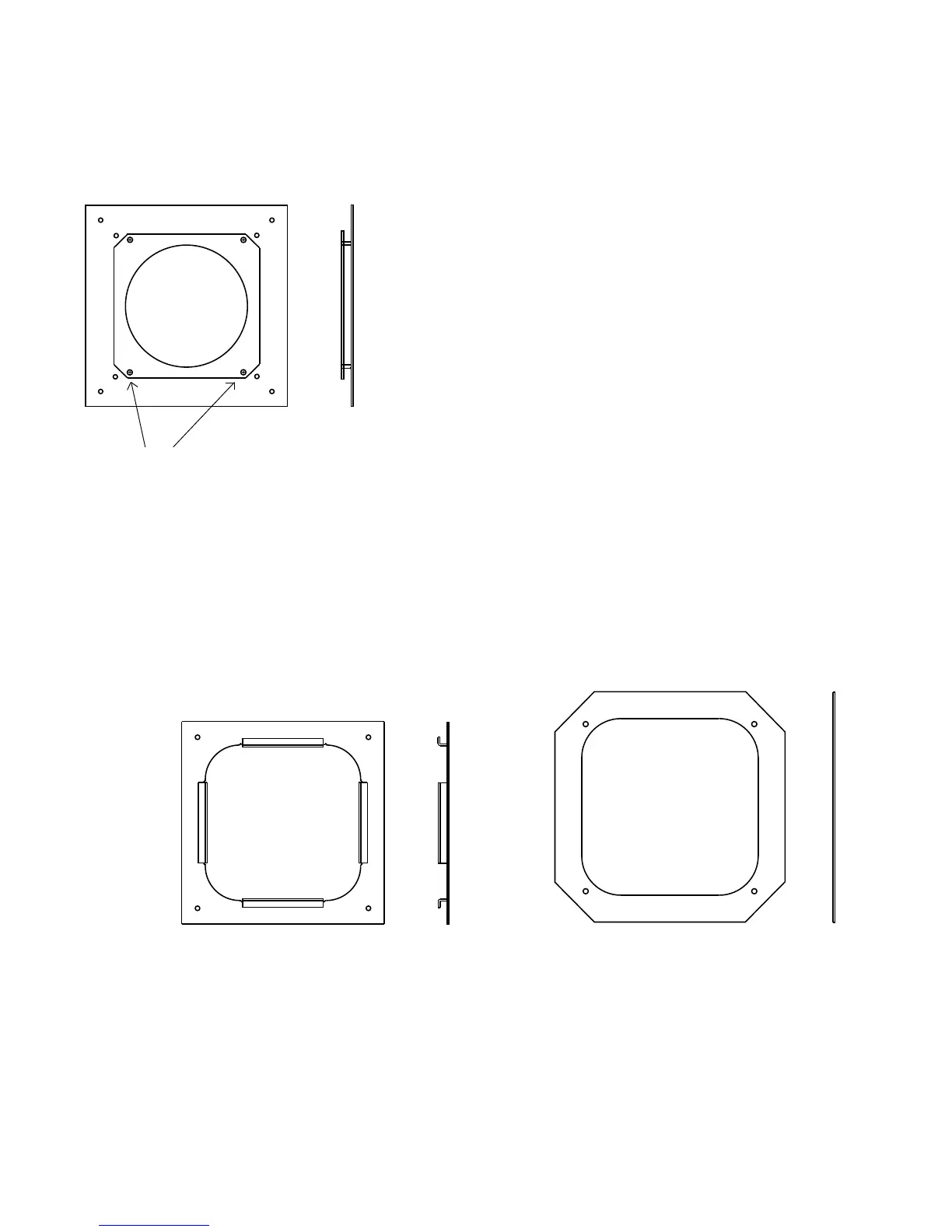
This mounting plate fits spotlights
with a 7.5” frame size, including
ETC Source FourPAR.
This mounting plate fits spotlights
with a 10” frame size.
This mounting plate fits spotlights with a
6.25” frame size, including ETC Source
Four. Mount the plate in the orientation
shown. Note that the screws are closer
together in one direction than the other.
Note screw
positions
Top
Replacing the mounting plate
The ColorSource Color Changer ships with your choice of available
mounting plates installed. Always use the supplied screws as they
are treated with an anti-vibration compound to keep them from
loosening.
Follow these steps to replace the mounting plate.
1. Place the Color Changer on a flat surface, with the ColorSource
logo face down.
2. Unscrew the four screws that hold the current mounting plate
on.
3. Place the replacement mounting plate on the Color Changer
aligning the screw holes properly. If you are installing the 6.25”
mounting plate, see the illustration to left for proper plate
orientation.
4. Fasten the four corners of the mounting plate to the Color
Changer using the same screws you removed in step 2.










 To Next Page