2 The Retrofit 11
Finish Up
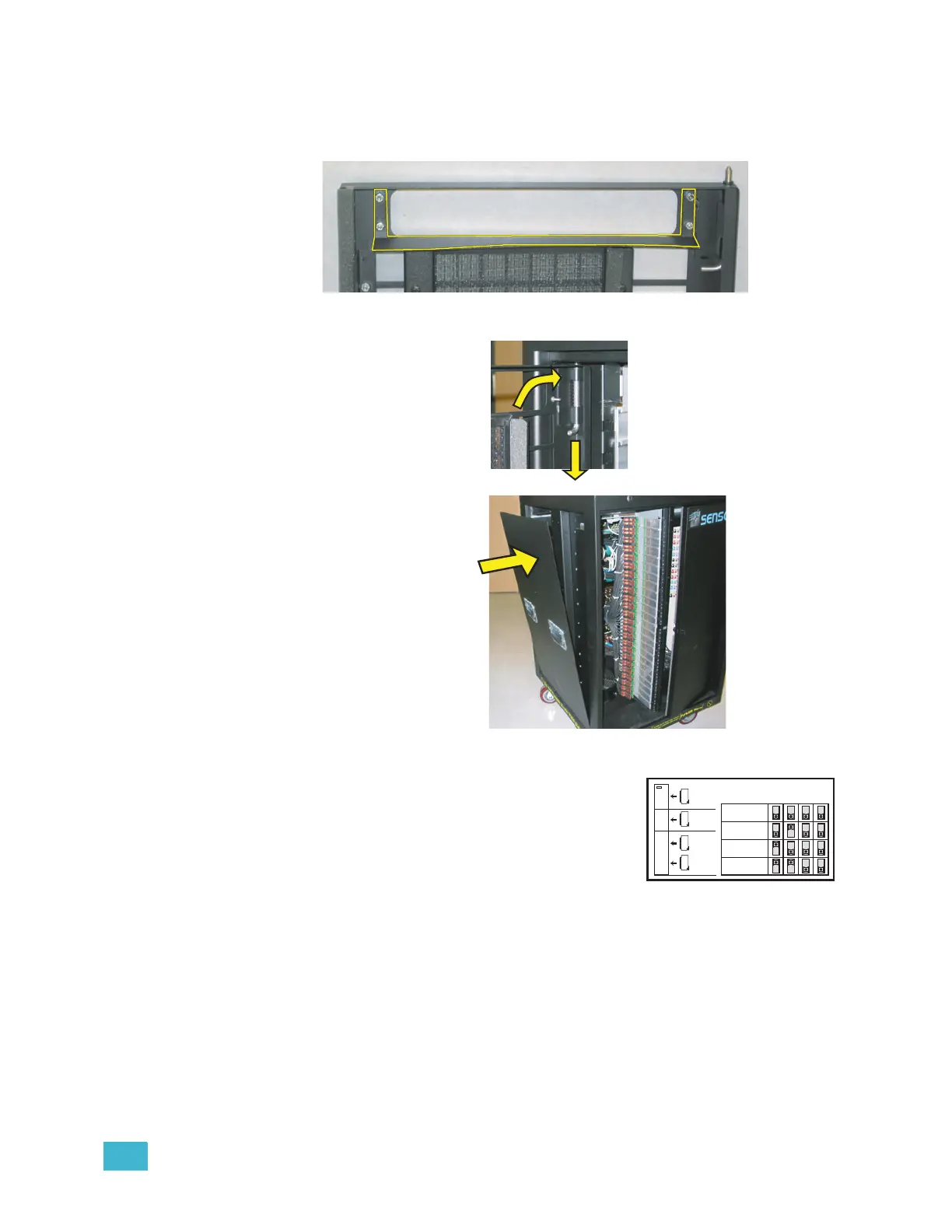
Step 1: Remove the old CEM rack door baffle from the door (outlined below) by removing
the four 5/16” nuts.
Step 2: Install the new CEM+ rack door baffle on the rack door with the four 5/16 nuts.
Step 3: Reinstall the rack door by
pushing down on the tab
in the hinged corner and
sliding the door back in
place.
Step 4: Reinstall the left side of
the rack with the original
10 screws.
Change out the AF Cards (if
present)
)
Step 1: Remove the old AF cards (pull the plastic tabs
Step 2: Address the new AF cards (mini-switches) as
shown here.
Step 3: Install the cards in the slots. Make sure they are
completely and securely seated. Card #1 at the
top, down to 4 at the bottom for SR48. (SR6, SR12 & SR24 have fewer cards.
Always start with #1 at the top.)
Repeat the above steps for the remainder of touring racks that are to
be retrofitted.
1-Push
2
-
R
e
i
n
s
t
a
l
l
R
ei
n
stal
l
AF Card Addressing
Card 1
Card 2
Card 3
Card 4
S
W
1
S
W
2
S
W
3
S
W
4
1
SR6+
SR12+
SR24+
SR48+
2
3
4
Sensor+



 To Next Page