ETC Source Four LED Quick Guide
Connect
Source Four LED Profile Page 3 of 8 Electronic Theatre Controls, Inc.
Connect
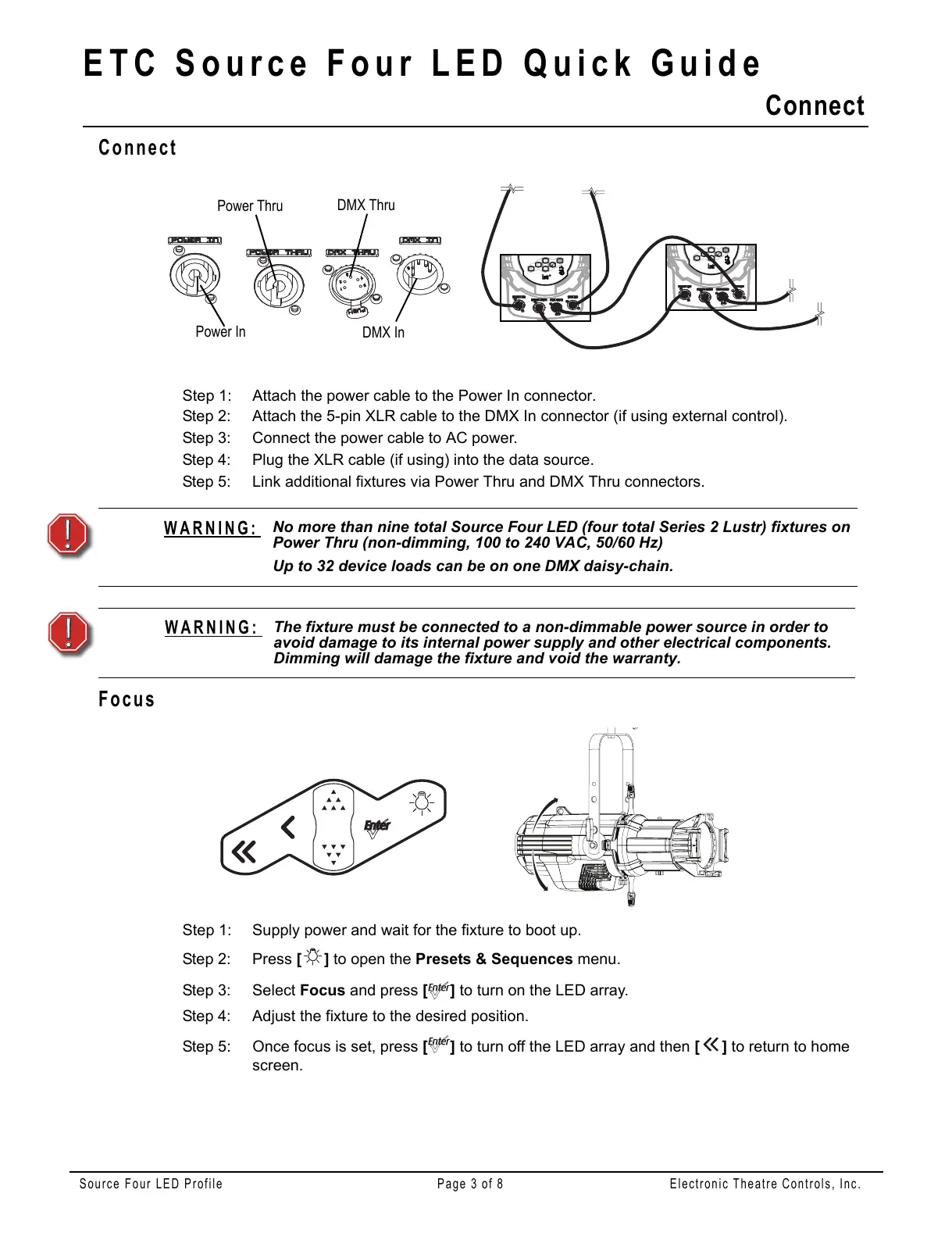
Step 1: Attach the power cable to the Power In connector.
Step 2: Attach the 5-pin XLR cable to the DMX In connector (if using external control).
Step 3: Connect the power cable to AC power.
Step 4: Plug the XLR cable (if using) into the data source.
Step 5: Link additional fixtures via Power Thru and DMX Thru connectors.
Focus
Step 1: Supply power and wait for the fixture to boot up.
Step 2: Press [] to open the Presets & Sequences menu.
Step 3: Select Focus and press [] to turn on the LED array.
Step 4: Adjust the fixture to the desired position.
Step 5: Once focus is set, press [] to turn off the LED array and then [] to return to home
screen.
WARNING:
No more than nine total Source Four LED (four total Series 2 Lustr) fixtures on
Power Thru (non-dimming, 100 to 240 VAC, 50/60 Hz)
Up to 32 device loads can be on one DMX daisy-chain.
WARNING:
The fixture must be connected to a non-dimmable power source in order to
avoid damage to its internal power supply and other electrical components.
Dimming will damage the fixture and void the warranty.















 To Next Page