26 / 36
Mounting
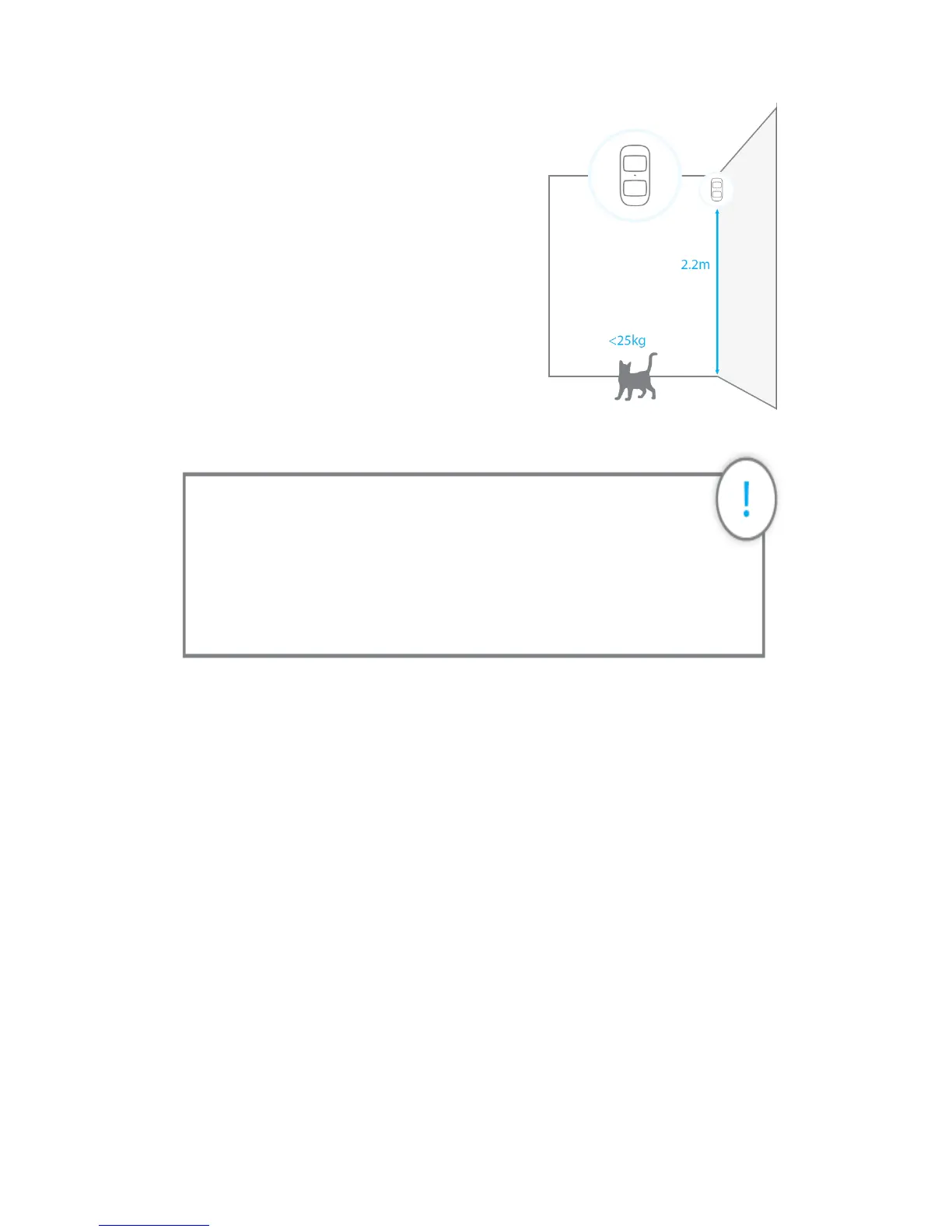
Fix the bracket onto the wall with screws and attach
the detector to the bracket. We recommend to
mount the detector at a height of 2.2m.
The detector is more sensitive to horizontal
movements than vertical movements, and does
not detect animals under 25 kg.
Avoid mounting the detector close to windows,
air conditioner, heater, refrigerator, oven,
sunshine and places where the temperature
changes fast or where the air stream flows frequently.
Testing
After installation, turn the detector on. After one minute of self-testing,press the test button,
walk in the scope of detection and watch the LED indicator to make sure the detector is
working. The LED indicator blinks once when a movement is detected.
LED indications
Blinks continuously: self-testing
Blinks once: Motion is detected
Blinks twice: self-testing is complete; entering working mode Blinks once every 3 seconds:
the batteries must be replaced.
Important: understanding the standby mode
If the detector is triggered more than twice within 3 minutes, it switches
to standby mode to save power. During standby mode, the detector is
inactive. If within the next 3 minutes a new movement is detected, the
standby mode is extended by 3 minutes. If no movement is detected
within the next 3 minutes, the sensor is activated again.


 To Next Page