EN 8
OPERATION
The sensitivity of the touch keys adapts continually to environmental conditions. Make sure the
surface of the control panel is clean and free of obstacles when plugging in the oven.
If the clock does not respond correctly when you touch the keys, unplug the oven for a few
seconds and then plug it in again. Doing this causes the keys to adjust automatically so that they
will react once more to fingertip control.
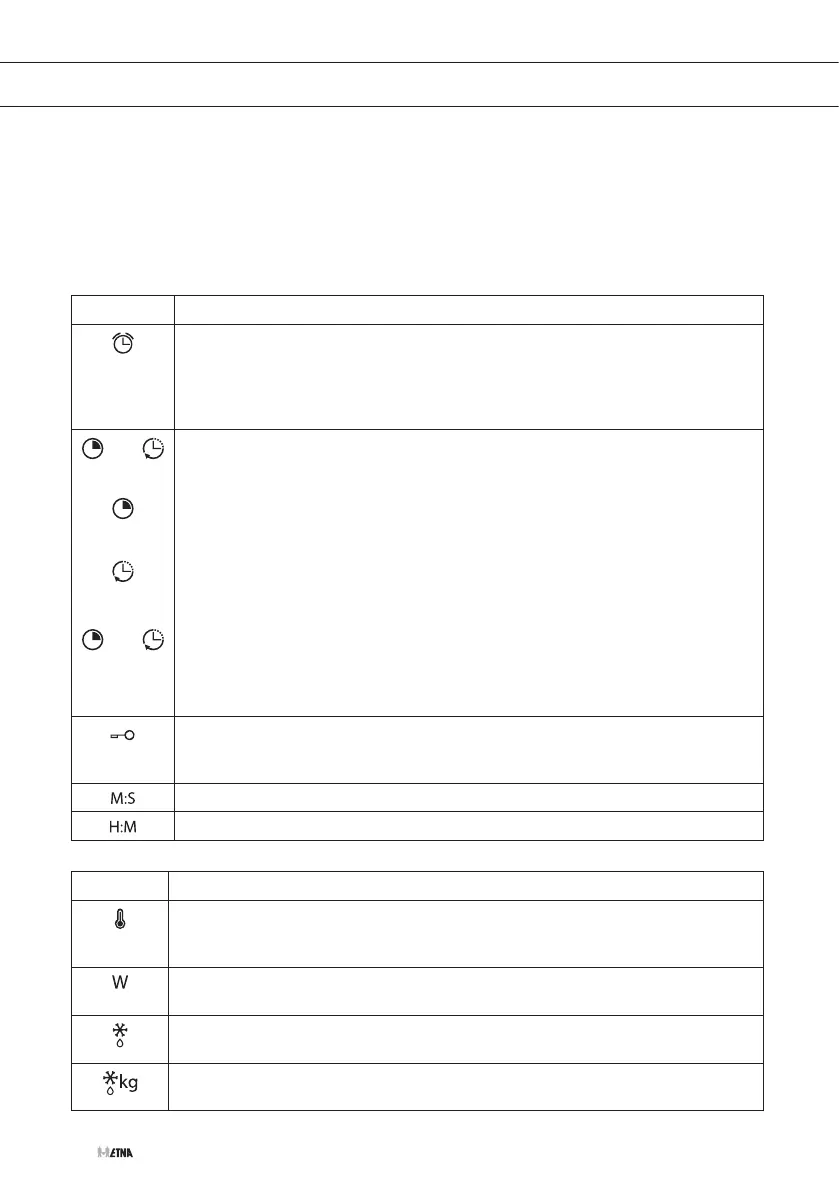
Symbols Clock settings
Kitchen timer
• Lights up when the clock/timer is selected.
• Generates an audio signal when the time has passed.
• The oven does not turn off at the end of the timer period.
• This function can always be used, also while the oven is cooking.
and
and
Programming
Light up to indicate that the oven is programmed (cooking time, stop time or
total).
• Cooking time
This setting allows you to programme the cooking time, after which the oven
will turn off automatically.
• Cooking end time
This setting allows you to programme the time for cooking to stop, after
which the oven will turn off automatically.
• Cooking time and Cooking end time
This setting allows you to programme the cooking time and cooking end
time. The oven switches on automatically at the set time and operates for the
selected cooking time. It then switches off automatically at the indicated time
(cooking end time).
Clock/timer lock (child lock)
Indicates that the touch keys for the clock/timer are locked, preventing
modifications by small children.
The time is displayed in Minutes : Seconds.
The time is displayed in Hours : Minutes.
Symbols Other functions
Temperature indication
Indicates that the oven is transmitting heat to the food. This symbol disappears
when the selected temperature has been reached.
Power indication
Lights up when the power is shown in the display.
Defrosting by time
Lights up while the defrosting by time function is activated.
Defrosting by weight
Lights up while the defrosting by weight function is activated.



 To Next Page