EN 17
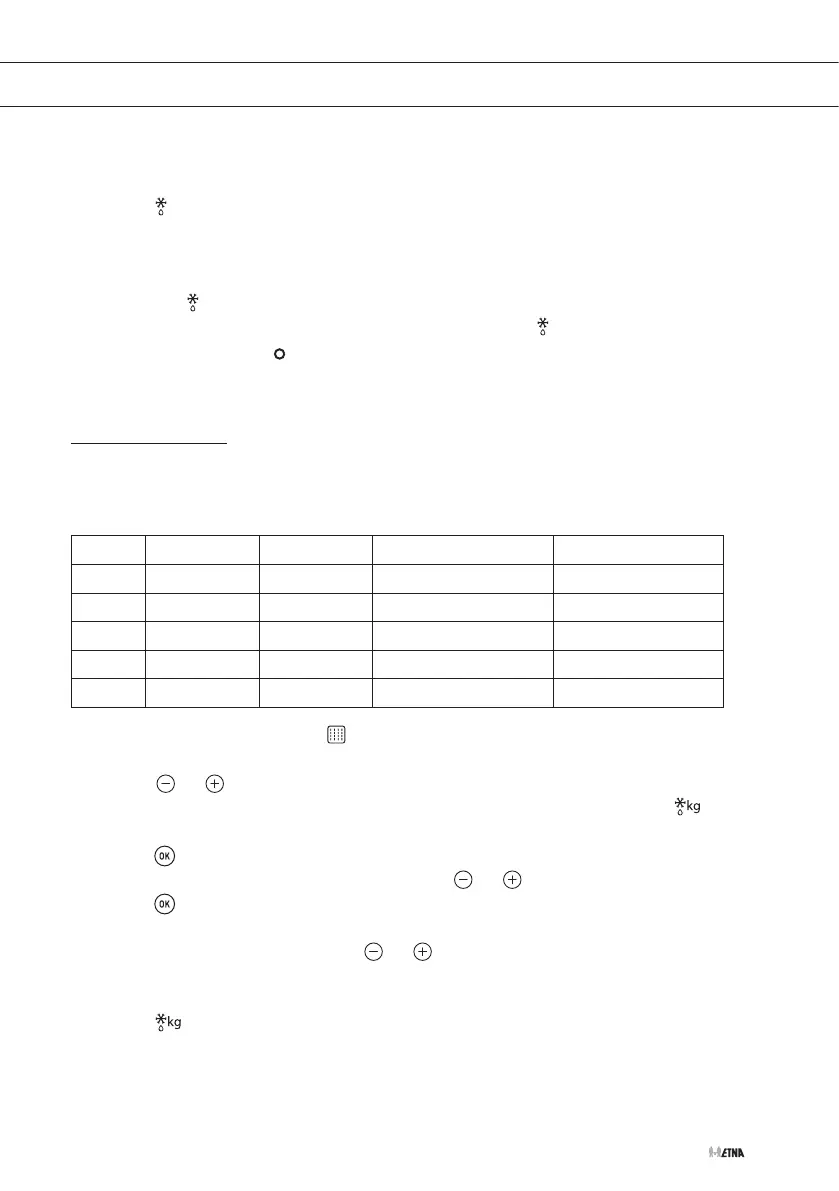
4. Touch the start key to start the operation.
▷ An audio signal will sound, the remaining defrosting time will appear on the display and
the symbol will flash slowly.
▷ When the display shows the word 'Turn', open the door and turn the food. Touch the
start key to continue defrosting.
▷ Once the defrosting time has ended, the oven will turn off, an audio signal will sound
and the symbol will flash quickly. 'End' appears in the display.
5. Touch the stop key to stop the audio signal and turn off the symbol and 'End'.
6. Set the controls to the position.
Defrosting by weight
The following table shows the defrosting by weight function programs, indicating weight intervals
and defrosting and standing times (in order to ensure the food is of a uniform temperature):
Prog. Food Weight (kg) Defrosting time (min.) Standing time (min.)
F01 Meat 0.10 - 2.00 2.10 - 43 20 - 30
F02 Poultry 0.10 - 2.50 2.20 - 58 20 - 30
F03 Fish 0.10 - 2.00 2.00 - 40 20 - 30
F04 Fruit 0.10 - 0.50 2.36 - 13 10 - 20
F05 Bread 0.10 - 0.80 2.25 - 19 10 - 20
1. Select the microwave function
.
▷ The display shows 0:10.
2. Touch or .
▷ The display shows a defrosting program. The 'defrosting by weight' symbol starts
flashing.
3. Touch .
4. Set the desired defrosting program by touching or .
5. Touch to confirm.
▷ The display shows the default weight.
6. Set the desired weight by touching or .
7. Touch the start key to start the operation.
▷ An audio signal will sound, the remaining defrosting time will appear on the display and
the symbol will flash slowly.
OPERATION



 To Next Page