08 EN EN 09
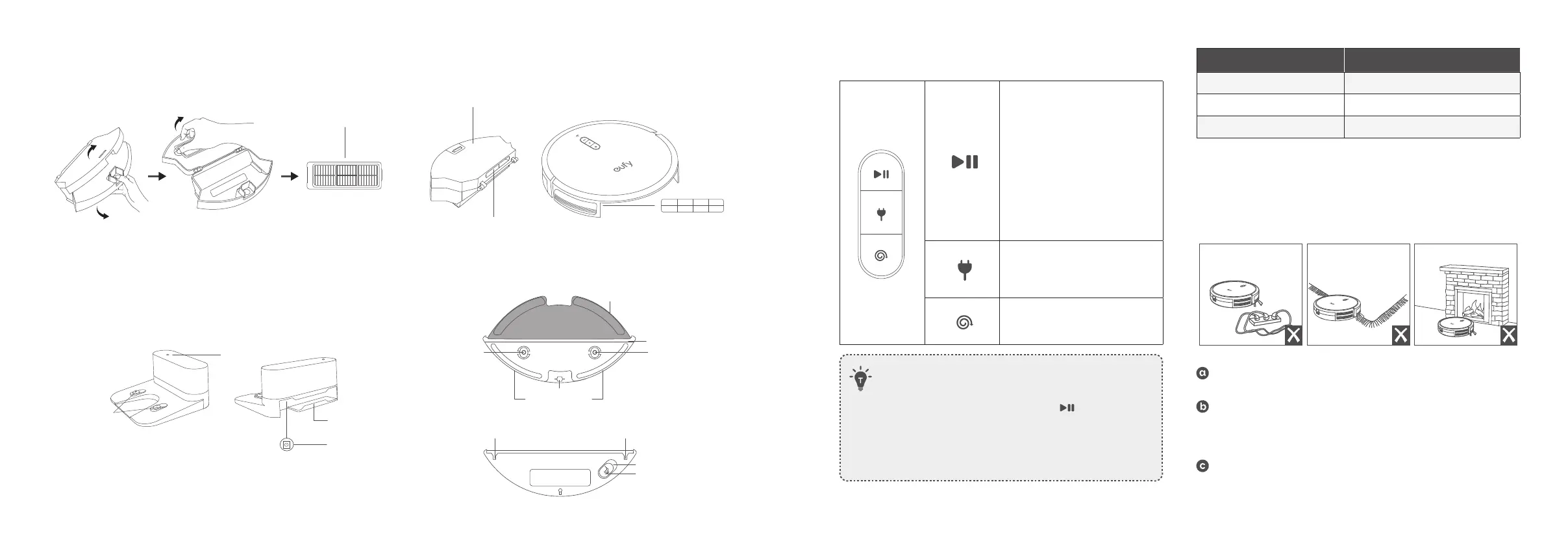
Buttons & Indicators
Start/Pause Cleaning
• Solid blue: standby, cleaning,
pause cleaning, returning to
charging base or fully charged
• Solid orange: standby or
working in low battery status
• Flashing red: error
* Refer to the
“Troubleshooting>Voice Alert”
section in this manual for solutions.
Reset the Wi-Fi Connection (Press
and hold for 10 seconds)
Return to Charging Base
• Flashing blue slowly: returning
to Charging Base
• Steady blue: standby or paused
Spot Cleaning
• Flashing blue slowly: Spot mode
• Steady blue: standby or paused
• When you use the Find My Robot function via the eufy Clean
app, all three LED indicators are solid blue and a voice prompt
is heard.
• To conserve power, the blue light on the
button becomes
dim when:
(1) RoboVac is not docked to the Charging Base and has been
inactive for 10 minutes;
(2) RoboVac is fully charged for 1 minute.
Wi-Fi Status Light Status
Slowly flashing blue Waiting for connection
Rapidly flashing blue Connecting with your wireless router
Solid blue Connected to your wireless router
Using Your RoboVac
Important Tips Before Use
Remove power cords and small objects from the floor that may
entangle RoboVac.
Fold tasseled edges of area rugs underneath to prevent tangling
RoboVac. Avoid cleaning very dark-colored high-pile rugs or
rugs thicker than 1.02in / 26mm as they may cause RoboVac to
malfunction.
It is strongly recommended to place boundary strips (sold
separately) in front of fireplaces and certain areas (i.e. air vents)
that may cause damage to RoboVac if entered.
C. Dust Collector D. Suction Inlet
Unibody Filter
Dust collector
Suction inlet
Suction inlet
E. Charging Base F. Water Tank *Only for G30 Hybrid (T2253)
Status light
Power cord storage
compartment
Power socket
Charging contact pins
Cloth attachment area
Movable pulley
Snap joints
Snap joints
Water inlet
Water inlet cover
Mopping cloth
Filter element
Slot
Filter element



 To Next Page