14 EN EN 15
Select BoostIQ™ feature
In the eufy Clean app, select the BoostIQ™ feature according to your
needs. While cleaning at standard suction power level, RoboVac will
automatically increase the suction power if it detects that stronger
power is needed to ensure the best clean. BoostIQ™ is ideal for
cleaning thicker carpets and hard-to-sweep messes, which will reduce
the total cleaning time, but increase the noise level. If the vacuuming
noise caused by BoostIQ™ disturbs you, you can disable this feature.
Use Mopping System
*Only available for G30 Hybrid (T2253)
• The mopping mode is not recommended when no one is
at home.
• Only use the mopping mode on a floor without carpets.
• Remove the water tank when RoboVac is under charging
or not in use.
1
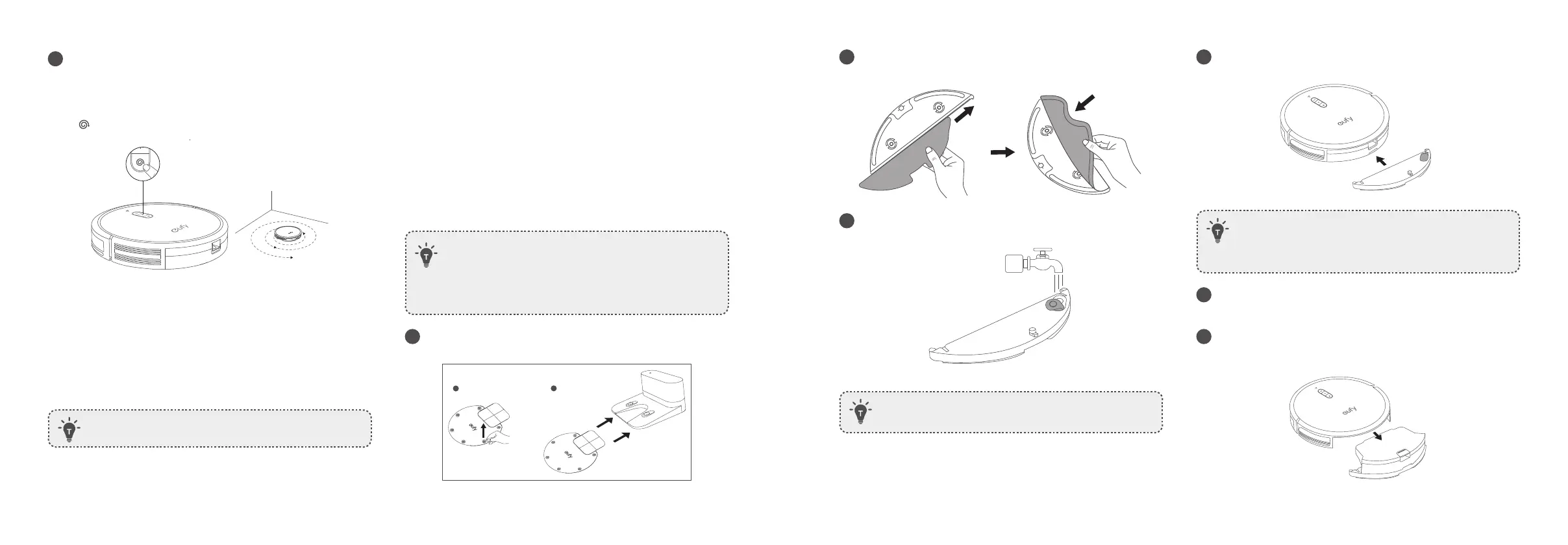
Before mopping, peel off the stickers on the waterproof pad and
install it under the Charging Base to keep the floor dry.
1
2
2
Wet the mopping cloth and wring it until it does not drip. Insert the
cloth along the bracket slot and stick it firmly.
3
Open the water inlet cover to fill the water tank, then close the
cover.
• Only use the cleaning solution designated by eufy, otherwise
it may affect the cleaning effect and damage the device.
4
Install the water tank into the bottom of RoboVac until a click is
heard.
• The mopping mode is only intended for a clean floor
without stubborn stains. To achieve a better mopping effect,
it is recommended to clean the floor with RoboVac three
times before installing the mopping module.
5
Select a cleaning mode to start cleaning.
• RoboVac automatically sweeps and mops in the selected mode.
6
When RoboVac finishes working and returns to the Charging Base,
press the release button to remove the dust collector and the water
tank.
2
Spot cleaning
RoboVac intensively cleans a specific area in a spiral pattern, useful if
there is a concentrated area of dust or debris. In Spot mode, RoboVac
will stop cleaning after 2 minutes.
Press on RoboVac to start cleaning in Spot Mode.
Select a Suction Power Level
In the eufy Clean app, select a suction power level according to your needs:
• Standard (Default)
• Turbo
• Max
• BoostIQ™
• When RoboVac starts cleaning the next time, it will clean
according to the suction power level you previously selected.



 To Next Page