10 EN EN 11
Use RoboVac with Amazon Alexa /
The Google Assistant
Amazon Alexa or the Google Assistant is a smart voice control device
that enables you to control RoboVac with your voice.
Before you start, make sure:
• RoboVac is attached to the Auto-Clean Station to ensure there is
enough power.
• RoboVac is connected with the eufy Clean app.
• You have an Amazon Alexa-enabled device (i.e. Amazon Echo, Echo
Dot, Amazon Tap, Echo Show, or Echo Spot) or a device enabled with
the Google Assistant (i.e. Google Home, Google Home Mini). These
devices are sold separately.
• The Amazon Alexa app or Google Home app is already installed on
your smart device, and you have created an account.
To control RoboVac with Amazon Alexa or the Google Assistant:
Open the eufy Clean app and find “Smart Integrations” in the top left.
Follow the on-screen instructions to complete the setup.
Enable / Disable the Child Safety Lock
• Press and hold the button for 5 seconds to turn on the child safety
lock. Once the child safety lock is enabled, all buttons will be locked
to prevent children from damaging the device or accidentally getting
hurt.
• To disable the child safety lock, press and hold the
button for 5
seconds again.
• This function is also available in the eufy Clean app.
Cleaning and Maintenance
Prior to cleaning and maintaining, turn o the device and unplug the
power cord.
For optimal performance, follow the instructions below to clean and
maintain RoboVac regularly. The cleaning and replacement frequency
will depend on your RoboVac usage habits.
Recommended Cleaning and Replacement Frequency
RoboVac Part
Cleaning
Frequency
Replacement
Frequency
Dust Box Once a week -
Dirty Water Tank After each use -
Mopping Pads - Every 3-6 months
Filter Once a week Every 3-6 months
Side Brush Once a month
Every 3 months (or
when visibly worn)
Brush Guard Once a month
Every 6 months (or
when visibly worn)
Rolling Brush Once a month Every 6 months
Sensors Once a month -
Charging Pins Once a month
-
Swivel Wheel Once a month
-
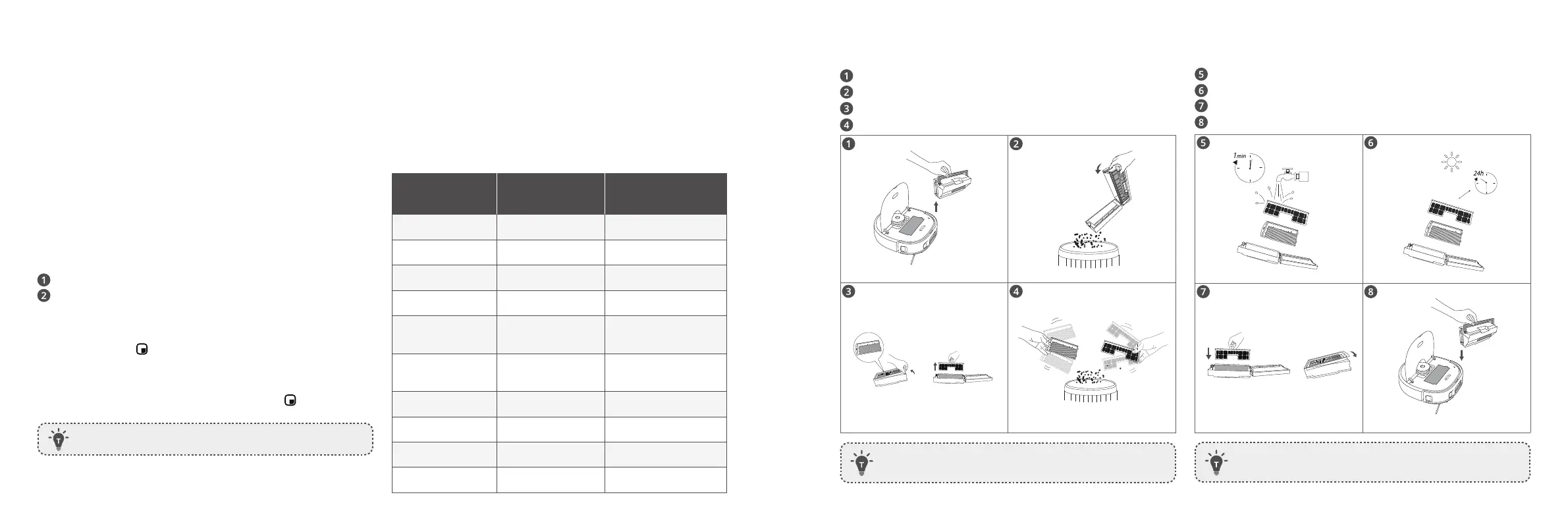
Clean the Dust Box and Filter
Open the top cover and remove the dust box.
Press the release button to open and empty the dust box.
Remove the high-performance filter and the pre-filter.
Tap the filters to remove dust.
• Do not use a brush, hot water, or any detergent to clean
the lters.
Rinse the dust box and filters thoroughly with water.
Air-dry the dust box and filters completely before next use.
Place the filters back into the dust box.
Push the dust box back into the main unit.
• Do not use the lters if they are not completely dry,
otherwise it may aect the cleaning performance.


 To Next Page