EasyManua.ls Logo

EUFY X8 Pro - User Manual

EUFY X8 Pro
12 pages
Print Icon
To Next Page IconTo Next Page
Loading...
T2266/T2276 5100500xxxx V01
Owner's Manual
Robotic Vacuum Cleaner (T2266)
Robotic Vacuum Cleaner with
Self-Empty Station (T2276)
X8 Pro
Question and Answer IconNeed help?

Do you have a question about the EUFY X8 Pro and is the answer not in the manual?

Summary

About Your RoboVac

Whats in the Box

Lists all items included in the package.

RoboVac Anatomy

Details the physical parts and components of the RoboVac.

LED Indication

Explains the meaning of different LED indicator lights.

Using Your RoboVac

Important Tips Before Use

Provides crucial advice before operating the device for the first time.

Preparation

Guides on setting up the charging base and clearing the area.

Charge Your RoboVac

Instructions on how to charge the RoboVac for optimal battery life.

Auto Recharge and Resume

Explains how the RoboVac automatically recharges and resumes cleaning.

Power On; Off

Steps to turn the RoboVac on and off.

Use Your RoboVac with the eufy Clean App

Guide to connecting and controlling the RoboVac via the mobile app.

Reset the Wi-Fi Connection

Instructions for resetting the Wi-Fi connection settings.

Schedule Cleaning

How to set up automated cleaning schedules through the app.

Auto-Cleaning Mode

Describes the default automatic cleaning process.

Select a Cleaning Mode

Options for choosing different cleaning modes.

Spot Cleaning Mode

How to activate spot cleaning for concentrated debris.

Select a Suction Power Level

How to adjust suction power for different cleaning needs.

Select BoostIQ Feature

Explains the automatic suction adjustment feature.

Room Cleaning Mode

How to use the app for room-specific cleaning.

Use the Mopping System

Instructions for setting up and using the mopping function.

Set Up Virtual Wall

How to define restricted areas using the app.

Use RoboVac with Amazon Alexa; The Google Assistant

Guide to controlling the RoboVac with voice assistants.

Cleaning and Maintenance

Recommended Cleaning and Replacement Frequency

Table outlining maintenance schedules for parts.

Clean the Dust Box and Filter

Steps to clean the dust box and its filter.

Clean the Rolling Brush

How to clean the main rolling brush.

Clean the Side Brush

Instructions for cleaning the side brush.

Clean the Swivel Wheel

Steps to clean the front swivel wheel.

Clean the Sensors and Charging Pins

How to clean sensors and charging contacts for optimal performance.

Clean the Mopping Cloth and Water Tank

Steps to clean the mopping cloth and water tank.

Replace the Dust Bag (T2276 Only)

Guide on how to replace the dust bag for specific models.

Troubleshooting

RoboVac will not turn on

Solutions for when the device fails to power on.

RoboVac suddenly stops working

Troubleshooting steps for unexpected shutdowns.

RoboVacs movements or travel paths are abnormal

Tips for resolving issues with navigation and movement.

You cannot schedule cleanings

Solutions for problems with setting up cleaning schedules.

Suction power is weak

How to fix issues with reduced suction power.

RoboVac cannot return to the Self-Empty Station; Charging Base

Solutions for when the RoboVac fails to dock.

RoboVac cannot connect to a Wi-Fi network

Steps to resolve Wi-Fi connectivity problems.

You cannot control RoboVac with Amazon Alexa

Troubleshooting voice control with Alexa.

RoboVac cannot be charged

Solutions for charging failures.

You cannot control RoboVac with the Google Assistant

Troubleshooting voice control with Google Assistant.

Specifications

Customer Service

Overview

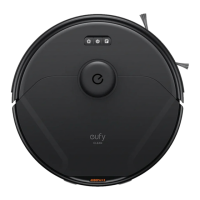
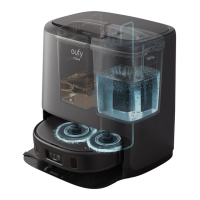
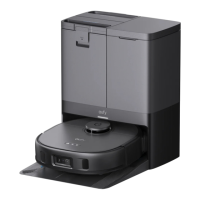
The Eufy X8 Pro is a robotic vacuum cleaner designed for automated home cleaning. It comes in two models: T2266, which is a standalone robotic vacuum cleaner, and T2276, which includes a self-empty station for enhanced convenience. This owner's manual provides comprehensive instructions for setting up, operating, and maintaining the device.

Function Description:

The Eufy X8 Pro is primarily a robotic vacuum cleaner that autonomously navigates and cleans various floor types. Its core function is to vacuum dust and debris from your floors. The T2276 model extends this functionality with a self-empty station, allowing the robot to automatically empty its dust box, reducing the frequency of manual intervention. Additionally, both models feature a mopping system, enabling them to vacuum and mop simultaneously for a more thorough clean. The robot uses a laser distance sensor (LDS) for navigation, creating a map of your home to plan efficient cleaning routes. It is equipped with anti-drop sensors to prevent falls from stairs and elevated surfaces.

Usage Features:

The RoboVac offers multiple ways to control and customize its cleaning operations.

  • Power On/Off: The device can be powered on or off by pressing and holding the Auto cleaning Start/Pause button for 3 seconds.
  • Charging: RoboVac automatically returns to its Self-Empty Station or Charging Base when cleaning is complete or when its battery is low. Users can also manually send it back to the station via the main unit button or the eufy Clean app. The T2276 model's Self-Empty Station automatically empties the dust box after a cleaning cycle of more than 15 minutes, provided the dust bag is properly installed.
  • eufy Clean App Control: The eufy Clean app is the primary interface for accessing all advanced features. Users can download the app, create an account, and add their RoboVac. The app allows for:
    • Wi-Fi Connection: Instructions are provided for setting up the Wi-Fi connection, with indicators for status (slowly flashing blue for waiting, rapidly flashing blue for connecting, solid blue for connected). The Wi-Fi connection can be reset by simultaneously pressing and holding the Auto cleaning Start/Pause and Recharge buttons for 5 seconds.
    • Cleaning Modes:
      • Auto-Cleaning Mode: After startup, RoboVac automatically determines its cleaning route, cleaning edges first and then following a Z-shaped path. It returns to the station once cleaning is finished. This mode can be started by pressing the Auto cleaning Start/Pause button.
      • Spot Cleaning Mode: This mode allows for intensive cleaning of a specific 4.9 ft × 4.9 ft (1.5 m x 1.5 m) area, useful for concentrated dust or debris. It can be initiated by pressing the Spot cleaning button on the device or via the app.
      • Room Cleaning Mode (App Only): The app automatically divides the house into several rooms, allowing users to select specific rooms for cleaning and customize room settings. RoboVac will clean only the selected rooms and then return to the station. This mode requires RoboVac to have first created a map of the home.
    • Suction Power Level: Users can select from Quiet, Standard (Default), Turbo, and Max suction power levels via the app. The device will remember the last selected level for subsequent cleanings.
    • BoostIQ™ Feature: This app-exclusive feature allows RoboVac to automatically increase suction power when it detects the need for stronger cleaning, such as on thicker carpets or for stubborn messes. This can reduce total cleaning time but may increase noise.
    • Scheduling: Cleaning schedules can be set and customized for specific days of the week through the eufy Clean app.
    • Virtual Wall (App Only): The app allows users to set up "No-Go Zones" (where RoboVac will not vacuum), "No-Mop Zones" (where RoboVac will not mop), or "Virtual Walls" (which RoboVac will not cross). This feature requires RoboVac to perform an initial cleaning run to create a floor plan.
  • Mopping System:
    • Setup: Before mopping, the waterproof pad should be installed under the Self-Empty Station/Charging Base. The water tank is filled with water (no cleaning formula) and installed into the main unit. The mopping cloth is wetted, wrung out, and attached to the mopping module, which then clicks into the bottom of RoboVac.
    • Operation: Once set up, RoboVac will automatically vacuum and mop. Water levels for mopping can be chosen via the eufy Clean app.
    • Post-Mopping: After cleaning, the water tank should be removed, emptied, and the mopping cloth cleaned to prevent mildew and odors.
  • Voice Control: RoboVac can be controlled using Amazon Alexa or Google Assistant. Users need to link their eufy Clean account with their smart assistant app (Amazon Alexa app or Google Home app) and enable the "eufy Clean - RoboVac" skill or action.

Maintenance Features:

Regular cleaning and maintenance are crucial for optimal performance and longevity of the RoboVac. The manual provides recommended cleaning and replacement frequencies, which may vary based on usage habits and home environment.

  • Dust Box and Filter:
    • Cleaning: The dust box should be emptied after each use (T2266) or once a week (T2276). The filter should be cleaned once a week and replaced every 3 months.
    • Procedure: Open the top cover, remove the dust box, press the release button to open and empty it. Remove the filter assembly, rinse the dust box and filter thoroughly with water, and air-dry completely before reassembly. Do not use hot water or any detergent on the filter.
  • Rolling Brush:
    • Cleaning: Clean once a month, replace every 6-12 months.
    • Procedure: Pull the release tabs to unlock the brush guard, lift the rolling brush to remove, clean it with the cleaning tool, and reinstall by inserting the fixed protrusion first.
  • Side Brush:
    • Cleaning: Clean once a month, replace every 3-6 months (or when visibly worn).
    • Procedure: Pull off the side brush, clean it, and push it back on.
  • Sensors and Charging Pins:
    • Cleaning: Clean once a month.
    • Procedure: Dust off the sensors and charging contact pins using a dry cloth or cleaning brush.
  • Swivel Wheel:
    • Cleaning: Clean once a month.
    • Procedure: Pull out the swivel wheel with a tool (like a screwdriver), clean any hair or debris wrapped around the wheel or entangled inside the wheel cavity, and reinstall until it clicks into place. Do not clean the swivel wheel with water.
  • Mopping Cloth and Water Tank:
    • Cleaning: After each use, remove the mopping cloth and water tank. Rinse both thoroughly with water and air-dry completely to prevent mildew or unpleasant smells.
  • Dust Bag (T2276 Only):
    • Replacement: Timely check and empty the dust bag, especially if you have a pet (every 2 months).
    • Procedure: Lift open the top cover of the Self-Empty Station, pull the release button to position, pull up the handle to remove the dust bag, discard it, and install a new dust bag by sliding its paper board into the slot until a click is heard.

Before any cleaning or maintenance, the device should be powered off and unplugged. Any servicing beyond basic cleaning should be performed by an authorized service representative.

EUFY X8 Pro Specifications

General IconGeneral
Suction Power2000Pa
Dustbin Capacity400ml
Charging Time4-5 hours
Noise Level65 dB
Wi-Fi ConnectivityYes
Auto Carpet BoostYes
NavigationLaser Navigation
Water Tank Capacity300ml
FeaturesMulti-Floor Mapping
Voice ControlYes (Amazon Alexa, Google Assistant)
Virtual BoundariesYes
RuntimeUp to 180 minutes

Related product manuals