14 EN EN 15
4
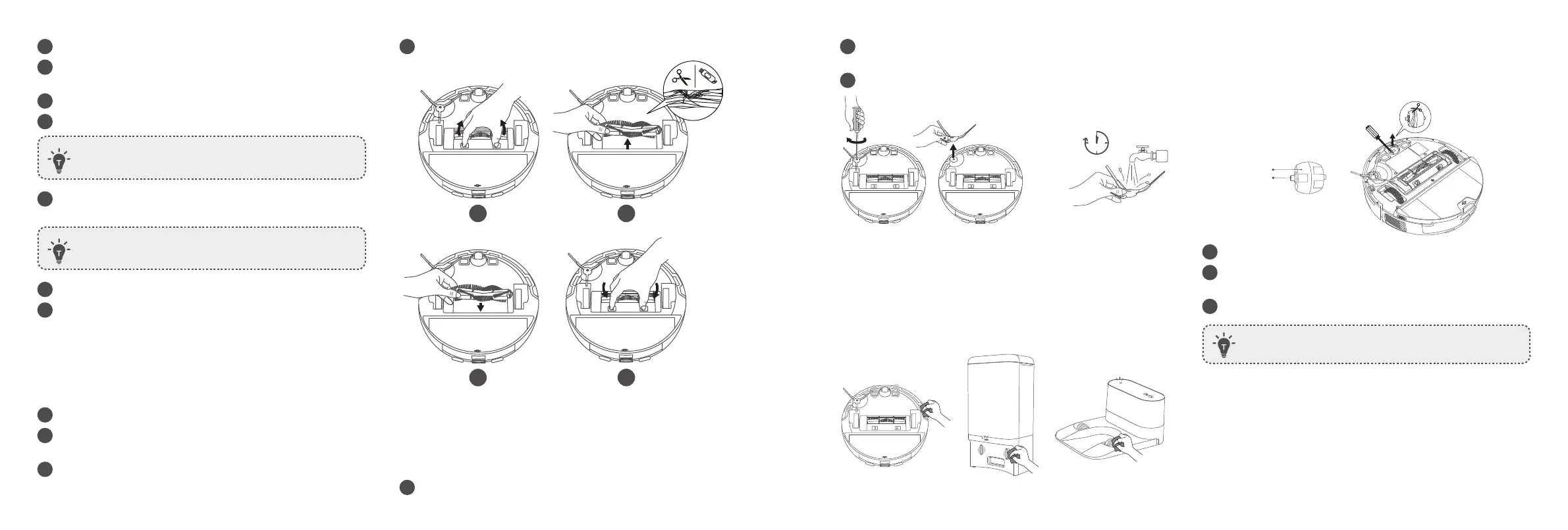
Press down to snap the brush guard into place.
1 2
4
3
Clean the Side Brush
Foreign substances, such as hair, can easily get tangled in the side
brush, so it is best to clean it regularly.
1
Remove the side brush.
2
Carefully unwind and pull off any hair or substances that are
wrapped between the main unit and the side brush.
3
Clean the side brush with water.
1
min
Clean the Sensors and Charging Pins
To maintain the best performance, clean the sensors and charging
contact pins regularly.
• Dust off the sensors and charging contact pins using a cloth or
cleaning brush.
1
Open the top cover and remove the dust box.
2
Press the release button to open and empty the dust box with
the cleaning tool.
3
Remove the filter assembly.
4
Rinse the dust box and filter thoroughly with water.
• Do not use a brush, hot water, or any detergent to clean
the filter.
5
Air-dry the dust box and filter assembly completely before next
use.
• Do not use the filter if it is not completely dry, otherwise it
may affect cleaning performance.
6
Place the filter assembly back into the dust box.
7
Push the dust box back into the main unit.
Clean the Rolling Brush
*For your convenience, it is recommended to use the Self Cleaning
feature of the rolling Brush.
1
Pull on the release tabs to unlock the brush guard, as shown.
2
Lift the rolling brush to remove. Clean the rolling brush with a
cleaning tool.
3
Reinstall the rolling brush by inserting the fixed protruding end
first.
Clean the Swivel Wheel
Hair or dust particles can easily get entangled in the swivel wheel. Be
sure to clean the swivel wheel periodically and as needed.
Wheel
Axle
1
Pull out the swivel wheel with a tool (such as a screwdriver).
2
Clean any hair or debris wrapped around the wheel or entangled
inside the wheel cavity.
3
Reinstall the wheel and push it in until it clicks into place.
• Do not clean the swivel wheel with water.


 To Next Page