18
5. Install station
Before mounting, write down the Elvi station ID.
This can be found on the backside of the station.
5.1
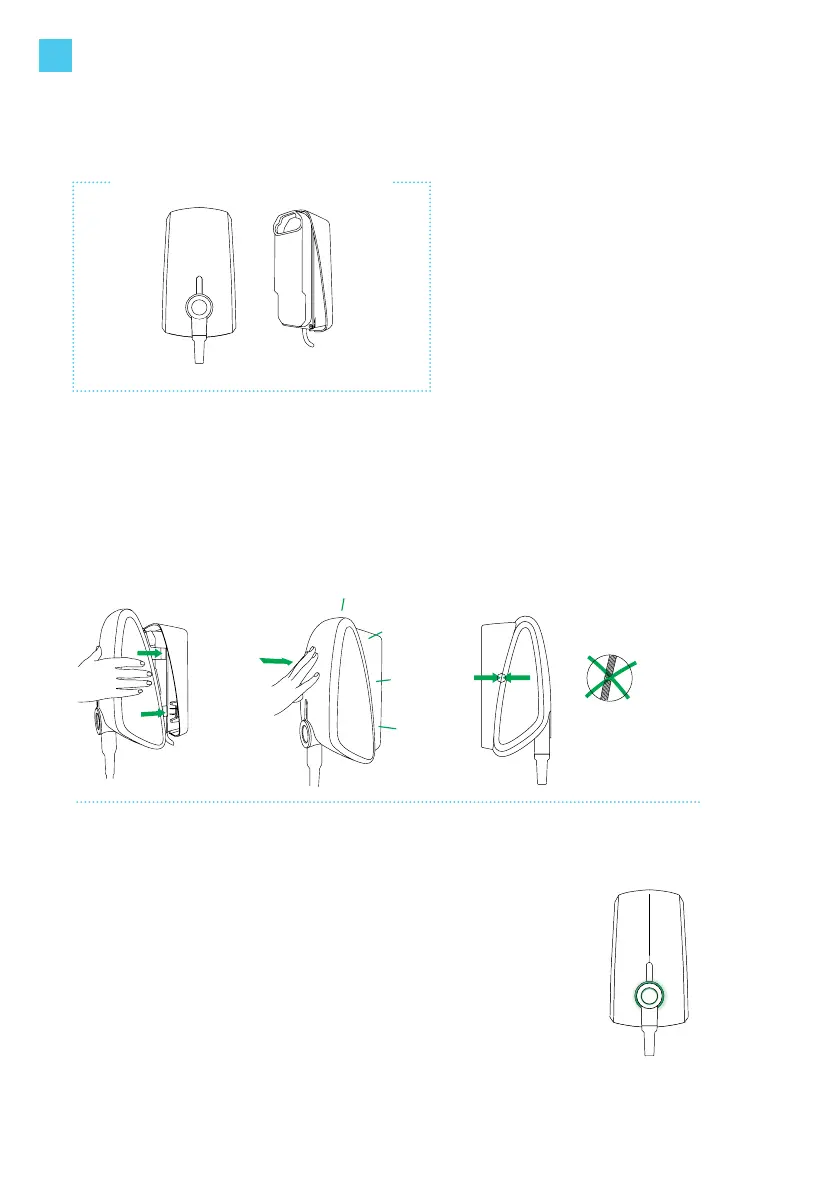
Align the station against the wall dock and press it in a straight
line until you hear a clicking sound.
To ensure that the connection is fully secured, press rmly on all
four corners and check that there is no air gap between the wall
dock and the station.
5.2
Switch on the power to the station on the service panel. Elvi will
switch on automatically. This is indicated by a ashing red LED
ring.
Note: If the LED ring does not show any color, it may be due to
improper installation of the charging cable. In this case, check/
repeat steps 3.3 and 3.4.
Note: Please be aware that soon after its registration and
activation, Elvi might start a software update automatically. Do
not switch Elvi off.
If the LED ring will not turn green after 20 minutes, verify that
the station is online in the backend/portal account. If the station
is not online, please contact your operator or service provider
for this product
Tools you need to install the station
No specic tools needed for this step.
CLICK
EN



 To Next Page