19
~ W 300 mm
H 65 mm
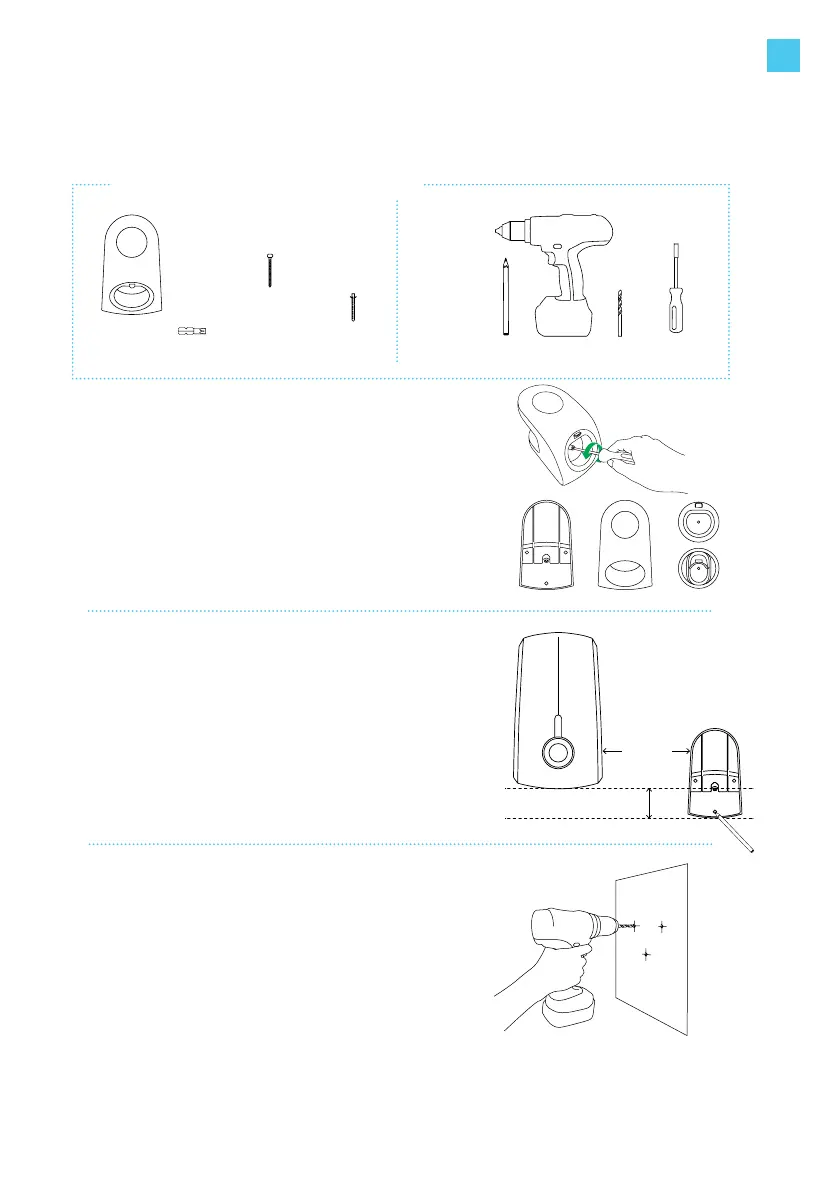
6. Install cable dock
sold separately
The Elvi cable dock is sold separately,
part No. 290135.
6.1
Unpack your Elvi cable dock.
Disassemble the charging cable holder by
removing the Torx bolt with the T30 bit.
6.2
Place the cable dock’s wall base on a solid and
at surface. Position the cable dock on the wall as
illustrated (it should be to the side of your station
and at a comfortable height within at least 1
meter from the ground).
Use the cable dock’s wall base as a drilling
template to mark the 3 holes to be drilled.
Make sure it is level.
6.3
Drill holes with drill round 8 mm.
Use the supplied plugs 8 x 65 mm.
Tools you need to install the cable dock
8 mm
drill bit
drill
pencil
3x
screw 5 x 70mm
3x
plug 8 x 65mm
Included
in the box
Not
included
in the box
1x bit T30
bit-holding
screwdriver
1x bit T25
EN



 To Next Page