25
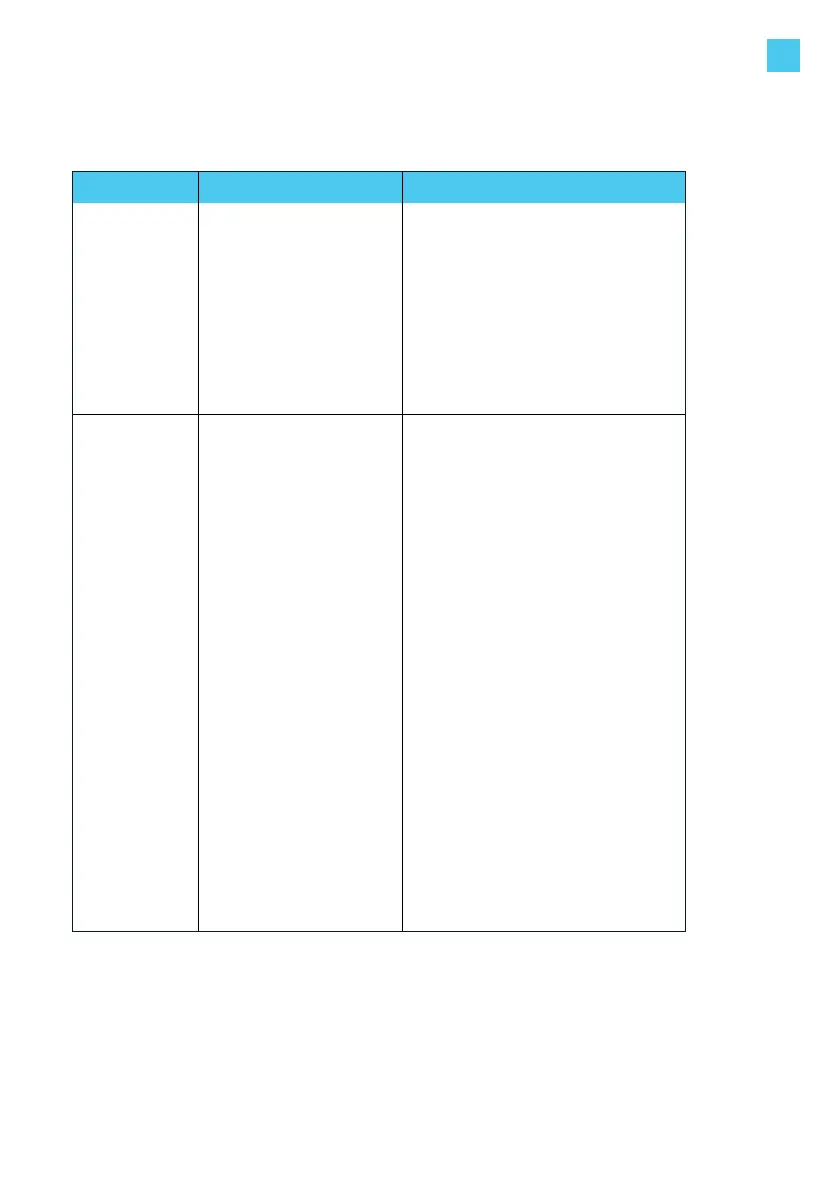
Problem Possible cause Solution
LED ring
lights up
yellow
constantly
• Vehicle is on a timer
• Vehicle is fully charged
• Grounding resistance
is too high (with spe-
cic vehicles,
this must be
< 50 Ohm)
• Check that the charging cable
plug is inserted into the
vehicle properly (check by user).
• Change the setting of the timer in
the vehicle (check by user).
• Replace the charging cable
(user-serviceable).
• Check that the ground resistance
is correct (grounding
measurement by electrician).
Red LED
starts ashing
immediately
after the card is
held against the
reader
• Charge card is not
authorized for
charging at this
charging station
• There is no
communication
with the
mobile app for station
management.
• Check that the charge card is reg-
istered correctly (check by user).
• Check the settings of your
charging station in the
mobile app and/or web platform
for station managementas provid-
ed by the operator or service pro-
vider for this product. For further
details, contact your operator or
service provider.
• Check that there is proper Wi-Fi
reception where Elvi is installed
(check by user).
• Reboot your Wi-Fi network rst.
Then reboot Elvi and check the
Wi-Fi reception (check by user).
• Check in the mobile app for sta-
tion management that your Wi-Fi
network is properly connected
to Elvi.
Reconnect again.
(check by user)
• If your Elvi is equipped with the
optional UMTS module, check
that Elvi is in contact with the
local cellular network and that it
has proper reception (check by
charging point operator).
9. Troubleshooting
EN



 To Next Page