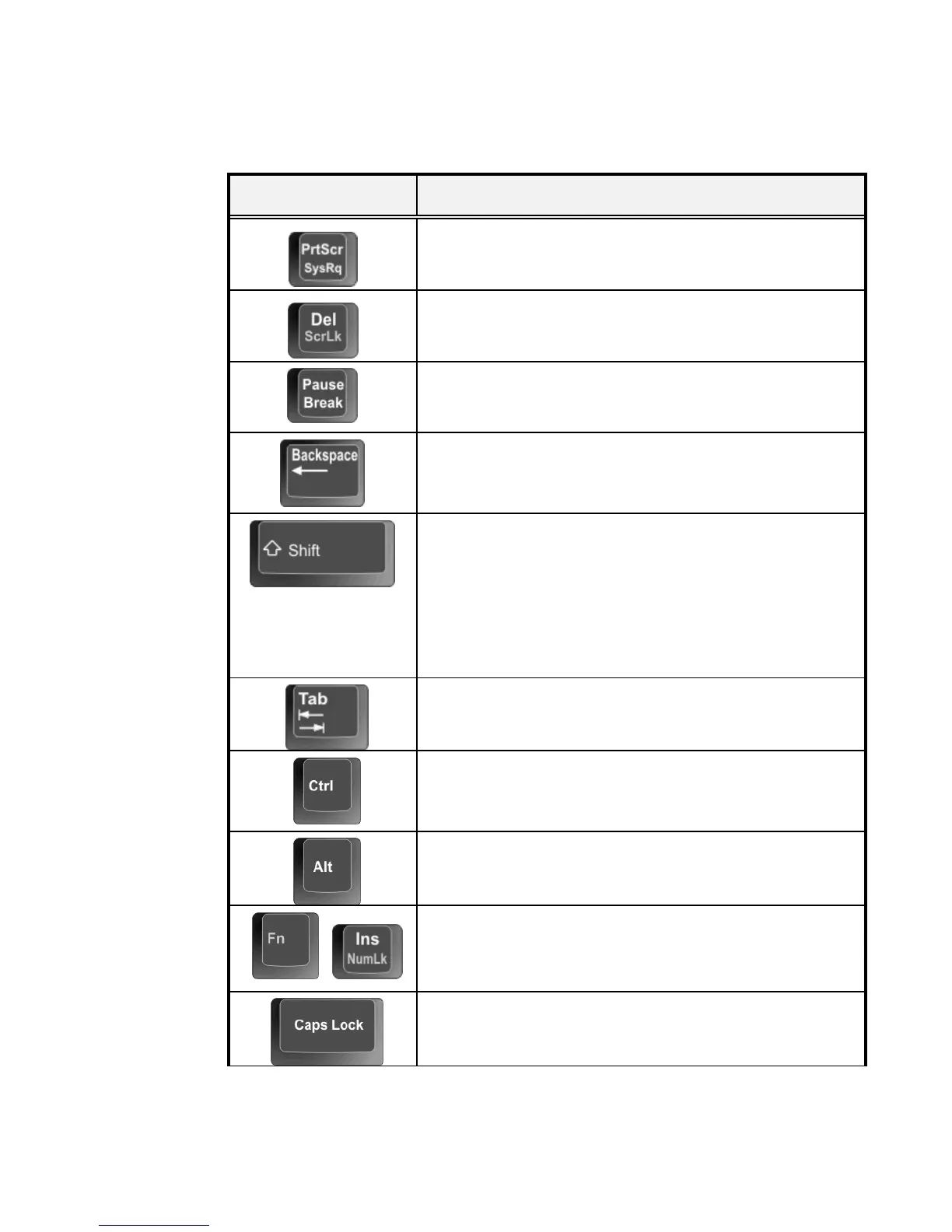
Keypad Function Description
<PrtScr> key. Known as the Print Screen key. Press
this key to map the whole screen to share memory for
your specific usage.
<Del> key. Known as the Delete key. Press this key
to delete the character to the right of the cursor, or
delete marked texts or items.
<Pause> key. Press this key to temporarily halt
execution of a command. Pressing any other key to
resume execution of a command.
<Backspace> key. Press this key to delete the
character to the left of the cursor.
<Shift> key. Press this key in combination with
alphabet letters to produce uppercase letters in
typing. Use this key in combination with those two-
character keys (found on the second row of the
keyboard) to produce the upper marked keys. Also
used in most application program in combination
with other keys to execute a certain command.
<Tab> key. Press this key to move the cursor to the
next tab stop on the right. This key works much the
same as in ordinary typewriter.
<Ctrl> key. Known as the Control key. Used in
most application program in combination with other
keys to execute a certain command.
<Alt> key. Known as the Alternate key. Used in
most application program in combination with other
keys to execute a certain command.
+
<Fn> + <Num Lock> key. Activates the
embedded 15-key numeric keypad. The keys are
color coded blue.
<Caps Lock> key. Used in most application
program to always activate uppercase alphabet
characters.


 To Next Page