1. Menu example with user access.
2. Menu example with super user access.
3. Menu example with advanced user access.
User access lets you view statistics (product counter) and cleaning history.
Super user access is a limited access for product settings, display, statistics and
history functions.
Advanced user access is a full access.
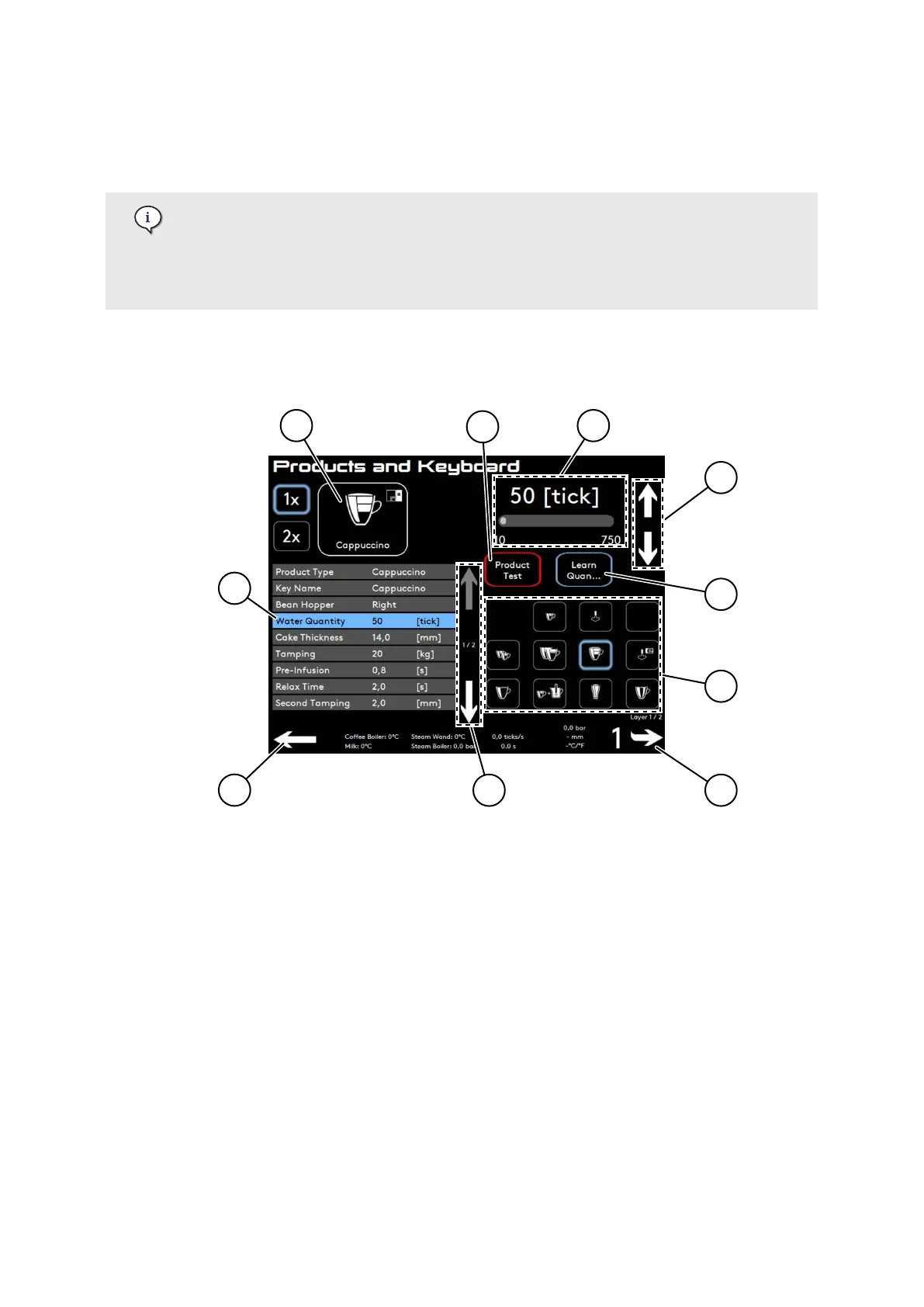
6.2. Use of the software menu
1. Select a product.
2. If needed, select another icon.
3. Press a sub-menu to display its settings.
4. Slider: Slide left or right to adjust settings.
5. Up/down keys: Use these arrows for ne adjustments.
6. Product Test, use this button to test the product and avoid going back to the main screen.
7. Learn Quantity, use this button to adjust the quantity of water or milk depending on the
product.
8. Browse menu.
9. Browse layers.
10. Navigate to previous menu.
6.3. Statistic / History menu
This menu allows access to:
Settings Menu
© Eversys S.A. Page 58 of 150 02.01.2023









 To Next Page