If your PC is on the network and is not already on the 10.0.0.0 domain, you will need to
add a route on your PC for the 10.0.0.0 domain. If there is no network, you will need to
connect the PC’s network port directly to the gateway and change your PC’s IP address to
access the gateway website to configure its network settings the first time.
A. Adding a route on your PC
If your PC is on the network but the network is not 10.0.0.0 domain, you will need
to add a route to your PC’s route map.
1. Connect the gateway to the same network as your PC
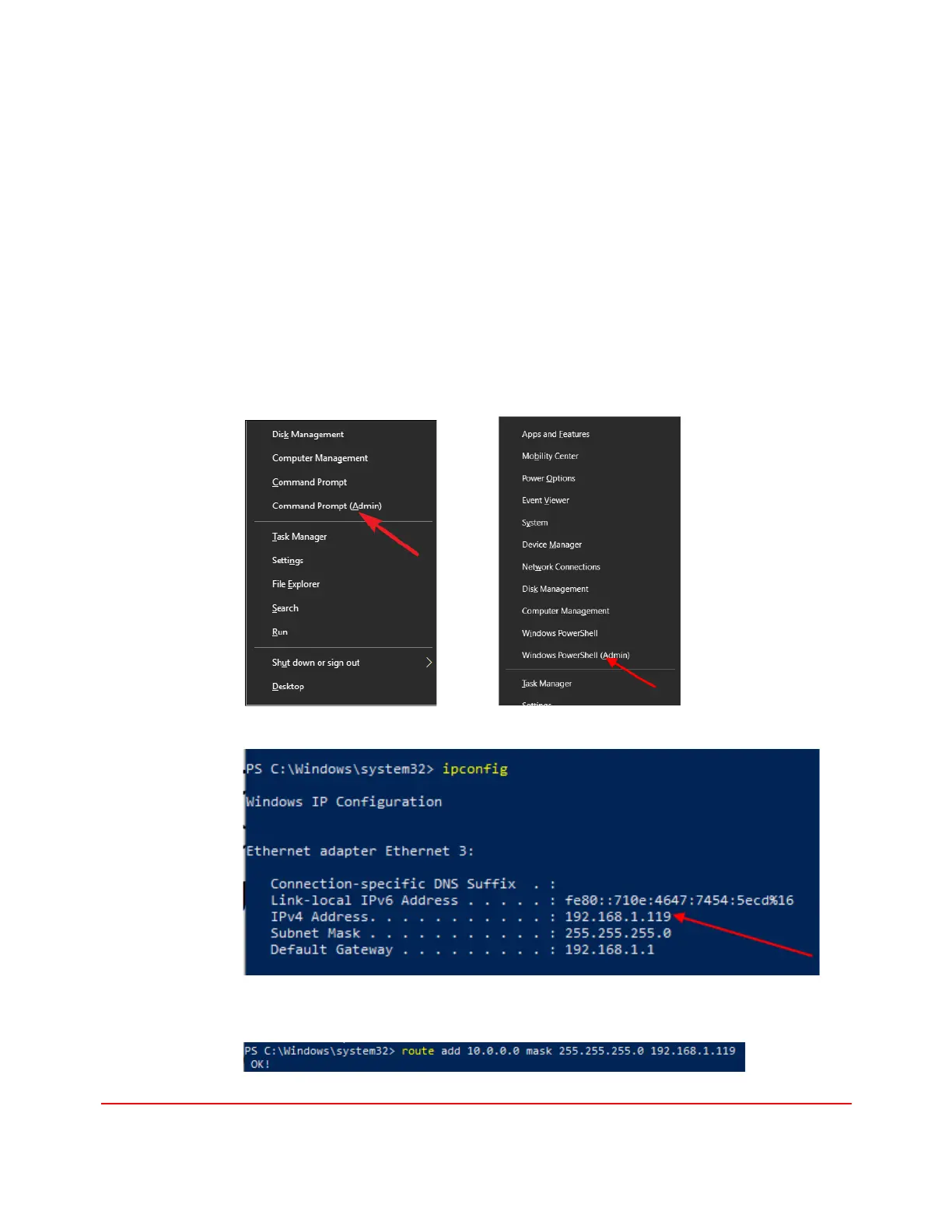
2. Press Windows+X and select Command Prompt(Admin) or Windows
PowerShell (Admin) to open the Windows command prompt (CMD) as
administrator
3. Type “ipconfig” and note the PC’s IP address.
4. Type “route add 10.0.0.0 mask 255.255.255.0 1.2.3.4” but substitute your PC’s
IP address for 1.2.3.4. In this example, substitute 192.168.1.119 for 1.2.3.4


 To Next Page