Babel Buster SPX Gateway Setup Procedure
There are network and hardware settings that the gateway needs to be configured for the first
time to join the BACnet network. The gateway is configured by using the embedded website. The
only tool needed for configuration is a Web browser. The link to the user guide is
https://csimn.com/CSI_docs/SPX-B-User-Guide.pdf. Here is a list of settings need to be
configured. Refer to the Babel Buster SPX User Guide to configure the settings in the gateway.
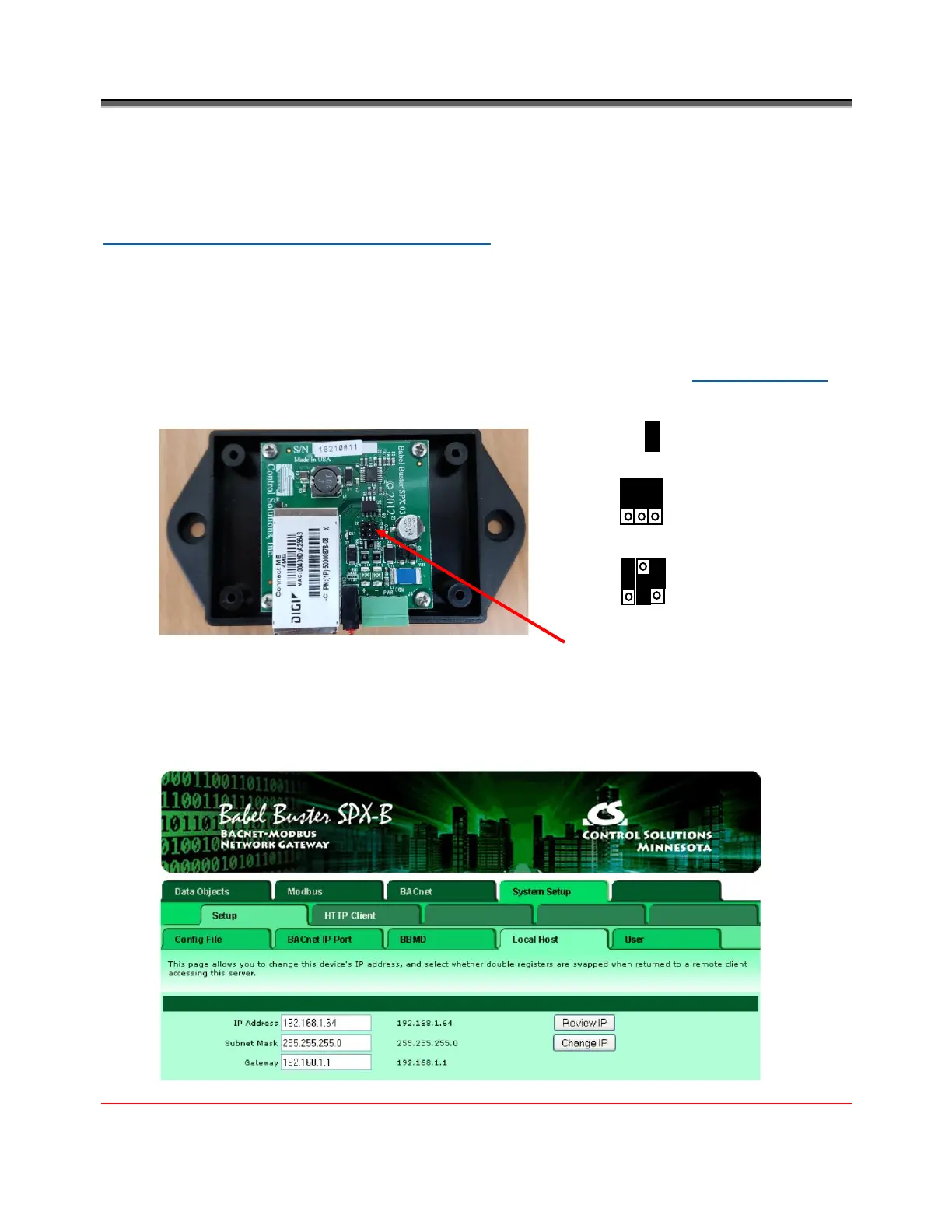
1. Set Modbus line conditioning
Disable RS485 line biasing. EVO/ECM-Modbus RTU has internal failsafe biasing. Enable
termination if the gateway is situated at the end of the Modbus trunk; otherwise, disable
termination and use external termination resistors as discussed in the Trunk Connection
section.
2. Configure the gateway’s IP settings
The gateway’s default IP address is 10.0.0.101. You need to set up the static IP address for
each gateway. You may need to get the static IP address, Subnet Mask and Network
Gateway address from your IT group for each gateway to avoid conflicting IP addresses.


 To Next Page