Modbus to BACnet Integration Procedure
1. Configure default settings in all EVO/ECM-Modbus RTU controllers.
The default settings including each controller’s assigned address and baud rate must be
first downloaded to each controller through the configuration port from a PC running the
EVO Modbus Configurator configuration software. Refer to the EVO Modbus Configuration
User Guide for details. The EVO/ECM-Modbus RTU addresses in the Modbus trunk must be
sequentially incremented from 1 to the number of controllers in the trunk and
communication rate must be 38400 Baud.
2. Upload a mapping file from the EVO/ECM-BACnet-Modbus library to the gateway.
The file provides the mapping to translate between the EVO/ECM-Modbus RTU registers
and the BACnet objects. The file name indicates the number of EVO/ECM-Modbus RTU
controllers the file is for.
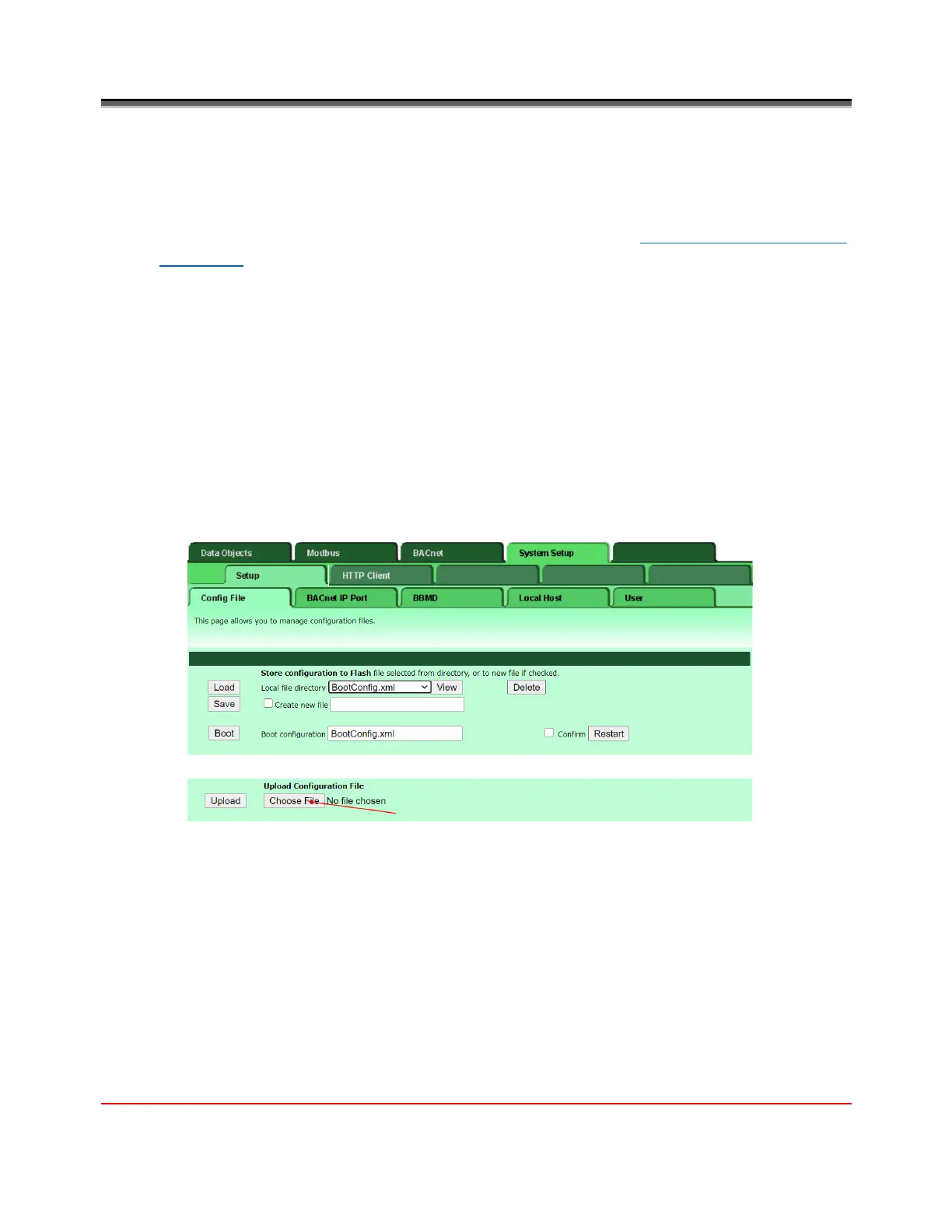
1. Select the System Setup>Setup>Config File tab
2. Click the Choose File button, go to the library file folder and select a file that matches
the number of controllers used with the gateway.
In this example, we are using eight controllers with the gateway.


 To Next Page