▲Shutdown Procedure
1. While using the projector, press the “Power” button to shut it down; Until the fans stop running the projector will not be shut down
completely.
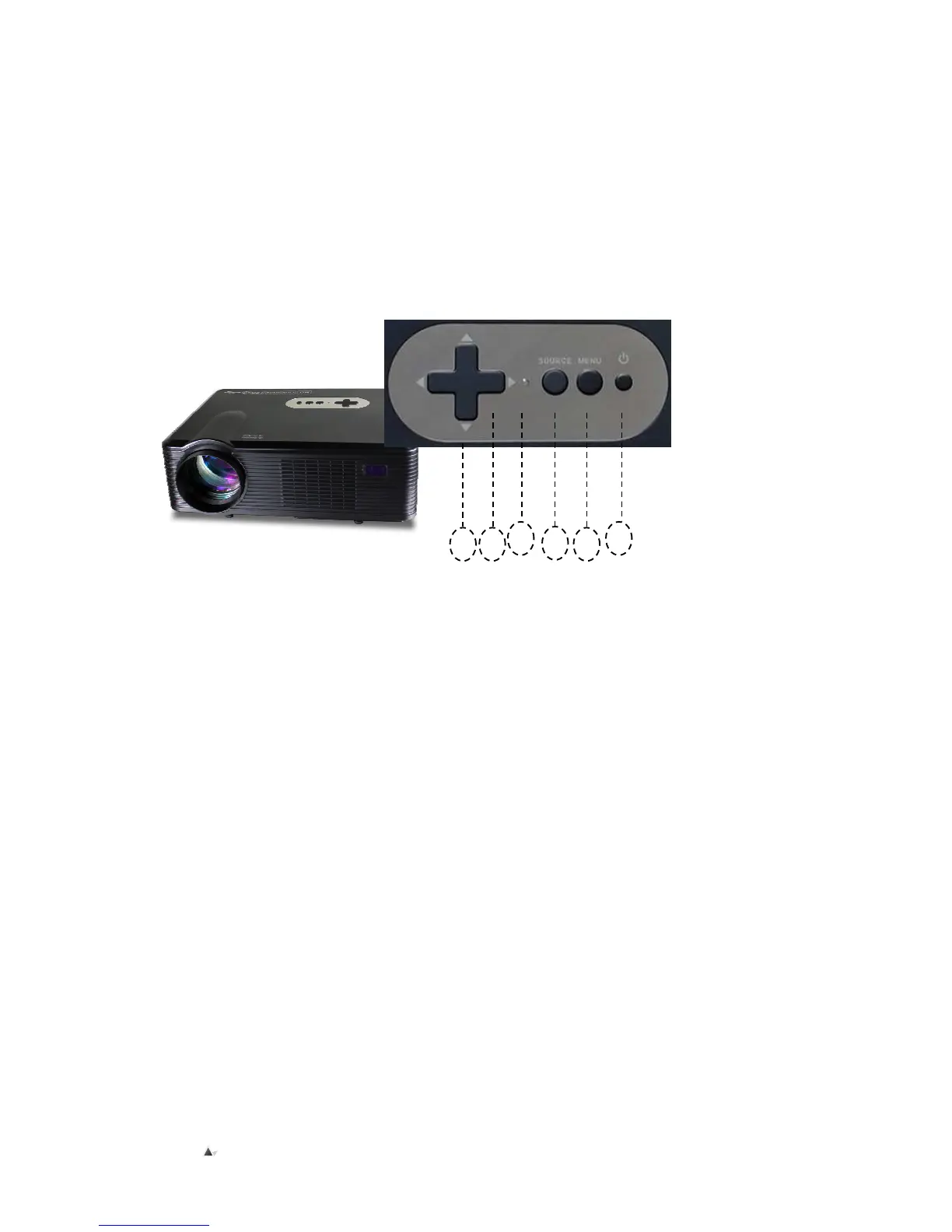
Instructions for main buttons on control panel
Sketch of main buttons on control panel
1. Power button
(For startup/ shutdown of projector; same function as “Power” button on remote control)
2. Source for signal button
(Use to choose the input signal source. (Such as AV, YPBPR, HDMI2, USB1, USB2, PC or TV etc.))
3. Menu button
(Use to show the main menu or back to the last menu; use CH+/- button to move forward or backward; use V+/- button to select
or enter mobile options.)
4. Indicator
5. The “UP↑” and “DOWN↓” buttons on remote control are the same function as “CH+” and “CH-” buttons on control panel, both use
the cursor to move upward or downward on the “Menu function” window or on the sub-menu.
6. The “LEFT” and “RIGHT” buttons on the remote control are the same as “V+” and “V-” buttons on face panel, it is used to move the
cursor left or right, or to increase or decrease the volume.
④
④④
④


 To Next Page