EXCELL PRECISION CO., LTD
2-3-7 Reset Auto Transmission
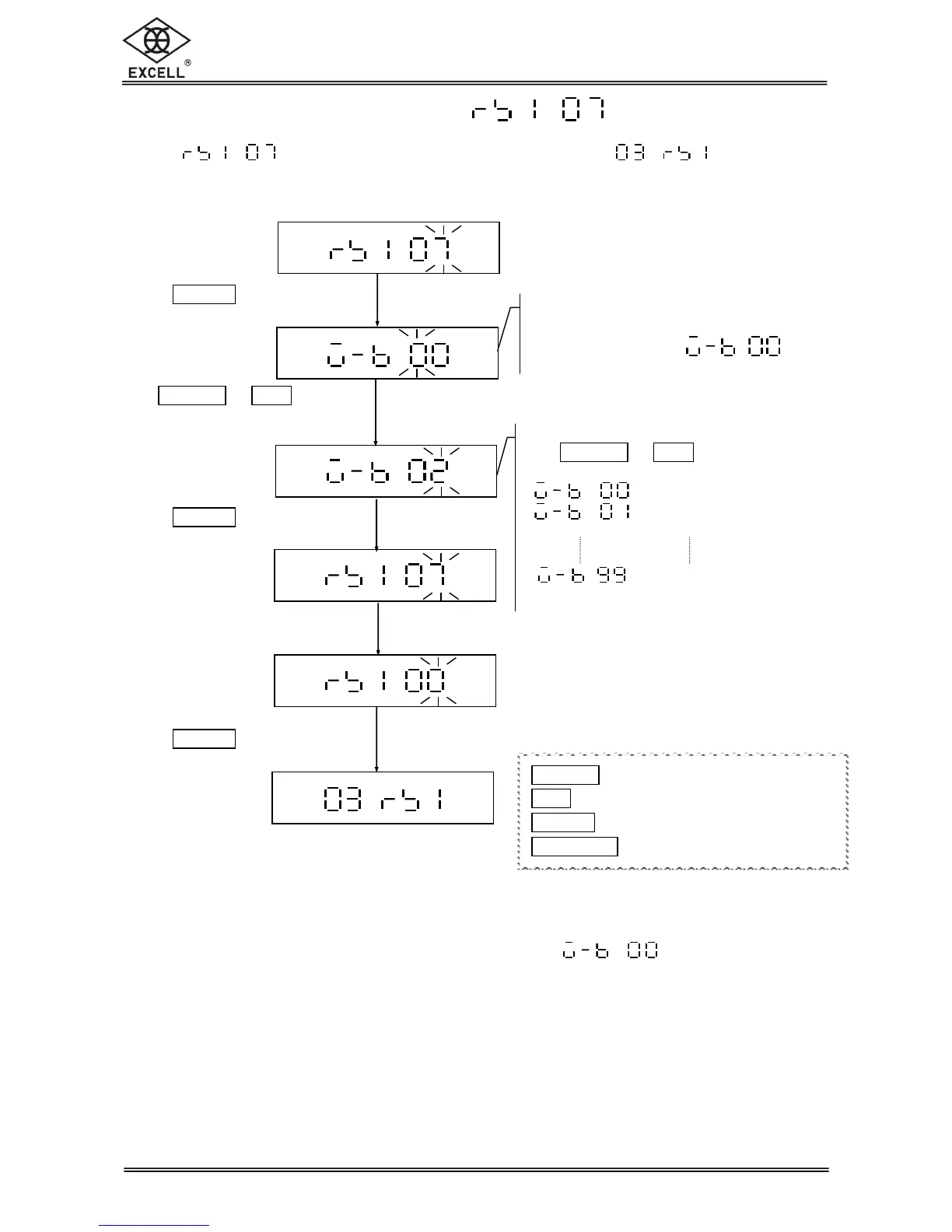
Select in the RS232 serial interface setting mode to Reset Auto
Transmission.
When the value of “Auto transmission at zero” set as
, the “Auto
transmission at zero” function is not available. Because when the scale is at zero and
keeping stable, the data are keeping transmitted, and that would be the same as
“Continuous Transmission”.
Resetting auto transmission
Use
ON|ZERO
or
UNIT
key to key in the
desired parameters:
= 00 division of weight value
= 01 division of weight value
= 99 divisions of weight value
Press
TARE
|
PT
key
Use
ON|ZERO
or
UNIT
key
to key in the desired
parameters
Press
TARE
|
PT
key
Key in the parameter “00”
Press
TARE
|
PT
key to exit
Resetting auto transmission
The LCD shows the last setting
Default setting:
ON|ZERO
key Upward key (0~9 digit entry)
1
UNIT
key Downward key (0~9 digit entry)
1
TARE
|
PT
key Move cursor rightward
1
NET
|
GROSS
key Move cursor leftward


 To Next Page