2842
28
Key Telephone
You can input the system password on the keyboard, the password default
setting is ”0000” .After you input the first digit of password
,
”*” is displaying,
prompt you to input the second digit of password
,
analogy in turn. If your
input password is wrong, you will hear warning voice ”DI,DI,DI”, prompt
you to input the password again.
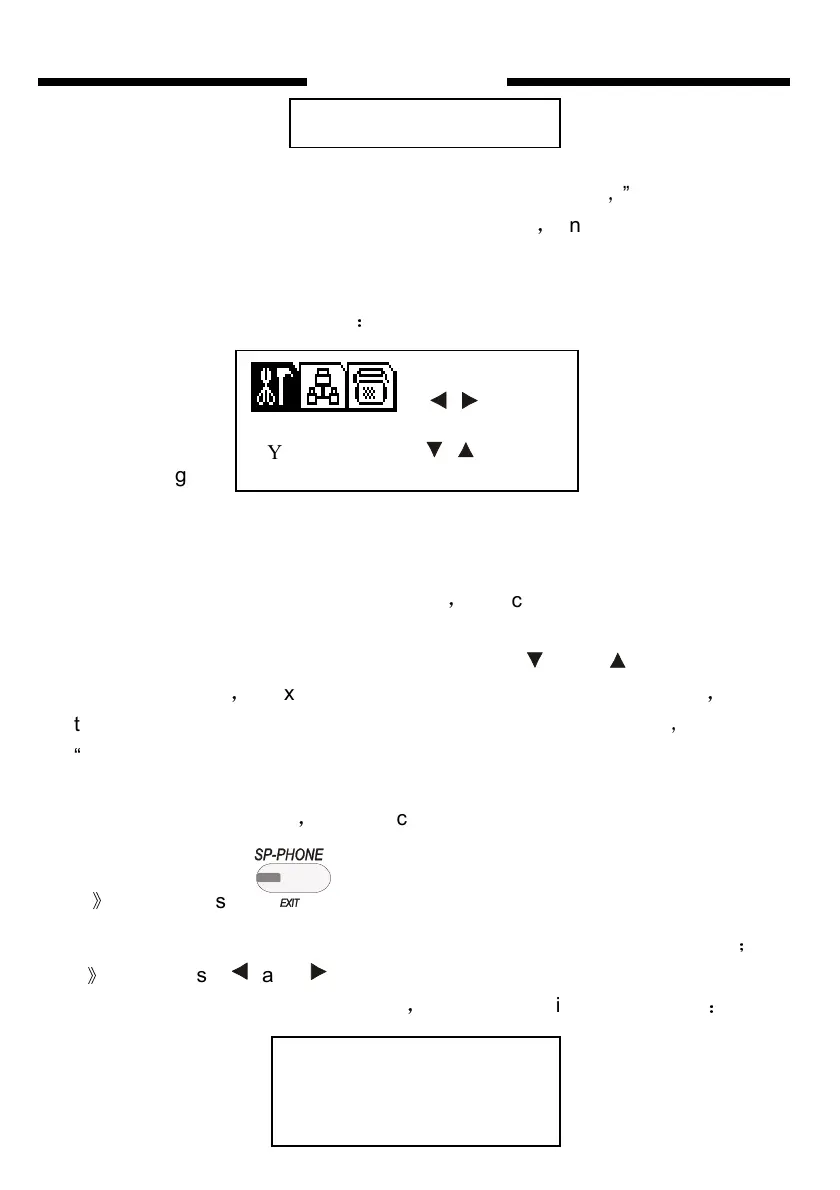
the LCD will display as follows
:
Fig6.1
Meanwhile, the cursor is on the system parameter setting icon, you can
choose one sort of parameter which need to be adjusted, there are three
sorts, “SYS.PARA”(system parameter), “EXT.PARA.”(extension parameter)
and “CO. PARA.”(CO. line parameter)
,
the cursor will move with your
choice.
After you choose the right sort, you can press and to enter each
option of the sort
,
for example, if your choice is “EXT. PARA.” setting
,
press
the two keys you can enter options of extension parameter
,
such as
“DIAL OUT MODE” “A GRU RESTRIC” (setting restriction Group A)… and
“NIGHT ACCESS CO.” (Assign EXT. Outgoing to Certain CO. Line or to
Clear in night mode)etc.
,
can recycle to choose. Meanwhile:
1
》
If you press once, you will come back to sort optional
menu(see Fig6.1). If press twice will come back to NORMAL IDLE state
;
2
》
If you press and will go into the selection setting. For example,
you want to set “ DIAL OUT MODE”
,
the LCD will display as follows
:
PASSWORD
S E L
S Y S. P A R A. E N T
DIAL OUT MODE
001 DE-DIRECT


 To Next Page