19
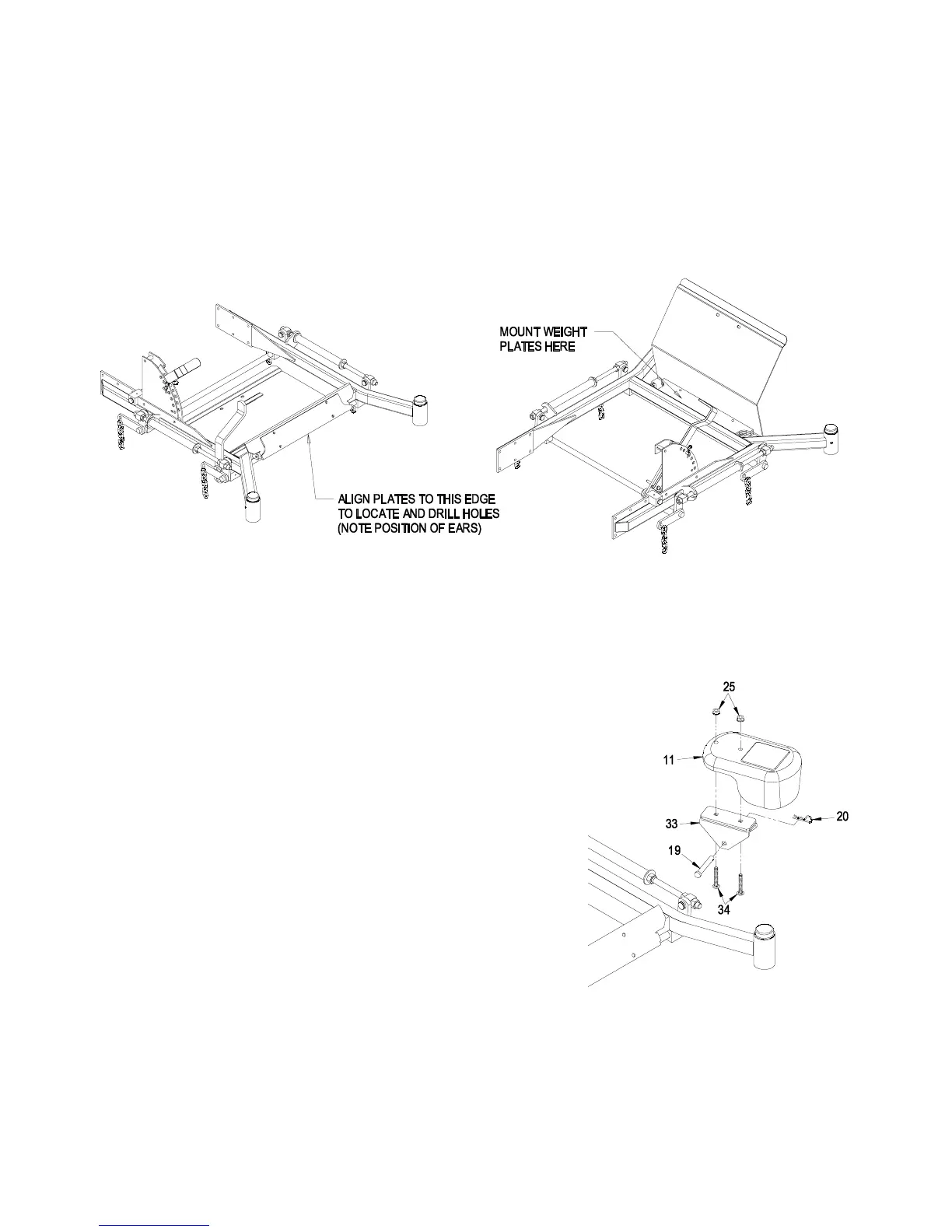
2. Locate the position of the mounting holes by clamping a weight plate to the front of the
floor pan (See Figure 7). The ears on the weight plate should be towards the bottom
(upside down from the actual mounted position). Align the bottom edge of the weight plate
with the bottom edge of the floor pan front panel. Center the weight plate side to side.
Mark the position of all four holes using a center punch.
3. Drill 3/8 inch holes at the points marked.
4. Open the floor pan and install the four weight plates behind the front panel using the 5/16-
18 x 1.50 screws, 5/16 washers and 5/16-18 whizlock nuts (Items 36, 37, and 38). The
weight plates will only fit with the ears located near the bend in the floor pan. The decal on
the floor pan will still be visible with the weight plates mounted.
FIGURE 7
FLOORPAN WEIGHT INSTALLATION
4.6 INSTALL THE REMOVABLE WEIGHTS
Note: The removable weights are heavy. Use
care when lifting them. Make sure that you can
hold them securely before lifting them. Use
caution when positioning your hands so that
you do not set them down on your hands or
fingers.
1. Assemble the weight brackets (Item 33) to the
removable weights (Item 11) using the 3/8-16
carriage bolts (Item 34) and 3/8 whizlock nuts (Item
25).
2. Install the removable weight assemblies over the
caster arms. On 60 and 52 inch machines one
weight has a wide mounting bracket and one has a
narrow bracket. They will only fit the machine one
way. Weights for the 72 are interchangeable left
and right.
3. Install a clevis pin (Item 19) and hairpin (Item 20)
on each caster weight to retain them.
FIGURE 8
REMOVABLE WEGHT
INSTALLATION




 To Next Page