26
English EX-61001
© Copyright 2023 by EXSYS Vertriebs GmbH. All rights reserved
7. Server Settings
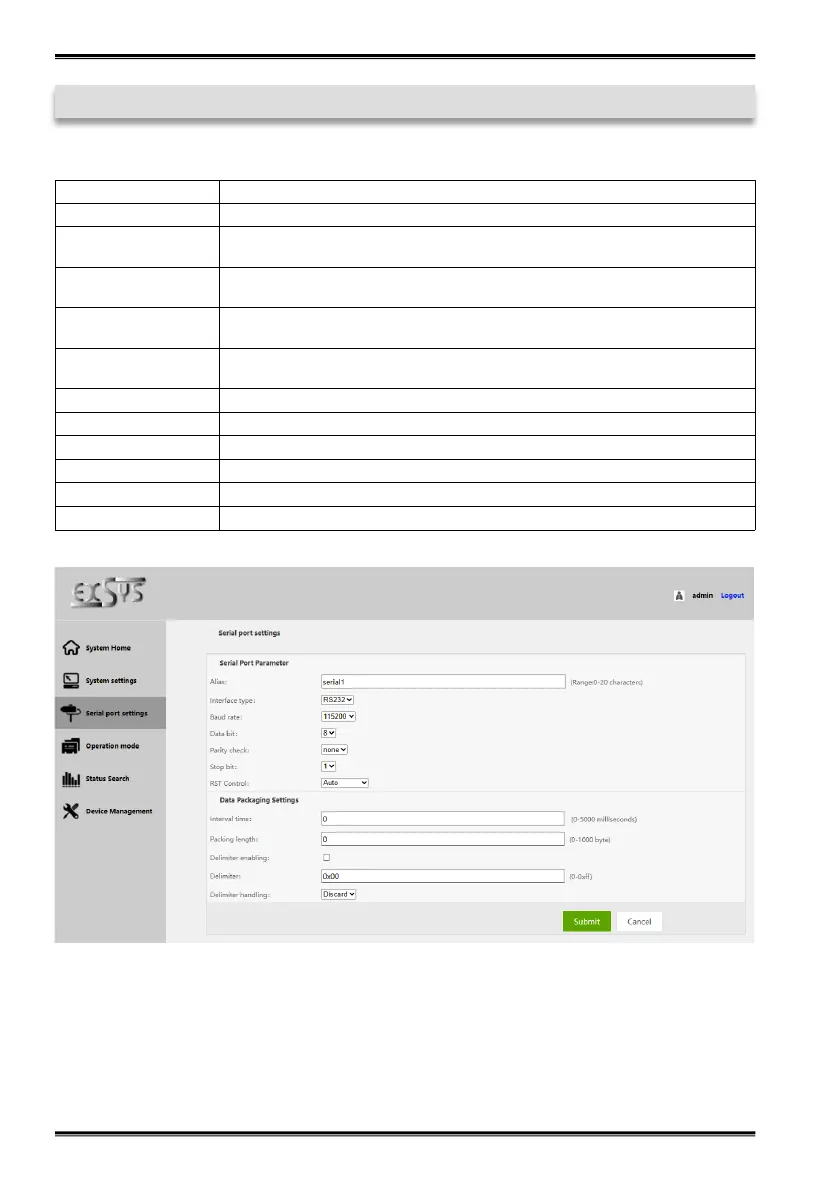
3. Serial Port Settings
Alias Set the serial port alias
Interface type Interface type (RS232/485/422)
Baud rate Serial port baud rate (the value should be the same as the baud rate of the device
connected)
Data bit Data bits (the value should be the same as the baud rate of the device connected),
default is 8
Parity check Check bits (none, even, odd), (the value should be the same as the baud rate of
the device connected), default is none
Stop bit Stop bit (the value should be the same as the baud rate of the device connected),
default is 8
RST Control Auto, XON/XOFF, CTS/RTS can be selected
Interval time Data packing interval (if required, default is 0)
Packing length Length of data pack (if required, default is 0)
Delimiter enabling Enable packet separation by delimiter if required
Delimiter Set the encoding of the delimiter for the transmitted data (0-0xff)
Delimiter handling Chose to keep und discard


 To Next Page