E045S 11 532373 - Rev.A
Translation of the original instructions
ENGLISH
MAINS POWER SUPPLY
F
Carry out the following operations with the power
supply disconnected.
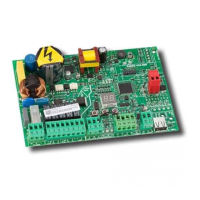
F+/R1 -/R2
RADIO
2EASY
CONNECTIVITY
USB-A
MAIN
PE
N
L
230 V~
9 10 11 20 21
LAMP
M1 M2
M M
1PE N L 2 3 4 5 6 7 8
COM
OP
CL
COM
OP
CL
C C
230 V~
60 W max
24 V
"
3 W max
115V-F10A
230V-F5A
T0.8A
15 16 17 18
OP-A
OP-B
STOP
+24V
+24V
W.L.
LOCK
Connect the Phase (L) and Neutral (N) to the 230 V~
power supply.
The board has a F5 A fuse on the Phase.
Connect the earth of the electrical system to terminal
PE.
6. START-UP
RISKS
PERSONAL PROTECTIVE EQUIPMENT
Carry out the following operations (refer to the specific
sections).
1. Turn power on to the board.
2. Check that the status of the LEDs is correct.
3. Configure the number of motors (Basic program-
ming,
Mn).
4. Enable the encoders, if present (Basic program-
ming,
En).
5. Check the leaf movement (Basic programming,
M2, M1).
6. Carry out the SETUP procedure that includes the
registration of BUS 2easy that are connected (Basic
programming,
tL).
7. Memorise the radio controls, if used.
8. Complete the required programming.
9. Carry out the final checks to make sure that the
automation system is working correctly with all
the devices installed.
6.1 TURN POWER ON TO THE BOARD
Turn on the mains power supply; the 5 V and 24 V LEDs
come on and the following appears on the display:
bo, then the FW version (e.g. 4.0), then S0 (SETUP
required).
If the SETUP has already been carried out
bo, appears
on the display and then the automation status (e.g.
00)
For LED and display signals see § Diagnostics.


 To Next Page