Fancom 747 4. Operation
6
4.2 Display (A)
The front of the 747 has an illuminated display consisting of 4 lines, each
with 20 characters. The display shows the most recent weight measured
by the computer, or the setting to be changed. A letter (or a figure) will
always flash in the display to indicate where the setting can be changed.
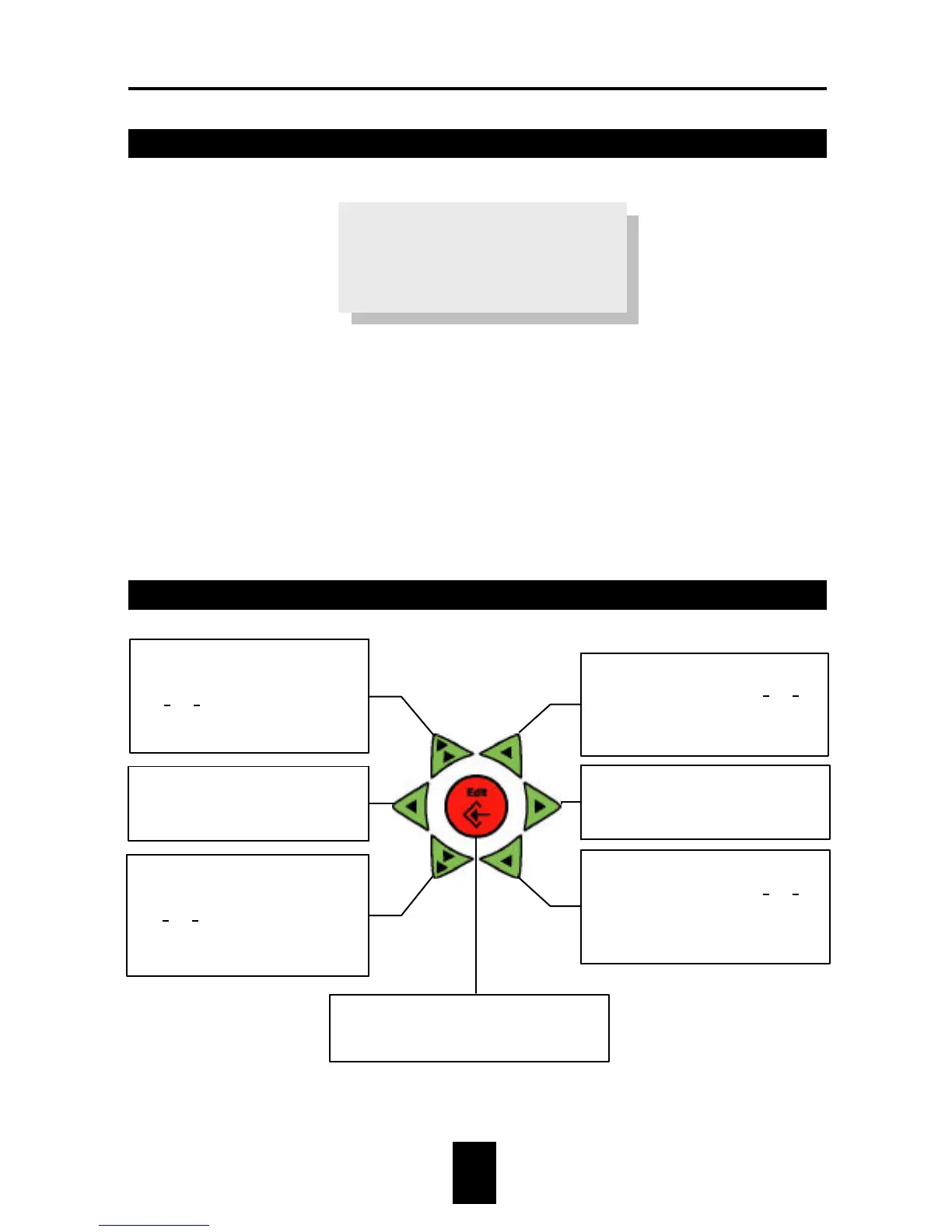
4.3 Keyboard (B)
Expected weight
1567 1583 1571
0 0 0
♦ During changes increase value of
flashing position by 1 (25à26).
♦ During text changes select the
next character from the group.
♦ During changes cursor to the
right.
♦ Open menu.
♦ During changes decrease value of
flashing position by 1 (25à24).
♦ During text changes select the
previous character from the
group.
♦ During changes increase value
in front of the flashing position
(25à35).
♦ During text changes select the
next group of characters.
♦ During changes cursor to the
left.
♦ Return to previous menu.
♦ During changes decrease value
in front of the flashing position
(25à15).
♦ During text changes select the
previous group of characters.


 To Next Page