Fanvil Technology Co., Ltd
HQ Add: Level 3, Block A, Gaoxinqi Building, Anhua Industrial Park, Qianjin 1 Road, 35th District, Bao'An, Shenzhen, 518101 P.R. China
Tel: +86-755-2640-2199 Fax: +86-755-2640-2618 Email: sales@fanvil.com support@fanvil.com Beijing Tel:+86-10-5753-6809
Suzhou Tel: +86-512-6592-0605 SEA Tel: +60-3-512-21997
7.5 Menu Settings
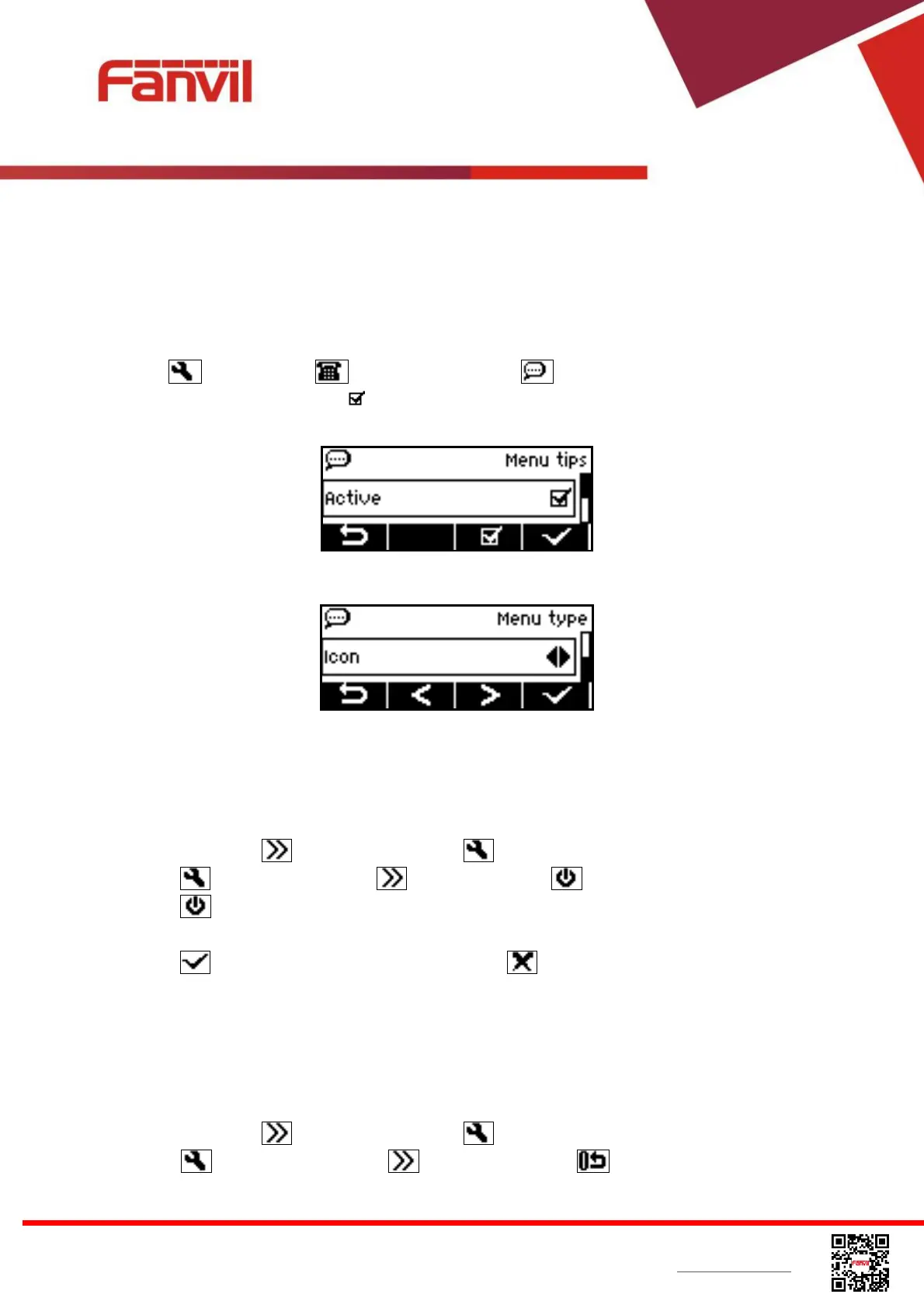
„Menu Settings‟ is a feature added since v1.3.346 which has two items, menu tips and menu type.
Menu tips is defaulted enabled. When „Menu Tips‟ enabled, user may get a prompt message for
some of the soft-buttons user pressed. This is to help user to understand and learn the graphical
user interface. If user has been familiar with the icons, user can disabled „Menu Tips‟ feature by
entering [Settings] -> [Phone Settings] -> [Menu Settings] menu and then
deactivate the menu tips by press . Menu type is defaulted to icon. To select the soft-menu to icon
or text, switch with [Left/Right] arrow buttons.
Figure 75 – Active /Inactive menu tips
Figure 76 – Select menu type
7.6 Reboot the Device
When the device is in the default standby mode,
Press soft-button [More] till you find the [Settings] button.
Press [Settings] button and [More] till you find [Reboot] button.
Press [Reboot] button, a warning message “System will be rebooted!” will be prompt to
user.
Press [OK] to execute the reset command, or [Cancel] to exit.
7.7 Reset to Factory Default
When the device is in the default standby mode,
Press soft-button [More] till you find the [Settings] button.
Press [Settings] button and [More] till you find [Reset to Factory Default]


 To Next Page