Need help?
Do you have a question about the Fanvil X301 and is the answer not in the manual?
Instructions on how to place an active call on hold and retrieve it.
Details on performing attended and blind call transfers.
Steps to configure call forwarding for incoming calls.
Guide to setting up and managing conference calls with multiple parties.
How to assign shortcuts to the phone's programmable keys.
Instructions for enabling and configuring the Do Not Disturb feature.
Steps to access the voice mailbox and listen to messages.
How to view and dial entries from the local call logs.
Guide to accessing and adding contacts to the phonebook.
Instructions for installing the phone on a desk or wall.
Details on configuring the phone via LCD menu or web interface.
How to select the desired language for the phone's interface.
Instructions for initiating calls using different methods like pre-dialing or handsfree.
Methods for answering calls using the handset, headset, or speakerphone.
How to redial the last called number.
Instructions for muting and un-muting the microphone during a call.
This document provides a comprehensive guide for the Fanvil X301/X301P/X301G IP Phone, covering its installation, basic operations, and advanced features.
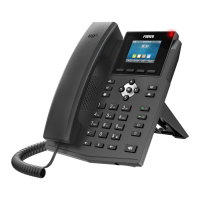
The Fanvil X301/X301P/X301G is a desktop IP phone designed for efficient communication. The packaging includes the IP Phone unit, handset, handset cord, Ethernet cable, stand, power adapter (optional), and a quick installation guide. For wall-mounted installations, a wall mount stand can be purchased separately.
To install the device, first, connect the handset to the phone using the handset cord. Next, connect the Ethernet cable to the LAN port on the phone and to your network or PC. If a power adapter is used, connect it to the power port. Finally, attach the stand to the phone for desktop use, or use the wall mount stand for wall installation. The height of the wall-mounted bracket should be less than 2 meters from the ground.
The phone offers a range of features for managing calls effectively.
The Fanvil X301/X301P/X301G offers several advanced features to enhance communication.
The phone's screen displays various icons indicating its status and active features:
The phone features several soft keys and navigation keys:
The phone can be configured via its LCD menu or a web interface.
The device complies with Part 15 of FCC Rules, ensuring it does not cause harmful interference and accepts any interference received. It has been tested and found to comply with Class B digital device limits. Any changes or modifications not expressly approved by the responsible party could void the user's authority to operate the equipment. The equipment also complies with Part 68 of the FCC rules and ACTA requirements. A product identifier (US: 311IPNANX303G) is located on the bottom of the equipment and must be provided to the telephone company if requested.
 General
| HD Audio | Yes |
|---|---|
| PoE | Yes |
| Handset | Yes |
| Speakerphone | Yes |
| Local Phonebook | 1000 entries |
| Call log | Yes |
| SIP Lines | 2 |
| Audio Codecs | G.711, G.722, G.729, iLBC |
| Network Interfaces | Dual 10/100M Ethernet ports |
| Supported Protocols | SIP, TCP, UDP, HTTP, HTTPS, DHCP, TFTP, NTP |
| Power Supply | PoE |
| Operating Temperature | 0°C to 40°C |
| Humidity | 10% to 90% (non-condensing) |
| Headset Port | Yes |


 To Next Page