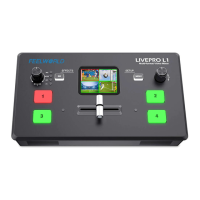
5.2.3 Mode
MAIN
Click【MAIN】to select signal source for main picture, red is the signal for PGM, green is the
signal for PST
PIP
Click【PIP】can set for picture in picture
Click to choose the signal of main picture and sub picture
Click icon can choose the PIP mode
Click icon can exchange main picture and sub picture


 To Next Page