- 19 -
[5] Follow speed
Users can select dierent gimbal follow speed proles, or customize follow
speed.
[6] Follow mode
Select gimbal follow mode.
PF: Pan follow, only the pan axis follows the movement of user's
hand.
PTF: Pan and tilt follow, where both the pan and tilt axes follow the
movement of user's hand, but roll axis does not.
FPV: Pan, tilt and roll follow, where all 3 axes follow the movement of
user's hand.
Lock: All 3 axes do not follow the movement of user's hand, gimbal
keeps the direction of the camera xed.
FFW: Flash follow, where all 3 axes follow the movement of user's
hand in high follow speed.
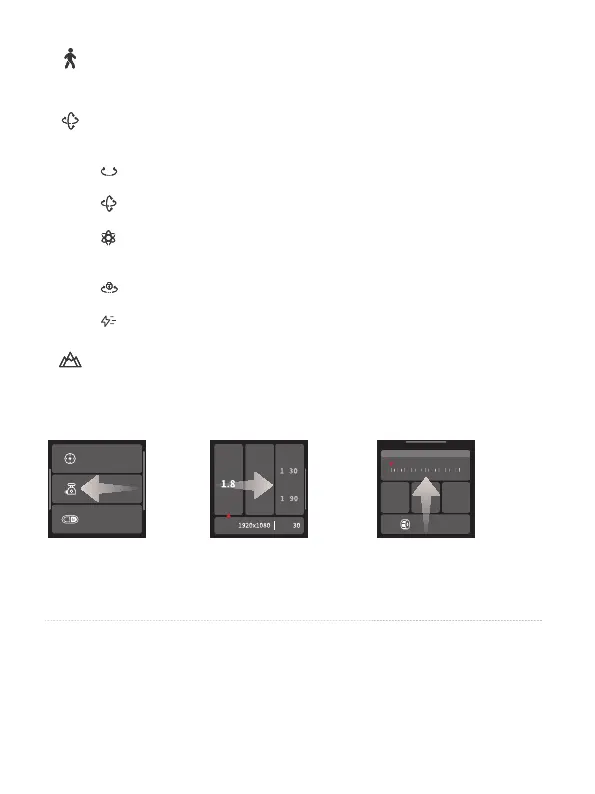
[7] Scenario
Select gimbal usage scenario (timlapse, auto rotation, panorama, portrait
mode, sele mode, track video, etc.)
Joystick settings
Gimbal settings
A/B settings
A
ISO
F Shutter
DPI FPS
Knob settings
Pan Tilt Roll
Focus motor
A B
Swipe from right to
left
Joystick, gimbal and
more settings
Swipe from left to
right
Shooting parameters
settings
Swipe up
Multifunction knob
settings
- Return to previous menu: Swipe to right















 To Next Page