- 24 -
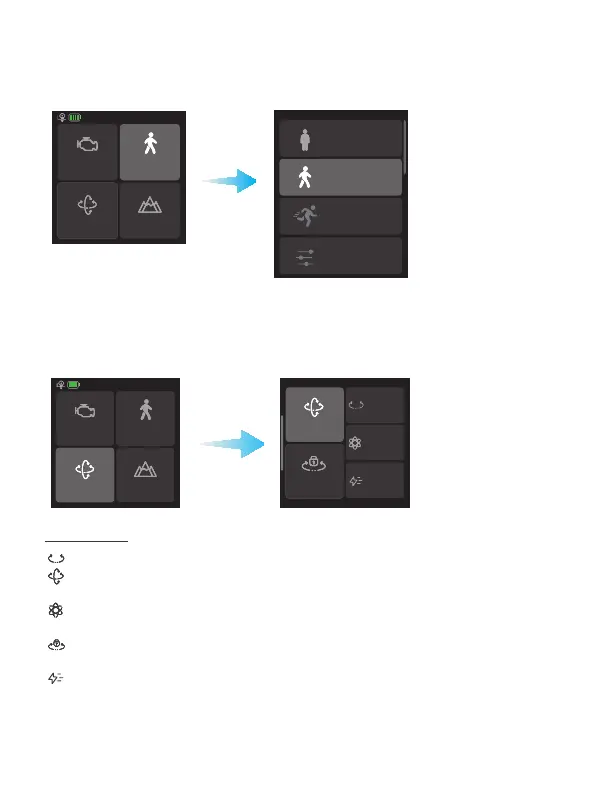
8.3.2 Follow speed settings
Tap "Follow speed" in home page, and select dierent preset gimbal follow speed
proles: Slow/Med/Fast, or custom follow speed and dead zone.
Motor power
PTF
Follow speed
Scenario
Slow
Med
Fast
Custom
8.3.3 Follow mode settings
Tap the lower left icon in home page to select follow modes.
Motor power
PTF
Follow speed
Scenario
PTF
Lock
PF
FPV
FFW
Follow mode
PF: Pan follow, only the pan axis follows the movement of user's hand.
PTF: Pan and tilt follow, where both the pan and tilt axes follow the movement
of user's hand, but roll axis does not.
FPV: Pan, tilt and roll follow, where all 3 axes follow the movement of user's
hand.
Lock: All 3 axes do not follow the movement of user's hand, gimbal keeps the
direction of the camera xed.
FFW: Flash follow, where all 3 axes follow the movement of user's hand in high
follow speed.














 To Next Page