17
www.feiyu-tech.cn
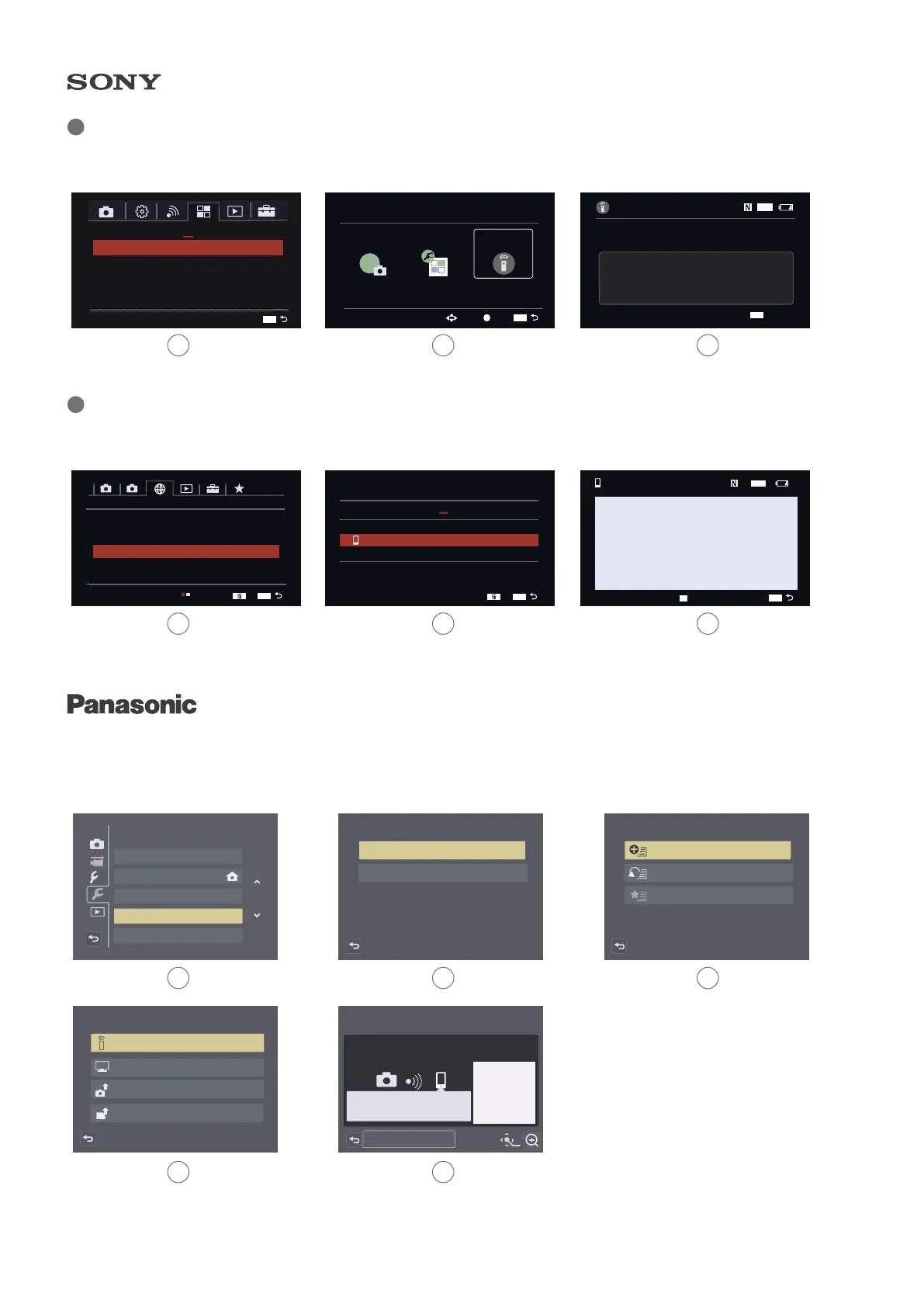
Please set on your smartphone
Please scan the QR code using "Image App",
or enter the password into Wi-Fi settings
SSID:GH4-35E9A7MJT
Password: afcc2de35e9a7
QR Cord
DISP.Change method
c
Setup
Clock Set
World Time
Travel Date
Wi-Fi
Beep
1/6
Wi-Fi
Wi-Fi Fuction
Wi-Fi Setup
Select a function
Playback on TV
Send Images While Recording
Send Images Stored in the Camera
Remote Shooting & View
Wi-Fi
New Connection
Select a destination from History
Select a destination from Favorite
Connection Information
Wi-Fi
Operate smartphone to connect to
this device via Wi-Fi.
SSID:XXXXXX-XXXX:ILCE-6400
Password: 12345678
Device Name: ILCE-6400
Connect via QR Code
MENU
Application List
Introduction
1
MENU
Application
Application
Management
Select
Enter
Smart Remote
Embedded
PlayMemories
Camera Apps
MENU
Smart Remote Embedded
Wi-Fi
Operate smartphone to connect to
this divice via Wi-Fi
SSID: XXXXXX-XXXX:XXXX-XXXX
Password: 12345678
Device Name: ILCE-XXXX
Exit App.
MENU
1 2
Network1 1/2 .
Send to Smartphone Fun
Send to Computer
View on TV
Airplane Mode
Wi-Fi Settings
Off
Ctrl w/ Smartphone
?
MENU
Ctrl w/ Smartphone
Ctrl w/ Smartphone
Always be connected
On
On
Connection
?
1
MENU
Gain Wi-Fi name and password at "smart remote embedded" in the Application list.
Camera :SONY a6300,A7S II, A7 etc.
1 2 3
1 2 3
1 2
4 5
3
Tap MENU button, find "smart cellphone control" connecting with password.
Select "setup" under "Wi-Fi", find "Wi-Fi function" - "New/Connection" - "remote shooting
& view" obtain Wi-Fi name and password.
Latest Camera :Sony a6400,A7R III



 To Next Page