fender.com
6
Rumble® 15 / 30 / 75 Bass Amps
Rumble® 15 / 30 / 75 Bass Amps
Thanks for buying a Fender® Rumble™ series bass amplifier. Fender
bass amplification provides thick, natural and balanced tone that
sits fat in your live or studio mix. Rumble amps are designed by
bass players. Full-featured and easy to operate, the Rumble family
gives you high-quality bass tone and incredible value.
The Fender Precision Bass® Guitar was introduced in 1951, forever
changing music and giving birth to a new kind of musician—the
electric bassist. Since then music has never been the same. Your
new Rumble will provide years of enjoyment as you continue your
musical journey and make history!
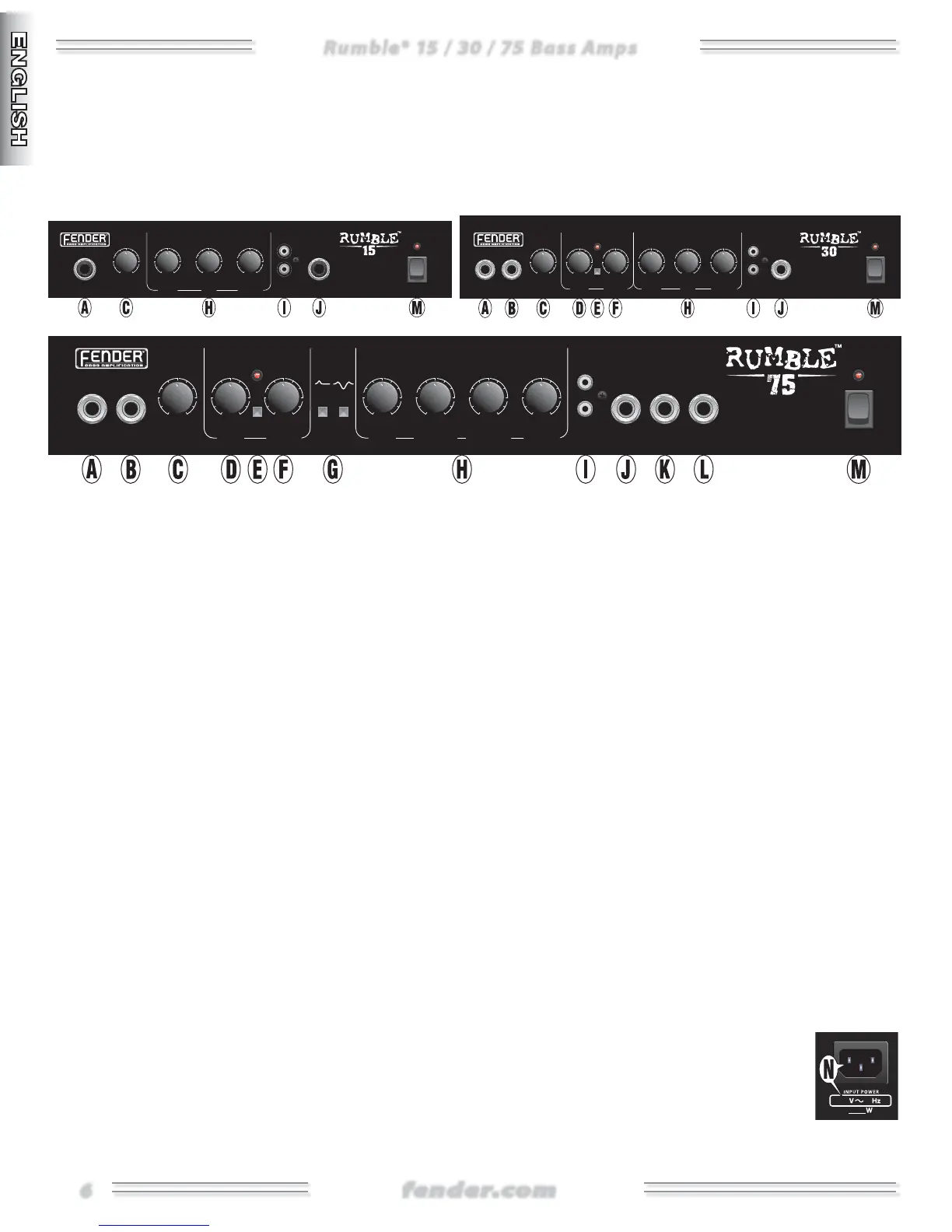
A. INPUT Plug your passive or active bass in here. If
your bass is too hot and causes distortion, try using
INPUT .
B. INPUT A lower sensitivity input (-dB) providing
more headroom to reduce distortion from high output
basses.
NOTE: Both INPUT and can be used simultaneously for
two instruments. In this situation, each input will have a
lower input sensitivity (-dB).
C. VOLUME Controls the loudness of the amplifier.
D. GAIN Controls the amount of OVERDRIVE distortion.
F. BLEND Controls the amount of distortion (set by
GAIN) to be blended with the clean bass signal. Lower
settings can maintain a cleaner tone, with some added
grit. Higher settings will produce more distorted tones
and add sustain.
E. ENABLE Press this button to turn the OVERDRIVE
on or off. The red LED (light) illuminates when the
OVERDRIVE is on.
G. SHAPE FILTERS:
• PUNCH Emphasizes tight punchy bass response,
useful for finger style playing or for enhancing the tonal
character of a bridge pickup.
• SCOOP Mid-frequency cut, combined with low-and-
high-frequency boosts that offer a fat pleasing tone,
useful for slap style playing, low-volume practice, or in
combination with OVERDRIVE.
H. EQUALIZATION Used to adjust overall tone and to
compensate for room acoustics. Remember, what sounds
harsh in one room may have just the right edge in
another room.
I. AUX IN Plug your CD player or mp player in here.
The amp controls do not affect this input. Adjust the
volume or tone of the aux signal at its source.
J. HEADPHONES
Plug your stereo headphones (
ohms minimum impedance) in here. Speaker output is
automatically disabled.
K. LINE OUT
Balanced output to connect to external
devices such as PA systems and recording consoles. Use
a balanced stereo cable (TRS→XLR or TRS→TRS) to reduce
noise and hum. Mono (unbalanced) cables can also be
used, but may be noisier. The level and tone of the LINE
OUT signal is affected by all pre-amp controls, including
Volume.
L. FOOTSWITCH Allows for remote switching of
OVERDRIVE. See the following page for details.
M. POWER Switches the amplifier ON/OFF as indicated
by the power light.
Rear Panel
N. IEC POWER CORD SOCKET Connect the included
power cord to a grounded A/C electrical
outlet in accordance with the voltage and
frequency ratings specified on the rear
panel of your amplifier.
12
INPUTS VOLUME
LINE
OUT
POWER
5
8
10
2
0
5
8
10
2
0
OVERDRIVE
SHAPE
75W BASS
AMPLIFIER
PUNCH SCOOP
ENABLE
AUX IN
FOOT
SWITCH
GAIN BLEND
50%
DRIVE
CLEAN
EQUALIZATION
BASS
0
+15
-15
TREBLE
0
+15
-15
LOW MID
0
+15
-15
HIGH MID
0
+15
-15
HEAD
PHONES
AUX IN POWERBASS MID TREBLE
0
+15
-15
0
+15
-15
0
+15
-15
12
INPUTS VOLUME BLEND
5
8
10
2
0
5
8
10
2
0
ENABLE
30W BASS
AMPLIFIER
GAIN
50%
DRIVE
CLEAN
EQUALIZATIONOVERDRIVE
HEAD
PHONES
VOLUME BASS MID TREBLE AUX IN
5
8
10
2
0
0
+15
-15
0
+15
-15
0
+15
-15
INPUT POWER
EQUALIZATION
15W BASS
AMPLIFIER
HEAD
PHONES



 To Next Page