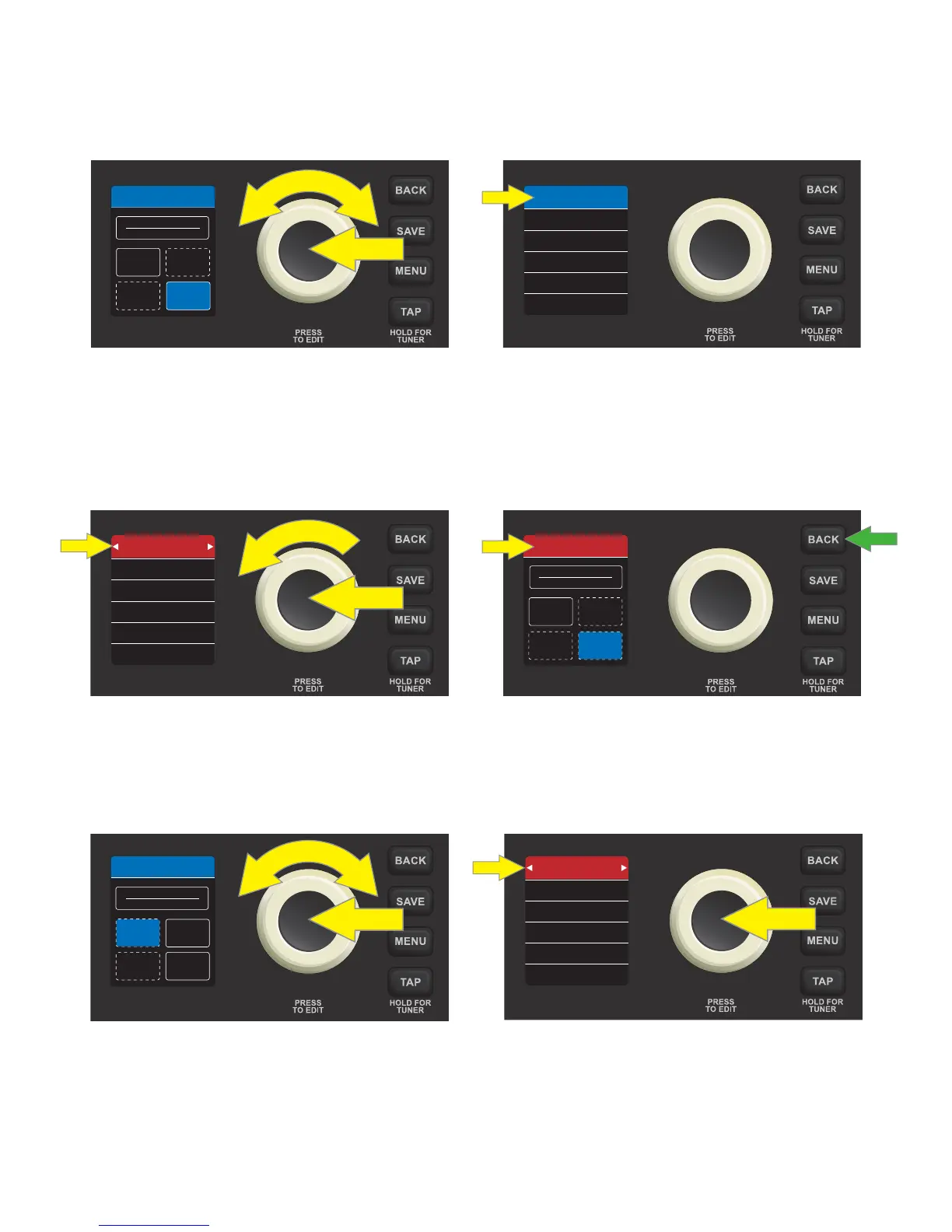
To delete an eect, the steps are very similar to those on page 10. As before, access the contents of a preset
by pressing the ENCODER on it, then use the ENCODER to scroll to an occupied eect category box. Press the
ENCODER again to see the eect contained in the eect category box; the name of the eect model is high-
lighted at the top of the DISPLAY WINDOW:
Press the ENCODER once more to activate the eect replacement function; the box surrounding the eect
name will turn from blue to red, and white arrows will bracket the eect name. Turn the ENCODER counter-
lockwise until the red-highlighted eect label at the top of the DISPLAY WINDOW reads “NONE”. Press the
ENCODER on “NONE” (or press the BACK utility button), after which the user is returned to the preset screen
with the previously occupied eect category box now empty:
To add an eect to an empty eect category box, rst access the contents of a preset by pressing the ENCOD-
ER on it, then use the ENCODER to scroll to the empty eect category box. Press the ENCODER again to access
the empty eect category box; the red-highlighted label “NONE” bracketed by white arrows will appear at the
top of the DISPLAY WINDOW:
Turn the ENCODER clockwise to scroll through eects models in that category. Press the ENCODER on the
desired eect, after which the box surrounding the eect name will return to blue and the eect is added—
although not yet saved—to that eect category box. Alternately, press the BACK utility button (green arrow)
to return to the preset contents screen (see illustrations on next page):
11
AMPLIFIER
EQ
MOD
ARENA BASS
STOMP
DELAY
29 AUDIO RA...
3.8
3.2
10.0
DECAY
LEVEL
TONE
HALL RVRB
NONE
29 AUDIO RA...
AMPLIFIER
EQ
MOD
ARENA BASS
STOMP
DELAY
STOMP
23 WAH ECHO
AMPLIFIER
EQ
MOD
DELAY
BIG RUMBLE
STOMP
NONE













 To Next Page