REPLACING, ADDING AND DELETING EFFECTS
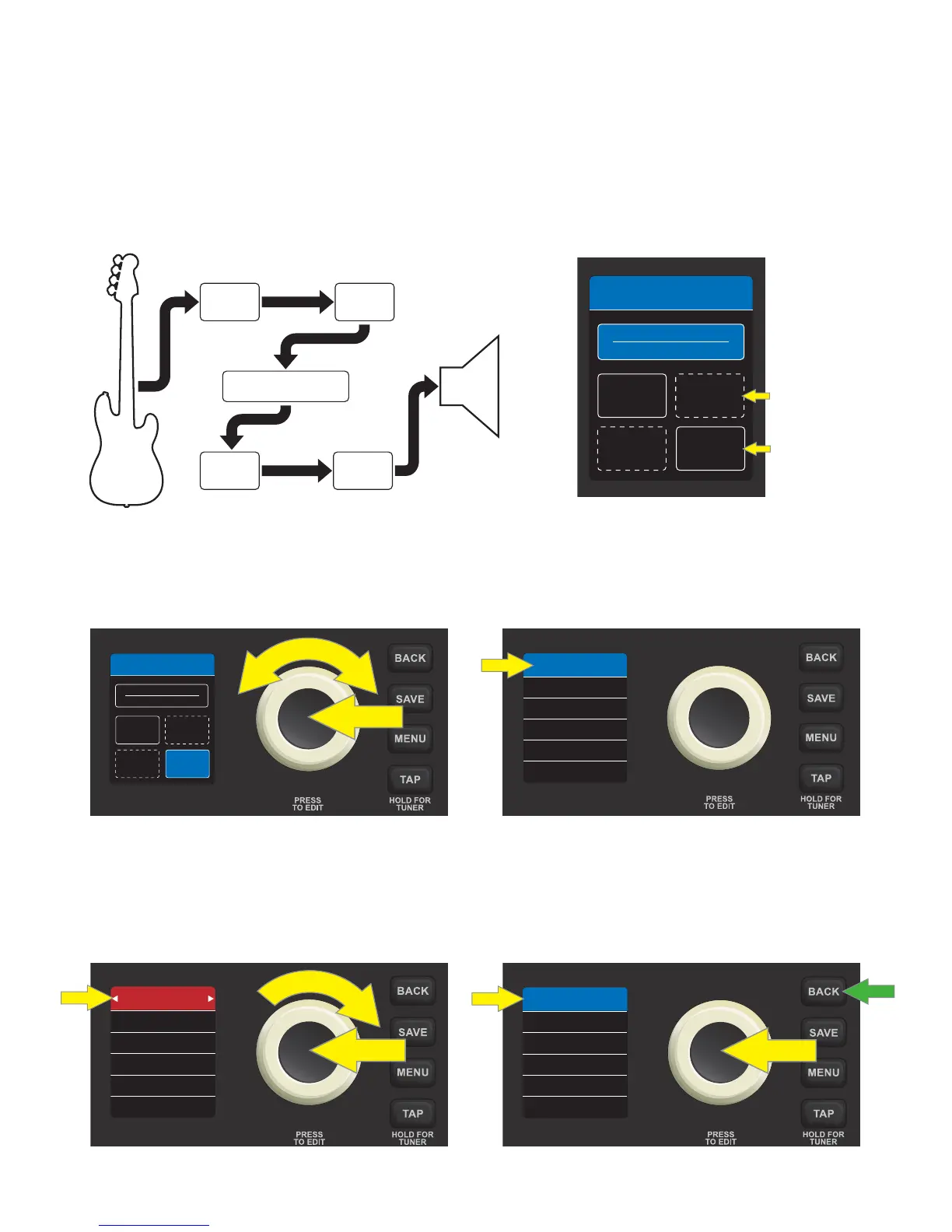
As noted, each of the four eect category boxes can contain one eect. If an eect is present, it can be re-
placed with another eect in that category, or it can be deleted. If no eect is present, one can be added (see
list of Rumble LT25 eect models on pages 13-14). The signal path is Instrument—Stompbox—Modulation—Am-
plier—EQ—Delay/Reverb—Speaker, as illustrated at left below.
Note that eects category boxes that already contain an eect have a solid outline, whereas eects category
boxes that do not contain an eect have a dotted outline, as seen in the image at right below:
To replace an eect, access the contents of a preset by pressing the ENCODER on it, then use the ENCODER
to scroll to one of the four eect category boxes. Press the ENCODER again to see the eect contained in the
eect category box; the name of the eect model is highlighted at the top of the DISPLAY WINDOW:
Press the ENCODER once more to activate the eect replacement function; the box surrounding the eect
name will turn from blue to red, and white arrows will bracket the eect name. Turn the ENCODER clockwise
to scroll through other eects models in that category. Press the ENCODER to accept a replacement eect
and exit edit mode; the surrounding box will return to blue. Alternately, press the BACK utility button (green
arrow) to accept the replacement eect and return to the preset contents screen:
10
AMPLIFIER
EQ
MOD
ARENA BASS
STOMP
DELAY
29 AUDIO RA...
DOTTED OUTLINE (NO
EFFECT PRESENT)
SOLID OUTLINE
(EFFECT PRESENT)
AMPLIFIER
EQ
MOD
ARENA BASS
STOMP
DELAY
29 AUDIO RA...
3.8
3.2
10.0
DECAY
LEVEL
TONE
HALL RVRB
5.5
400 MS
3.2
TIME
LEVEL
FEEDBACK
ECHO
5.5WOW
5.5
400 MS
3.2
TIME
LEVEL
FEEDBACK
ECHO
5.5WOW
BASS
AMPLIFIER
STOMP
EQ
MOD
DELAY/
REVERB
SPKR
Rumble LT25 signal path













 To Next Page