18
AUXILIARY INPUT AND HEADPHONE OUTPUT
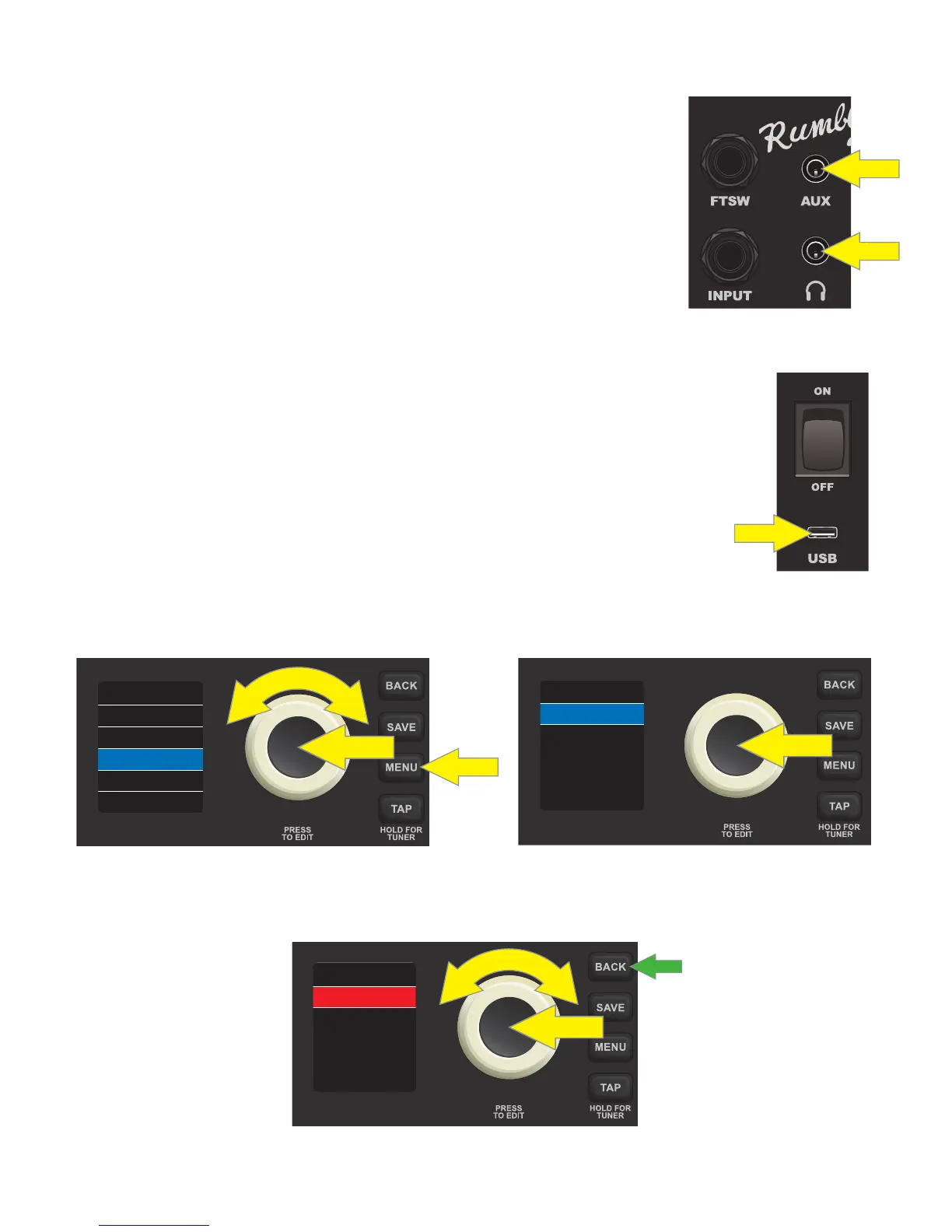
The Rumble LT25 control panel features two 1/8”-inch jacks: an auxiliary input
for connecting external mobile/audio devices and an output for convenient
headphone use.
Note that when using the auxiliary input, volume levels for external devices
are set using volume controls on the external devices themselves (the amp’s
volume controls are for overall volume level only and do not aect individual
volume of external devices connected to the auxiliary input jack). Also note
that when headphones are plugged in, speaker output is muted.
USB PORT
The Rumble LT25 control panel features a USB port for audio recording. Using a micro USB
cable (not included), connect a computer with recording software to this port. No external
driver is needed to connect to an Apple computer. To connect to a Windows-based com-
puter, the user must download the ASIO driver setup with Fender Mustang device, avail-
able at www.fender.com/support/articles/fender-universal-asio-drive.
Note that although the USB port and the auxiliary input can be used simultaneously, the
USB port cannot be used to record a signal from the auxiliary input.
When recording using the USB port, a gain control is located in the SETTINGS menu func-
tion (page 17). To access and use this gain control, press the MENU utility button and use the
ENCODER to scroll to and select SETTINGS; “USB GAIN” will automatically be highlighted. Press the ENCODER on
“USB GAIN” to select it; the surrounding box will turn from blue to red:
Turn the ENCODER to set a new “USB GAIN” value. Press the ENCODER to accept the new value; the surround-
ing box will return to blue (not shown). Alternately, press the BACK utility button (green arrow) to accept the
new value and return to the MENU function screen:
Note that the “USB GAIN” control in the SETTINGS menu function is the only one that aects USB recording;
the actual physical GAIN control knob on the control panel does not aect USB recording.
FOOTSWITCH
TUNER
RESTORE
SETTINGS
MENU
+6.0USB GAIN
VERSION
0.3.8
SETTINGS
+8.5USB GAIN
VERSION
0.3.8
SETTINGS













 To Next Page