MIDTYPE
COMPRESSOR
12
MIDTYPE
COMPRESSOR
IMPORTANT: If an eect is not saved once it has been replaced, deleted or added, the preset will revert to
its original eect model(s) when returning to the preset after leaving it, or when turning the amplier o
and back on again. To save a changed, deleted or added eect model, follow the SAVE, SAVE AS or REPLACE
instructions on pages 6 and 7.
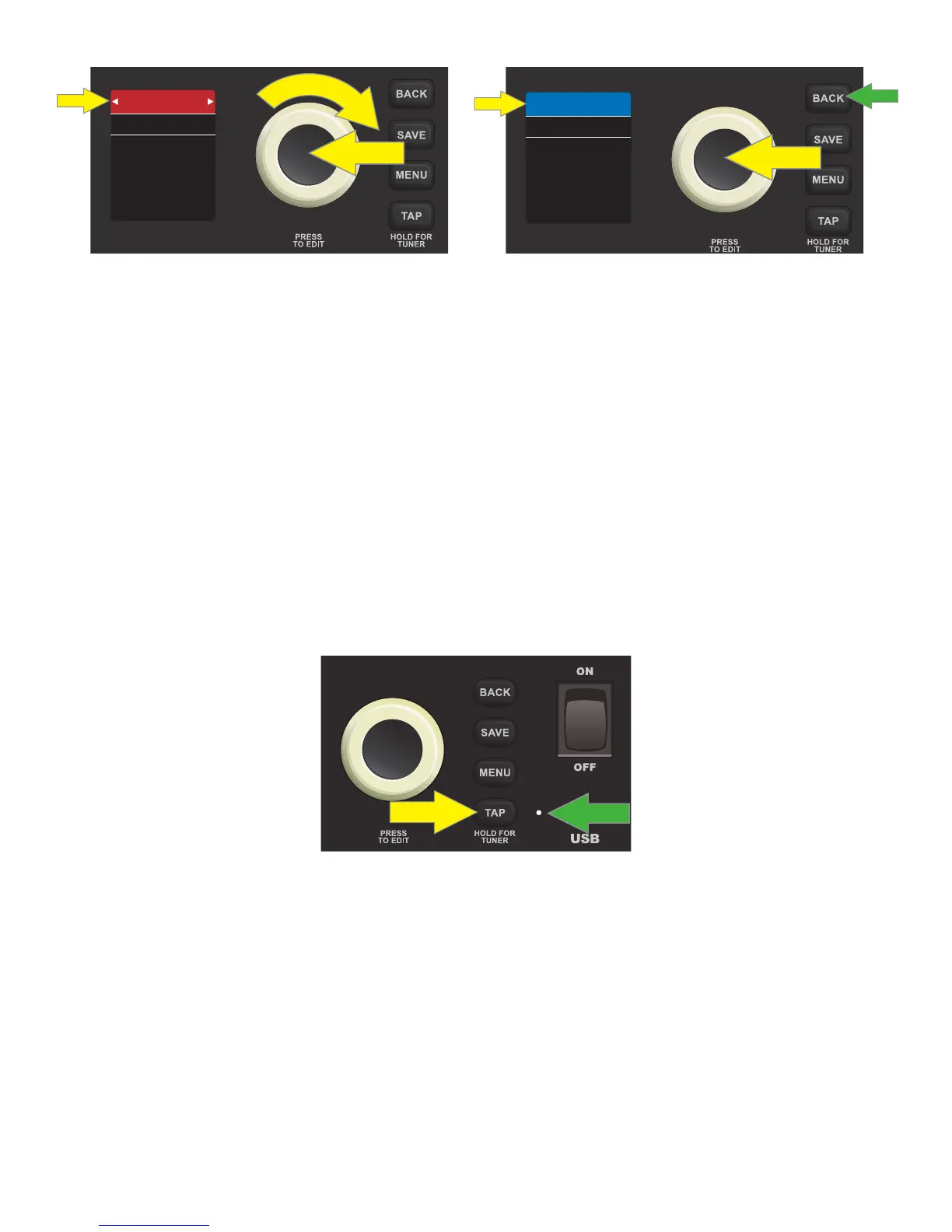
SETTING DELAY TIMES WITH THE TAP BUTTON
There are two ways to set delay times for eects in Rumble LT25’s “DELAY” eects category box. The rst way
is to use the “Editing and Saving Eects Control Settings” instructions found on page 9, using the ENCODER
to scroll to, select and adjust individual eect settings, including delay time.
The second way is to use Rumble LT25’s TAP utility button (yellow arrow). If a preset includes a delay eect, the
TAP LIGHT (green arrow) ashes in time with that eect’s default delay time. This time setting can be modied
by tapping the TAP utility button two or more times at the desired tempo, regardless of what screen is shown
in the DISPLAY WINDOW:
IMPORTANT: If an edited delay time is not saved, the eect will revert to its original delay time when return-
ing to the preset after leaving it, or when turning the amplier o and back on again. To save an edited delay
time, follow the SAVE, SAVE AS or REPLACE instructions on pages 6 and 7.













 To Next Page