MENU FUNCTION: TUNER
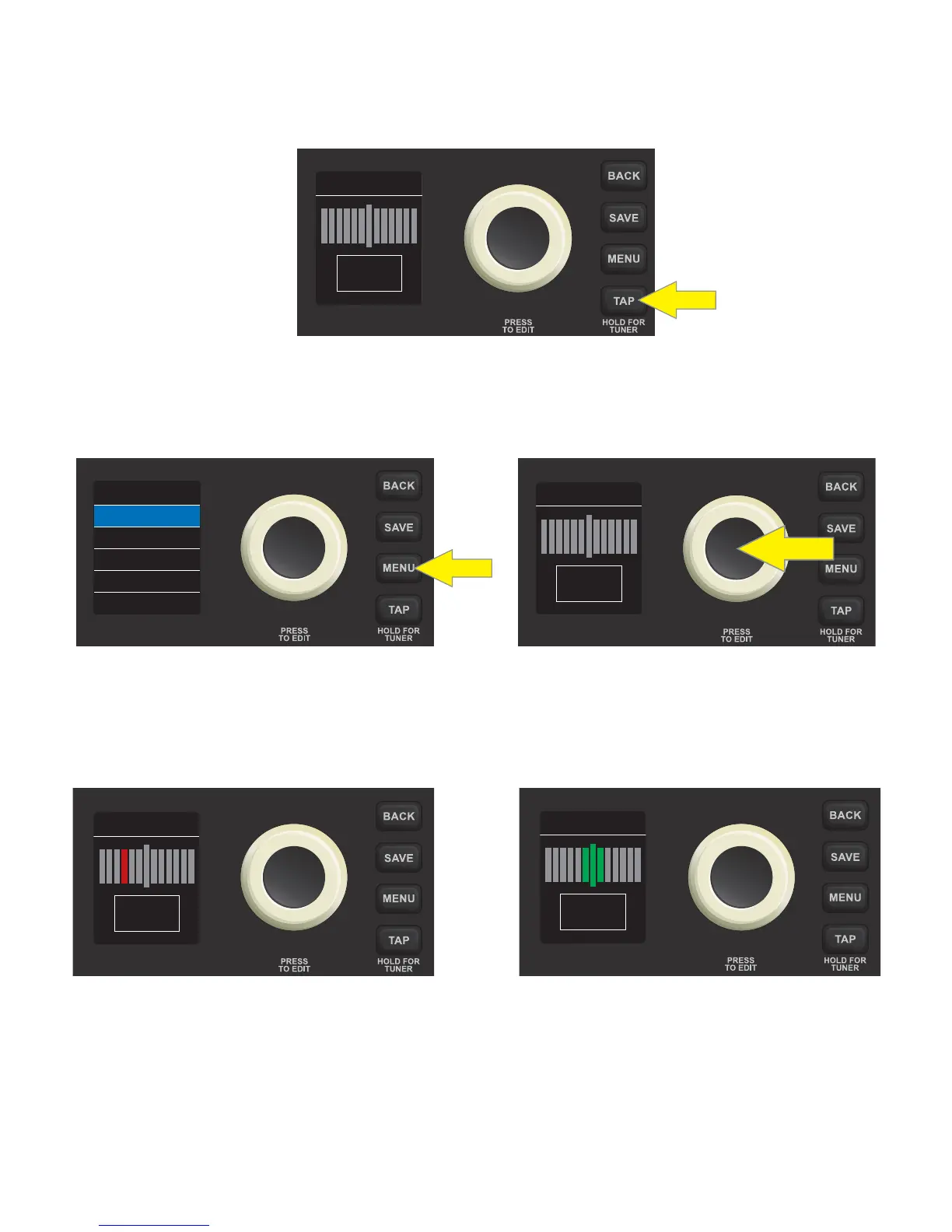
There are two ways to access Rumble LT25’s built-in chromatic tuner. The rst way is to press and hold the TAP
utility button on the control panel until the tuner screen appears in the DISPLAY WINDOW:
The second way is to press the MENU utility button on the control panel; the list of MENU functions will
appear in the DISPLAY WINDOW with the TUNER function automatically highlighted atop the list. Press the
ENCODER on TUNER to access the tuner screen:
To use the TUNER, sound a note; the letter name of the pitch will appear in the box at bottom and the shorter
vertical bars on either side of the longer vertical center bar will illuminate red to indicate varying degrees of
sharpness (to the right) or atness (to the left). When a pitch is precisely in tune, the longer vertical center bar
and the two shorter vertical bars on either side of it will illuminate green:
Note that speaker output is muted when tuning, and that the volume control on the instrument being tuned
must be turned up suciently to register a TUNER reading.
15
TUNER
FOOTSWITCH
TUNER
RESTORE
SETTINGS
MENU
TUNER
TUNER
A
TUNER
A
“A” PITCH SLIGHTLY FLAT “A” PITCH IN TUNE













 To Next Page