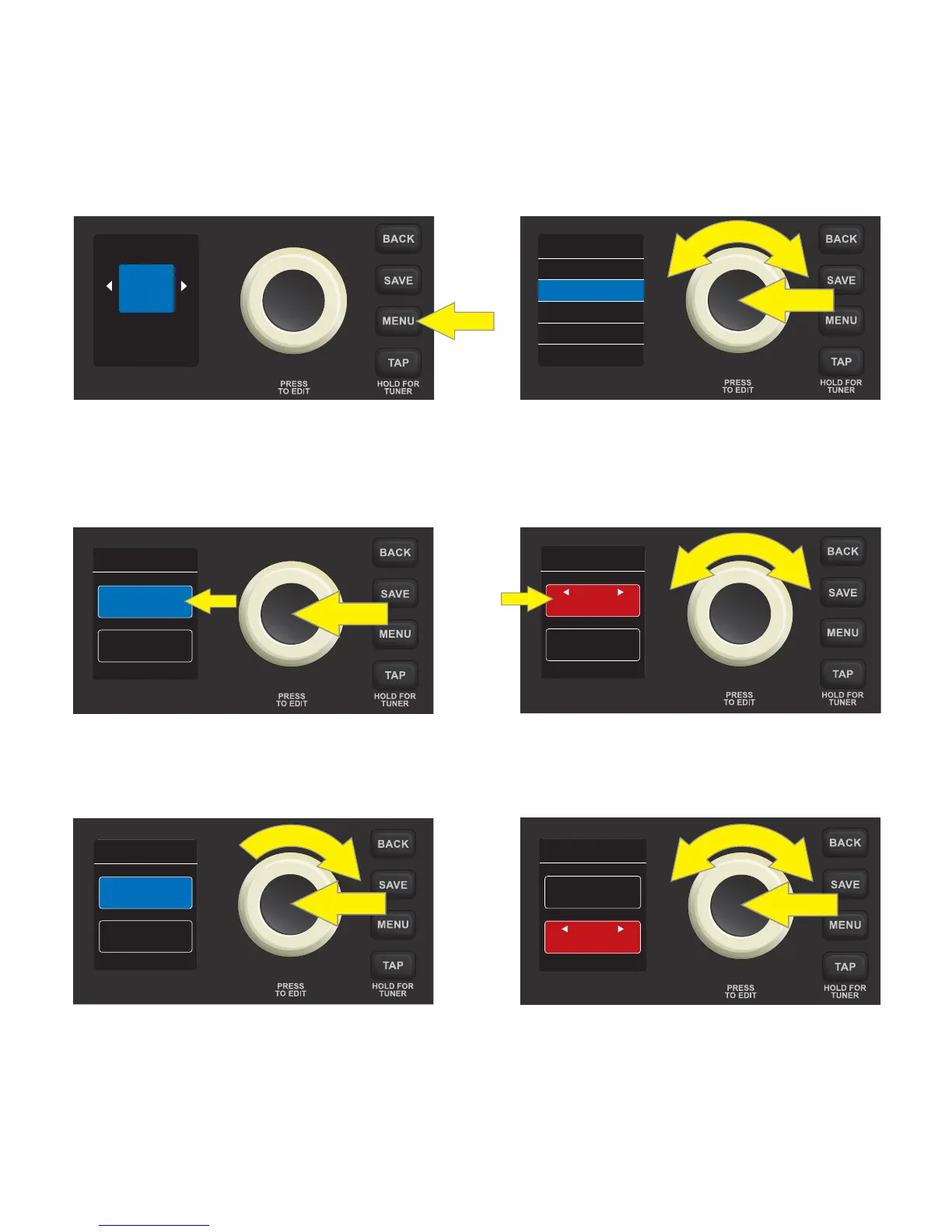
MENU FUNCTION: FOOTSWITCH
Connect an optional Fender single-button footswitch (PN 0994052000) by plugging it into the “FTSW” jack
on the control panel. The footswitch provides convenient hands-free switching between two pre-determined
“quick-access” presets. The second MENU function—FOOTSWITCH—enables easy conguration of any two
presets for quick-access footswitch use. To do this, press the MENU utility button, then use the ENCODER to
scroll to and select FOOTSWITCH:
Two presets will be shown in the DISPLAY WINDOW below the header “QUICK ACCESS”; the upper preset is au-
tomatically highlighted in blue. To choose a new preset for this upper quick-access position, press the ENCOD-
ER on it; the box surrounding the preset name will turn red. Use the ENCODER to scroll to a new preset for the
upper quick-access position:
Press the ENCODER to select the new upper quick-access preset; the box surrounding the preset name will
return to blue. To choose a new preset for the lower quick-access position, turn the ENCODER clockwise to
highlight the lower preset, then follow the same steps as above:
IMPORTANT: If quick-access footswitch presets are not saved, the quick-access preset slots will revert to
their original contents when returning to the preset after leaving it, or when turning the amplier o and
back on again. To save quick-access footswitch presets, follow the SAVE, SAVE AS or REPLACE instructions on
pages 6 and 7.
16
07
ORGAN
TONE
FOOTSWITCH
TUNER
RESTORE
SETTINGS
MENU
02
STUDIO SQUE
01
STUDIO CLEA
QUICK ACCESS
02
STUDIO SQUE
17
70S ROCK
QUICK ACCESS
02
STUDIO SQUE
17
70S ROCK
QUICK ACCESS
17
70S ROCK
QUICK ACCESS
03
RUMBLE













 To Next Page