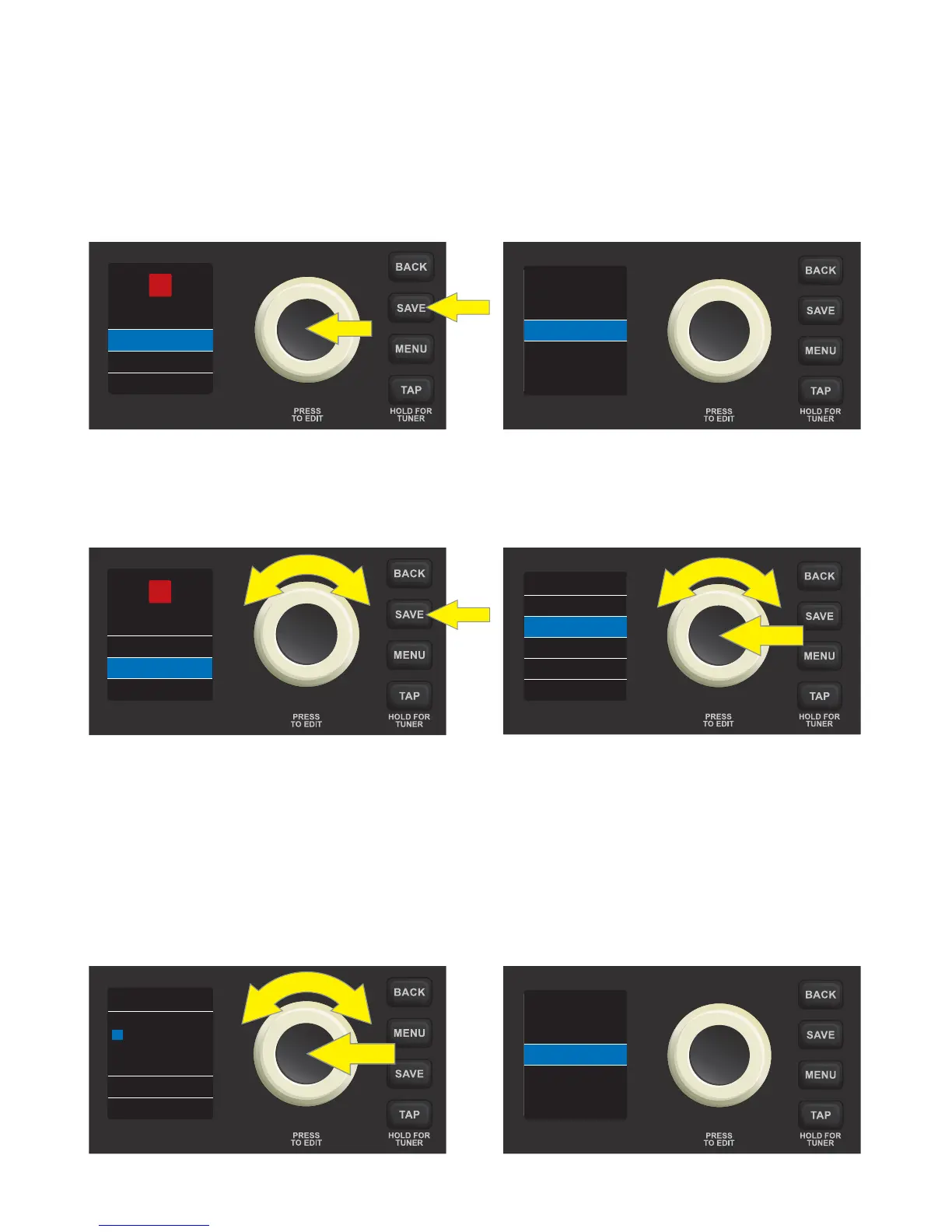
IMPORTANT: If edited amp control settings are not saved, the preset will revert to its original amp control
settings when returning to the preset after leaving it, or when turning the amplier o and back on again. To
save edited amp control settings, press the SAVE utility button and use the ENCODER to scroll to one of three
options—SAVE, SAVE AS or REPLACE. Each is detailed below.
SAVE: Keeps an edited preset in the same location with the same name. To do this, press the SAVE utility
button and use the ENCODER to scroll to “SAVE”. Press the SAVE utility button again or press the ENCODER. A
brief “PRESET SAVED!” screen will then ash before returning to the original preset screen:
SAVE AS: Enables saving an edited preset in a dierent position, with or without a dierent name. To do this, press
the SAVE utility button and use the ENCODER to scroll to “SAVE AS”. Press the ENCODER to access a “CHOOSE SLOT”
list of locations where the preset can be moved. Select a new location by turning and pressing the ENCODER:
NOTE: When using “SAVE AS”, note that a preset can be moved to a dierent position even if no edits have been made.
Also note that saving a preset to a dierent location permanently deletes the previous contents of the new location.
Whether renaming the preset or not when using “SAVE AS”, a name must be entered by pressing the ENCOD-
ER to activate a cursor, then spelling out the name by turning and pressing the ENCODER to scroll through
and select characters. All characters can be cleared by using the ENCODER to scroll to and select “CLEAR ALL”.
When name entry is completed for the new location, save it by pressing the SAVE utility button or by using
the ENCODER to scroll to and select “SAVE”. A brief “PRESET SAVED!” screen will then ash before returning to
the original preset screen:
6
02
STUDIO
SQUEEZE
SAVE
REPLACE
SAVE AS
PRESET SAVED!
02
STUDIO
SQUEEZE
SAVE
REPLACE
SAVE AS
04 ROCK A B...
07 ORGAN T...
06 FAT OLD...
08 SLAP BASS
10 VINTAGE...
09 SYNTH FU...
CHOOSE SLOT
S T U D I O _ _
Q U E E Z E _
S
SAVE
CLEAR ALL
RENAME
PRESET SAVED!













 To Next Page