2. Timely charge the light to ensure the normal life of the battery.
3. Recharge a stored light every four months to maintain the optimum performance of the
battery.
4. The light may not be able to charge some mobile phones that require special charging
protocols, such as Samsung, Sony and other brands of mobile phones.
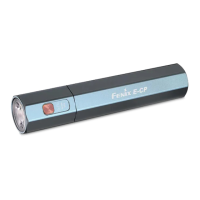
Battery Level Indication
With the light switched off, single click the side switch to check the battery status, which will last
for 3 seconds.
Green light on: saturated 100% - 85%
Green light flashes: sufficient 85% - 50%
Red light on: poor 50% - 25%
Red light flashes: critical 25% - 1%
Low-voltage Warning
When the voltage level drops below the preset level, the flashlight is programmed to downshift
to a lower brightness level until Low output is reached. When this happens in Low output mode,
the indicator blinks red to remind you to timely recharge the battery.
Usage and Maintenance
l Disassembling the sealed head can cause damage to the light and will void the warranty.
l Lock the light to prevent accidental activation during storage or transportation.
l The light may flicker, shine intermittently or even fail to illuminate for the following reasons:
A: Poor battery level.
Solution: Recharge the light.
B: The light has been locked.
Solution: Double click the switch to unlock the light.
If the above methods don't work, please contact your authorized distributor.


 To Next Page