17
INSTALLATION
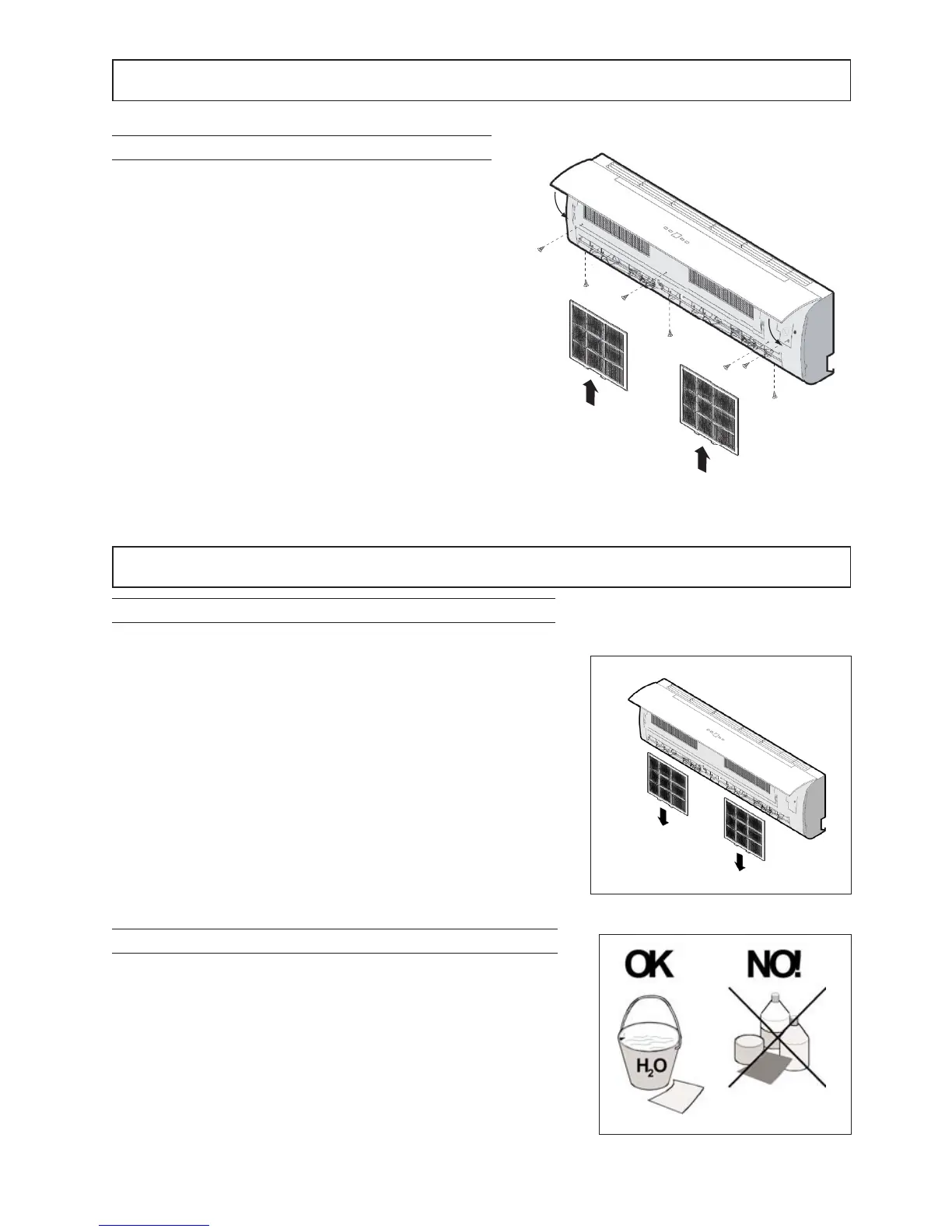
UNIT CLOSING
1 Refit the panel
2 Insert the filters
3 Connect the display connector
4 Close the cover of the unit
Fig 8
MAINTENANCE
FILTER CLEANING
UNIT CLEANING
To ensure proper unit operation it is necessary to periodically check
and clean the air filter To do this, proceed as follows (Fig 1):
1 Disconnect the plug from the power socket
2 Lift the front panel
3 Remove the inlet grille by pulling it outward
4 Remove filters by pushing the middle tabs up until they are freed
from the retainer then pull them out downwards
5 Wash them with water or clean with a vacuum cleaner
6 Refit everything in the initial position
NB This operation must be carried out at least once a month (the
frequency of cleaning depends on the characteristics and the dust in
the room to be conditioned) or when the filter indicator lights up
To clean the unit, proceed as indicated below (Fig2):
1 Clean with a damp cloth
2 To prevent damage to the electrical components, do not clean with
direct jets of water
3 Do not clean with alcohol or other corrosive substances
Fig 1
Fig 2



 To Next Page