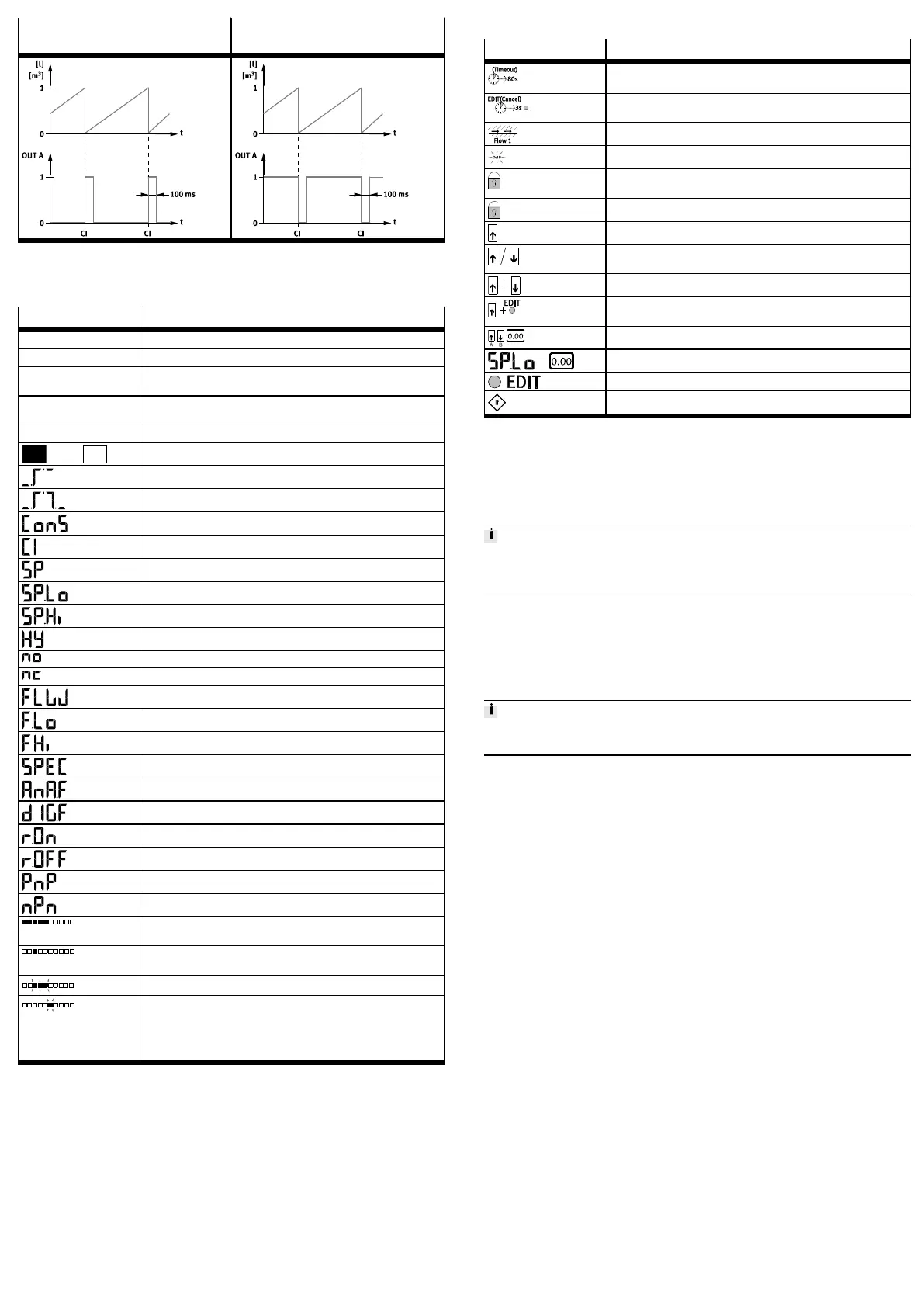
Setting NO (N/O (normally open) con-
tact)
Setting NC (N/C (normally closed)
contact)
Tab. 5 Consumption switching pulses
9.2 Display components
9.2.1 Symbols on the display
Symbol Description
OutA / OutB Switching output A/switching output B
Lock Security code active (blocked against unauthorised programming)
Run Accumulated air consumption measurement is active in RECORDER
mode
Option Sensor is set to a standard condition that differs from the factory set
ting è 9.7.4.1 Setting the standard conditions
Stop Air consumption measurement stopped
Switching output set / not set
Threshold value comparator
Window comparator
Air consumption switching mode (consumption – only for OutA)
Cumulative air consumption impulse (consumption impulse)
Switching point
Lower switching point (switching point low)
Upper switching point (switching point high)
Hysteresis
N/O contact (normally open)
N/C contact (normally closed)
Switching mode flow rate (flow only for OutA)
Minimum flow rate (flow low)
Maximum flow rate (flow high)
Special menu
Analogue filter
Digital filter
Display red with switching status ON and/or logic 1
Display red with switching status OFF and/or logic 0
Positive switch output
Zero switch output
Segments illuminated: graphic display of the current measured value
related to the maximum measured value of the measuring range
Running light (1 segment): air consumption measurement for OutA or
RECORDER mode active
3 segments flash: hysteresis value is displayed
1 segment flashes:
– Segment 6: switching point SP or SP.Lo is displayed
– Segment 8: switching point SP.Hi is displayed
– Segment1: min. flow rate (F.Lo) is displayed
– Segment10: max. flow rate (F.Hi) is displayed
Tab. 6
9.3 Preparing commissioning
In the basic status, the product is in RUN mode. The current measurement values
are displayed. The basic status can be reached from other modes by:
– Pressing Edit button for 3 seconds
– Expiration of a monitoring time, timeout
1. Switch on the operating voltage.
Ä
The SFAB is in RUN mode.
2. Checking the SFAB settings è 9.6 SHOW mode.
9.4 Symbols for representing the menu structure
Symbol Description
Automatic return to the basic status (RUN mode) when the monitoring
time has expired (here 80 seconds)
In order to return manually to the basic status (RUN mode), press the
EDIT button for 3seconds.
Generate flow rate (for teaching the measured value here Flow 1)
The symbol on the display flashes (here OutB)
Security code active (lock blocked against unauthorised program
ming)
Security code inactive (lock)
Press key (here A key).
Press the A key or B key. SFAB changes to the setting indicated by the
arrows.
Press A and B pushbuttons simultaneously.
Press pushbutton (here A pushbutton) and the EDIT button simultan
eously.
Press Akey or Bkey to set the desired value.
Display for a value or switching point. Value can be set.
Press the Edit button.
Branching in the menu
Tab. 7
9.5 RUN mode
The following values are displayed in RUN mode:
– Measurement values for the flow rate (in l/min, scfm or l/h)
– Measurement values for air consumption (in m³, scf or l)
– Signal states of the switching outputs OutA, OutB (set, not set)
If the measured value display flashes, one of the following errors has occurred:
• Measured value outside the permissible measuring range
• Incorrect tubing è 8.1 Pneumatic installation
9.6 SHOW mode
In SHOW mode, the current settings for the switching outputs OutA and OutB
are displayed.
The SFAB must be in RUN mode.
• To start the SHOW mode for the respective switching output, press the A key
(OutA) or B key (OutB).
If there are errors, the corresponding error numbers are displayed first after
pressing the A / B pushbutton.
• To display the settings one by one, press the A/B pushbutton repeatedly.
When all settings have been displayed, the SFAB goes back into RUN mode when
the A pushbutton / B pushbutton are pressed again and displays the current
measurement value for the corresponding output.
Thus, the SHOW mode can also be used to switch the display, e.g. to switch
between the displayed measured values for a combination of air consumption
measurement and flow rate measurement.
The following settings will be displayed for outA:
– With flow measurement [FLW]:
– Switching function [threshold value or window comparator]
– Switching point [SP], Switching points [SP.Lo] and [SP.Hi]
– Hysteresis [Hy]
– Switching element function [no/nc] (N/O contact/N/C contact)
– Minimum flow rate [F.Lo] (flow low)
– Maximum flow rate [F.Hi] (flow high)
To delete the minimum or maximum value, press the EDIT button.
– For air consumption measurement [ConS]:
– Air consumption switching impulse [CI]
– Switching element function [no/nc] (N/O contact/N/C contact)
– Minimum value flow rate [F.Lo]
– Maximum value flow rate [F.Hi]
To delete the minimum or maximum value, press the EDIT button.
The following settings will be displayed for OutB:
– Switching function [threshold value or window comparator]
– Switching point [SP], Switching points [SP.Lo] and [SP.Hi]
– Hysteresis [Hy]
– Switching element function [no/nc] (N/O contact/N/C contact)
– Status colour change [bLUE/rON/rOFF]
– Minimum value flow rate [F.Lo]
– Maximum value flow rate [F.Hi]
To delete the minimum or maximum value, press the EDIT button.



 To Next Page