10 Vecturo OS 400 EQ Multi-Tool
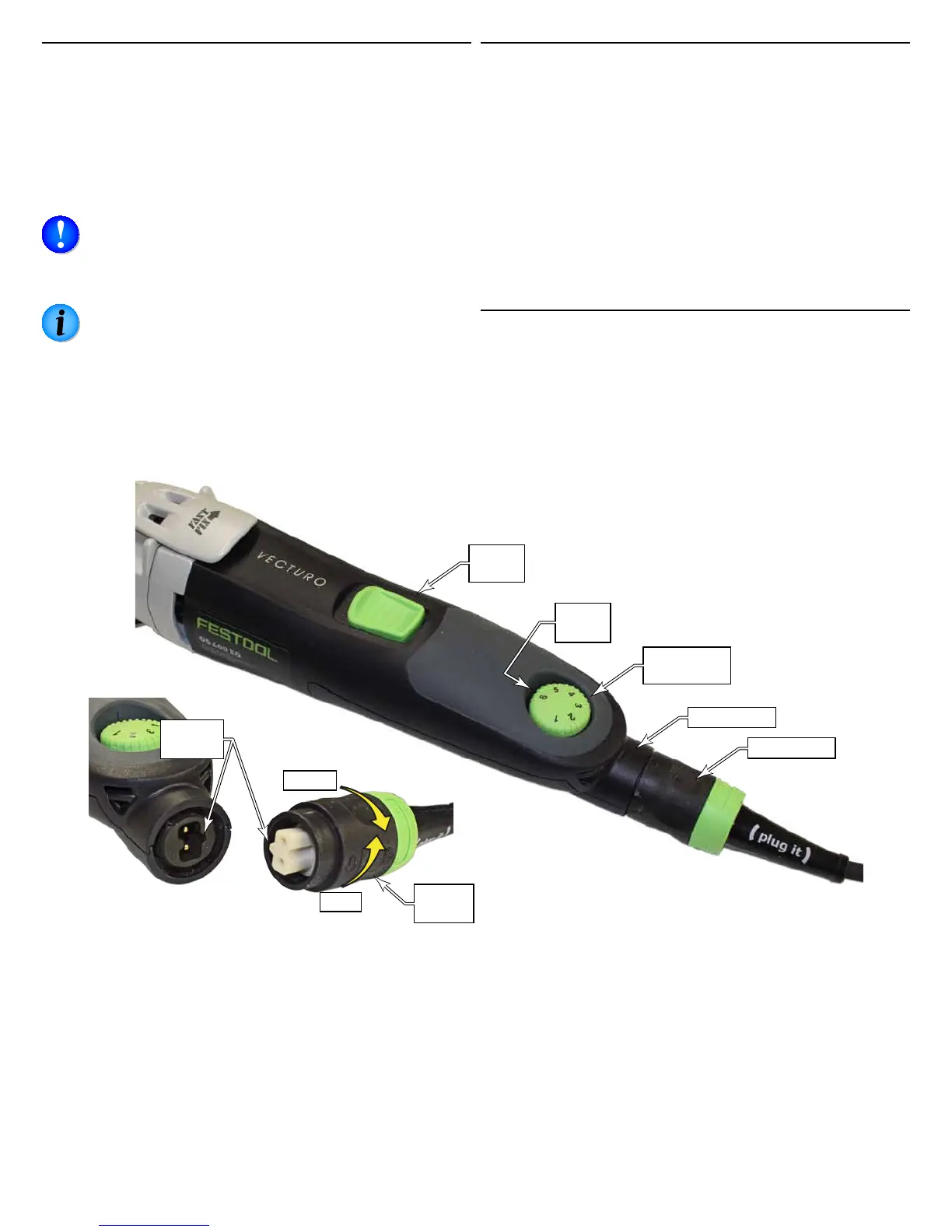
Connecting the Plug-It Power Cord
The Vecturo comes equipped with a removable Plug-It
power cord. The cord can be removed for easier storage of
the tool.
To install the power cord, insert the cord into the inlet (port)
on the tool with the key and keyway aligned, and twist the
locking ring ¼-turn until it clicks. Reverse the procedure to
remove the cord.
NOTICE: Make sure to fully tighten the plug-it cord
a full quarter-turn until it clicks. If the plug is not
fully locked, the socket and cord can overheat and be
damaged.
NOTE: The 18 gauge plug-it cord is interchangeable
with other tools that use the same size cord, but it
cannot be used with larger tools, such as routers and
saws. The plug has an extra key to prevent it from
being used on a larger tool that would otherwise
damage the cord. Larger cords may be used with
smaller tools, but not the reverse.
Setting the Speed Control
The Vecturo is variable speed controlled from 10,000 to
18,500 oscillations per minute. Different speeds are used for
different tasks, but the optimal speed is somewhat subject
and not rigidly dened. A lower speed results in less heat,
and is therefore preferred, but a higher speed results in
greater control and cleaner cuts. Generally speaking softer
materials may be cut with lower speeds. A good rule of
thumb is to use the lowest speed that performs the desired
task with good control.
The speed may be set with the motor running or not run-
ning. The higher the number on the speed control dial, the
higher the speed.
Power Switch
The power switch is self-latching, and will stay on until you
switch it off. Slide the switch forward to turn the tool on,
and slide the switch back to turn the tool off. Note that the
tool has a soft-start motor, so there is a slight delay from
turning it on to when the motor begins to run.
Speed
Setting
Speed
Control Dial
Power
Switch
Lock
Key &
Keyway
Unlock
Locking
Ring
Plug-It Port
Plug-It Cord






 To Next Page