Supplemental Owner’s Manual 9
Installing the Plunge Base
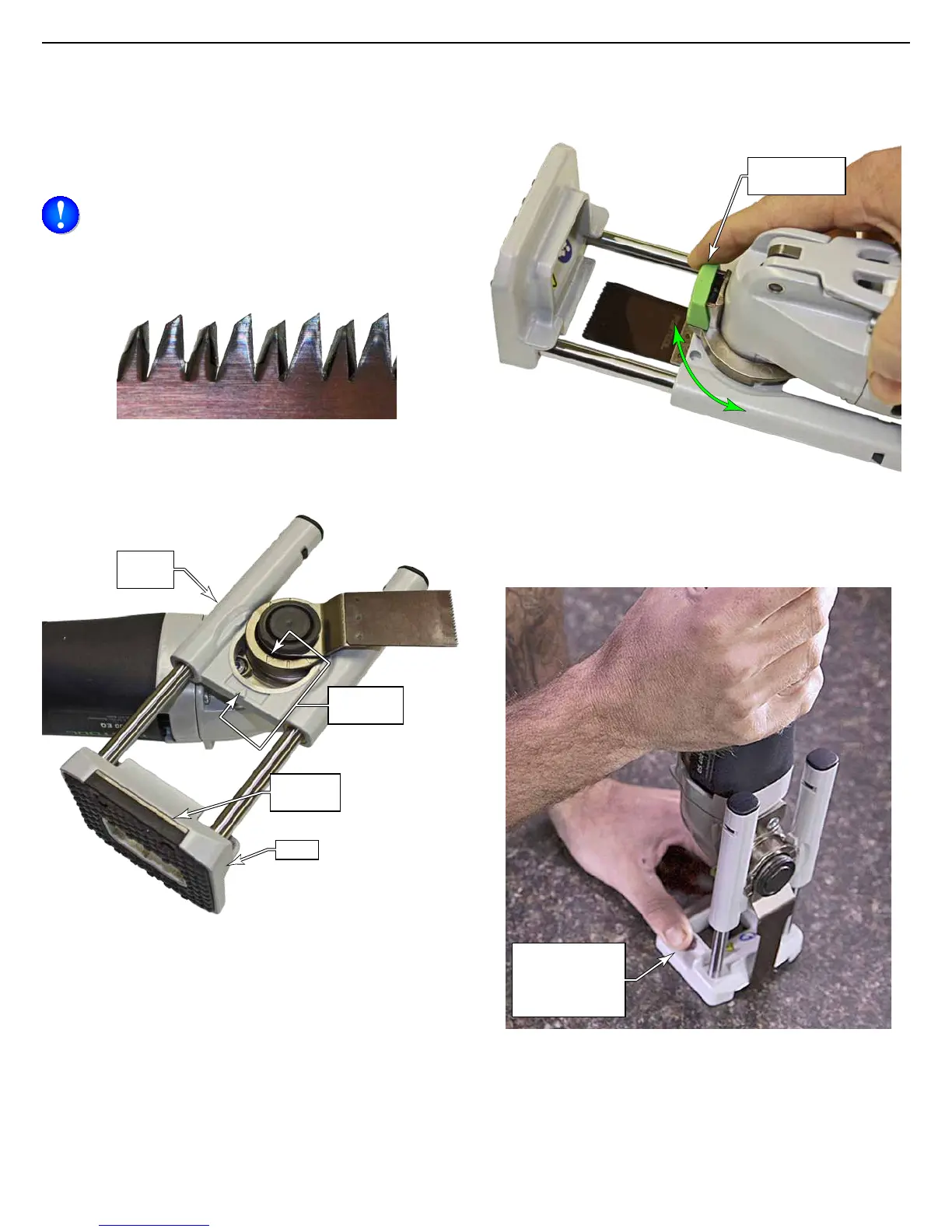
The plunge base provides a guided cut perpendicular to the
workpiece surface for a more accurate and ner cut than is
obtainable freehand. The shoe of the plunge base contains a
strong magnet to help guide the blade by holding it near the
edge of the base.
NOTE: It is not recommended to make conned
plunges with blades having Japan-style teeth, as the
teeth may be prone to breaking, and the narrow kerf
can tend to bind. They can be used, but the blade life
may be shorter than desired.
Japanese-Style Teeth
1. Slide the plunge base over the accessory adapter by lin-
ing up the arrows and sliding it toward the center.
Alignment
Arrows
Plunge
Base
Magnetic
Guide
Shoe
2. Press in on the rotation adjust button and rotate the
plunge base to the desired position. The plunge base can
match any of the blade angles.
Rotation
Adjust Button
For best results, steady the base with one hand during
plunging, but make sure to keep your ngers away from the
blade area.
Hold the base
by the finger
guides, away
from the blade.













 To Next Page